Get set up
You can read this page without running anything. To run the code yourself, the easiest way needs nothing installed, only a web browser and a free Google account:
- Open this lesson in Google Colab. Colab is Google's free service for running Python notebooks in the browser; sign in with your Google account if asked.
- Run the cells in order, from the top: click the ▶ button at the left of a cell, or click inside it and press Shift+Enter. The first cell installs what the lesson needs and takes a minute or two.
- If Colab warns "This notebook was not authored by Google", click Run anyway: the notebook comes from this course's own repository.
- Under each cell you should see what the box labelled Output under the same code on the lesson's page shows (the notebook opens with our outputs already in place; running a cell replaces them with yours). Boxes labelled Example output show timings or memory, so your numbers will differ a little.
New to notebooks, or want to run the lessons on your own computer instead (with Jupyter, Anaconda or a terminal)? Start here shows every step.
If you already work in a terminal, the short version, with uv and Git installed:
git clone https://github.com/David-Alobo/monstrous-learn.git
cd monstrous-learn/data-engineering/series-1
uv sync
uv run python 02-text-patterns-and-numbers/code.py
or, in any Python 3.11+ environment: python -m pip install rdkit pandas.
Module 1 treated a molecule as a graph. Most chemical data does not arrive as graphs, though. It arrives as text: SMILES strings, InChIs, SDF files. It is searched with patterns, and it is compared and modelled as numbers. Each of these ways of writing a molecule down (we call them representations) keeps some things and loses others. Before we choose what to store, we have to know which.
By the end of this module you will be able to:
- explain why one molecule can be written as many different SMILES strings, and how RDKit picks one standard string for it (the canonical SMILES);
- tell what each representation keeps and what it loses, such as stereochemistry (which mirror image a molecule is), aromaticity and tautomers (forms that differ only in where a hydrogen sits);
- use an InChIKey, a short code calculated from the structure, as a molecule's identity, and a SMARTS pattern to search for a group such as a carboxylic acid;
- turn molecules into fingerprints (long strings of 0s and 1s) and descriptors (calculated numbers such as molecular weight), to compare them and to use them in models;
- choose which of these to store, for which job.
From Module 1 we use RDKit's Chem.MolFromSmiles, which reads a SMILES string into a molecule, and
the habit of reporting with log and showing values with print.
The lesson uses two Python packages:
- RDKit, the chemistry toolkit from Module 1. We load five of its parts:
Chem(reading and writing molecules),AllChem(3D shapes),rdFingerprintGenerator(making fingerprints),DataStructs(comparing fingerprints) andDescriptors(calculated properties); - pandas, for tables with named columns (used at the end to build a small compound table).
Everything here runs in a browser notebook or on any laptop.
Setup
Run this block first. It loads the packages and sets the lesson's settings, written in CAPITALS, so
they can be changed in one place. As in Module 1, log reports what a job did and print shows you
values; Module 1 explains why.
import logging

import pandas as pd
from rdkit import Chem, DataStructs
from rdkit.Chem import AllChem, Descriptors, rdFingerprintGenerator

# log lines: level and message only, so the lesson's outputs are the same on every run
# (a real job would add "%(asctime)s" to the format)
logging.basicConfig(level=logging.INFO, format="%(levelname)s %(message)s", force=True)
log = logging.getLogger(__name__)

# conformers (section 5): how many to generate, and the random seed that makes them repeatable
N_CONFORMERS = 5
CONFORMER_SEED = 42
# Morgan fingerprints (section 7): radius 2 is ECFP4-like; 2048 bits is a common length
MORGAN_RADIUS = 2
MORGAN_BITS = 2048
We start from aspirin again:
aspirin = Chem.MolFromSmiles("CC(=O)Oc1ccccc1C(=O)O")
1. SMILES: one molecule, many strings
SMILES (Simplified Molecular Input Line Entry System) writes the graph of Module 1 as a line of text, by walking from atom to atom and writing down what it meets. The main rules:
- an atom is its element symbol:
C,N,O,Cl. Hydrogens are left out and filled in by the usual valences, soCCOis ethanol, CH3-CH2-OH; - lower-case letters (
c,n,o) are aromatic atoms, soc1ccccc1is benzene; - atoms written next to each other are joined by a single bond;
=is a double bond and#a triple bond; - brackets
( )hold a branch: inCC(=O)O(acetic acid) the=Ohangs off the second carbon and the walk then carries on to the lastO; - a matching pair of digits closes a ring: the two atoms marked
1inc1ccccc1are bonded to each other; - square brackets hold an atom written in full, with its hydrogens, charge or stereochemistry:
[CH3],[O-],[nH],[C@H].
You can start the walk at any atom and take the branches in any order, so one molecule has many
valid SMILES. RDKit's canonical SMILES always picks the same one for a given molecule, which
makes it usable for comparing molecules. In the code, {smiles:16} inside the f-string pads the
text to 16 characters, so that the arrows line up:
for smiles in ["OCC", "CCO", "C(O)C", "[CH3][CH2][OH]"]:
    canonical = Chem.MolToSmiles(Chem.MolFromSmiles(smiles))
    print(f"{smiles:16} -> {canonical}")
OCC              -> CCO
CCO              -> CCO
C(O)C            -> CCO
[CH3][CH2][OH]   -> CCO
Canonical means canonical for one toolkit and version. (A toolkit is a chemistry program or package such as RDKit.) Another program, or another RDKit release, may choose a different canonical form. That is why a database needs an identity that does not depend on the toolkit (section 3).
Aromaticity is a choice too. Benzene can be written with alternating single and double bonds
(the Kekulé form, C1=CC=CC=C1) or with aromatic lower-case atoms (c1ccccc1). When RDKit reads a
molecule it decides which rings are aromatic (it perceives aromaticity), and writes them in lower
case. Chem.Kekulize turns the aromatic form back into alternating bonds:
benzene = Chem.MolFromSmiles("C1=CC=CC=C1")
print("as read:   ", Chem.MolToSmiles(benzene))
Chem.Kekulize(benzene, clearAromaticFlags=True)
print("kekulised: ", Chem.MolToSmiles(benzene))
as read:    c1ccccc1
kekulised:  C1=CC=CC=C1
Different toolkits perceive aromaticity by different rules, so the same file can give different aromatic forms in different programs. That is one more reason to standardise before storing, that is, to put every molecule into one agreed form (Module 7).
2. What a representation can lose: stereochemistry
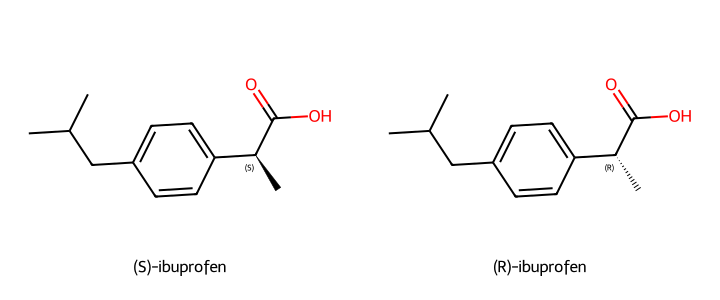
Ibuprofen has one stereocentre: a carbon with four different groups on it. The two mirror images
(enantiomers, R and S) are different molecules with different biology. Isomeric SMILES, SMILES
that include stereochemistry, keeps them apart with @ and @@ inside the square brackets: they
say whether, looking from the first neighbour written towards the stereocentre, the other three
neighbours, in the order they are written, go round anticlockwise (@) or clockwise (@@). Chem.FindMolChiralCenters lists each stereocentre as its atom number and
its R or S label:
s_ibuprofen = Chem.MolFromSmiles("CC(C)Cc1ccc(cc1)[C@H](C)C(=O)O")
r_ibuprofen = Chem.MolFromSmiles("CC(C)Cc1ccc(cc1)[C@@H](C)C(=O)O")
print("S:", Chem.FindMolChiralCenters(s_ibuprofen), Chem.MolToSmiles(s_ibuprofen))
print("R:", Chem.FindMolChiralCenters(r_ibuprofen), Chem.MolToSmiles(r_ibuprofen))
S: [(10, 'S')] CC(C)Cc1ccc([C@H](C)C(=O)O)cc1
R: [(10, 'R')] CC(C)Cc1ccc([C@@H](C)C(=O)O)cc1
Ask for SMILES without stereochemistry, and the two collapse into one. The small function below
does that. In its first line, mol: Chem.Mol and -> str are type hints: notes that say the
function takes an RDKit molecule and returns a string (text). Python does not check them; they are
there for the reader:
def flat(mol: Chem.Mol) -> str:
    """Canonical SMILES with the stereochemistry left out."""
    return Chem.MolToSmiles(mol, isomericSmiles=False)


print("isomeric SMILES equal:", Chem.MolToSmiles(s_ibuprofen) == Chem.MolToSmiles(r_ibuprofen))
print("flat SMILES equal:    ", flat(s_ibuprofen) == flat(r_ibuprofen))
print("flat:", flat(s_ibuprofen))
isomeric SMILES equal: False
flat SMILES equal:     True
flat: CC(C)Cc1ccc(C(C)C(=O)O)cc1
Store the flat form and your database silently merges two different drugs. Sometimes that is what you want (grouping a racemate, the 50:50 mixture, with its two enantiomers), but it must be a decision, never an accident.
3. InChI and InChIKey: an identity for every molecule
The InChI (IUPAC International Chemical Identifier) is a standard, open description of a
molecule. It is written in layers separated by /: the formula, then the connections between atoms
(c...), then the hydrogens (h...), and further layers for charge and stereochemistry when there
are any. Every program that uses the official InChI software produces the same InChI for the same
molecule.
The InChIKey is a hash of the InChI: a code of fixed length (27 characters) calculated from it. The same InChI always gives the same key, but the key cannot be turned back into the InChI. It is short enough to use as a label in a database: to look a molecule up quickly, and to match rows of two tables that share it (a join).
print(Chem.MolToInchi(aspirin))
print(Chem.MolToInchiKey(aspirin))
InChI=1S/C9H8O4/c1-6(10)13-8-5-3-2-4-7(8)9(11)12/h2-5H,1H3,(H,11,12)
BSYNRYMUTXBXSQ-UHFFFAOYSA-N
The key has three blocks. The first 14 letters encode the connectivity (the skeleton). The next
block has 8 letters for stereochemistry and the other layers, then S (a standard InChI) and A
(version 1). The last letter records protonation (N for neutral). So the two ibuprofen
enantiomers share the first block and differ in the second. key[:14] takes the first 14
characters of the key:
for name, mol in [("S", s_ibuprofen), ("R", r_ibuprofen)]:
    key = Chem.MolToInchiKey(mol)
    print(name, key, "  skeleton:", key[:14])
S HEFNNWSXXWATRW-JTQLQIEISA-N   skeleton: HEFNNWSXXWATRW
R HEFNNWSXXWATRW-SNVBAGLBSA-N   skeleton: HEFNNWSXXWATRW
Grouping on the first 14 letters finds every stereoisomer of a structure; joining on the whole key keeps them apart.
Tautomers are forms of one compound that differ only in where a hydrogen sits (and so which
bonds are double), and that turn into each other easily: 2-pyridone and 2-hydroxypyridine are one
example. Standard InChI treats some of these mobile hydrogens as one, so certain tautomers share a
key, which is usually what a database wants. (In the SMILES below, [nH] is an aromatic nitrogen
that carries a hydrogen.)
pyridone = Chem.MolFromSmiles("O=c1cccc[nH]1")
hydroxypyridine = Chem.MolFromSmiles("Oc1ccccn1")
print("SMILES equal:  ", Chem.MolToSmiles(pyridone) == Chem.MolToSmiles(hydroxypyridine))
print("InChIKey equal:", Chem.MolToInchiKey(pyridone) == Chem.MolToInchiKey(hydroxypyridine))
SMILES equal:   False
InChIKey equal: True
InChIKeys are hashes, so two different molecules could in principle share one (a collision). In practice collisions are extremely rare, but a careful pipeline keeps the full InChI or SMILES beside the key.
4. Molfiles and SDF: the connection table
Before SMILES there were connection tables: a list of atoms (with coordinates) and a list of
bonds between them. The molfile, from the company MDL, is the classic format. An SDF
(structure-data file, ending .sdf) is many molfiles one after another, each followed by optional
data fields such as a name, a price or a measured value. Most compound libraries and vendor
catalogues arrive as SDF. Chem.MolToMolBlock gives a molecule as molfile text:
ethanol = Chem.MolFromSmiles("CCO")
print(Chem.MolToMolBlock(ethanol))
     RDKit          2D

  3  2  0  0  0  0  0  0  0  0999 V2000
    0.0000    0.0000    0.0000 C   0  0  0  0  0  0  0  0  0  0  0  0
    1.2990    0.7500    0.0000 C   0  0  0  0  0  0  0  0  0  0  0  0
    2.5981   -0.0000    0.0000 O   0  0  0  0  0  0  0  0  0  0  0  0
  1  2  1  0
  2  3  1  0
M  END
Read it as a table: the counts line (3 atoms, 2 bonds), three atom lines (x, y, z, element) and two bond lines (atom, atom, bond order). Unlike SMILES, a molfile carries coordinates, which also means it is much larger: Module 3 measures what each format costs.
5. Three dimensions: conformers
Real molecules are three-dimensional and flexible. RDKit can generate 3D shapes, called
conformers, but one molecule has many, and which you get depends on the method and the random
seed. (The method starts from random numbers; a seed is the number the random numbers start
from, so the same seed gives the same conformers on every run. Both are set in the Setup block.)
AllChem holds RDKit's 3D tools. The code first adds the hydrogens with Chem.AddHs, because a 3D
shape needs them, then generates the conformers and compares the x coordinate of atom 0 in the first
two:
with_h = Chem.AddHs(aspirin)
ids = AllChem.EmbedMultipleConfs(with_h, numConfs=N_CONFORMERS, randomSeed=CONFORMER_SEED)
print(len(ids), "conformers of", with_h.GetNumAtoms(), "atoms (hydrogens included)")
print(
    "same atoms, different coordinates:",
    with_h.GetConformer(0).GetAtomPosition(0).x != with_h.GetConformer(1).GetAtomPosition(0).x,
)
5 conformers of 21 atoms (hydrogens included)
same atoms, different coordinates: True
So 3D coordinates are not an identity: store them, when a job needs them (docking, which predicts how a molecule fits into a protein, or shape searches), as data about a molecule, never as the molecule's key.
6. SMARTS: patterns, not molecules
SMARTS describes a pattern to search for, not a molecule. It looks like SMILES, but each atom in
square brackets can carry conditions. A common mistake is to search with a molecule written as
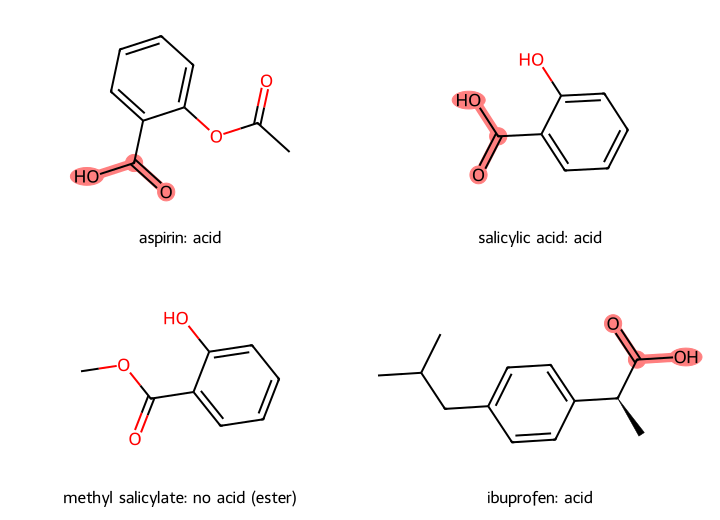
SMILES. C(=O)O read as a molecule matches any carbon double-bonded to one oxygen and
single-bonded to another: carboxylic acids, but also esters. The SMARTS [CX3](=O)[OX2H1] adds
conditions. [CX3] is a carbon with three neighbours, and [OX2H1] is an oxygen with two
neighbours, one of which is a hydrogen. So it finds acids only.
The code keeps the four molecules in a dictionary called library (each name points to its
molecule), and .items() goes through the name and molecule pairs. HasSubstructMatch says whether
the pattern occurs anywhere in a molecule. In the printout, !s:5 turns True or False into
text and pads it to 5 characters, so that the columns line up:
library = {
    "aspirin": aspirin,
    "salicylic acid": Chem.MolFromSmiles("O=C(O)c1ccccc1O"),
    "methyl salicylate": Chem.MolFromSmiles("COC(=O)c1ccccc1O"),
    "ibuprofen": s_ibuprofen,
}
as_molecule = Chem.MolFromSmiles("C(=O)O")
acid = Chem.MolFromSmarts("[CX3](=O)[OX2H1]")
for name, mol in library.items():
    print(
        f"{name:18} C(=O)O as a molecule: {mol.HasSubstructMatch(as_molecule)!s:5}  "
        f"acid SMARTS: {mol.HasSubstructMatch(acid)}"
    )
aspirin            C(=O)O as a molecule: True   acid SMARTS: True
salicylic acid     C(=O)O as a molecule: True   acid SMARTS: True
methyl salicylate  C(=O)O as a molecule: True   acid SMARTS: False
ibuprofen          C(=O)O as a molecule: True   acid SMARTS: True
Methyl salicylate is an ester, not an acid: only the SMARTS gets it right. Module 4 runs the same searches inside the database.
7. Fingerprints: molecules as bits
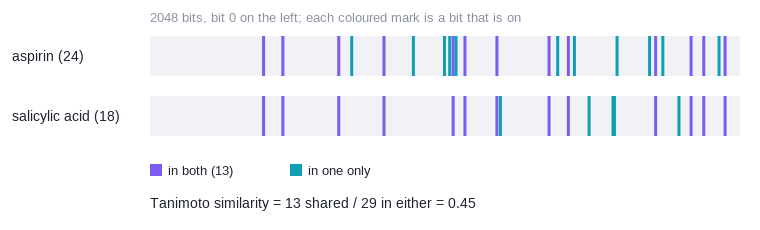
To compare thousands of molecules quickly, we turn each into a fingerprint, a fixed-length string of bits (each bit is a 0 or a 1). A Morgan fingerprint looks at every atom's surroundings out to a radius (radius 2 means the atom, its neighbours, and their neighbours), and sets a bit to 1 for each environment it finds. It is also called a circular fingerprint, and it is close to the published ECFP (extended-connectivity fingerprint); ECFP4 has radius 2. The radius and length are set in the Setup block. Similar molecules share many bits.
The code makes a fingerprint generator (an object that makes fingerprints with fixed settings),
uses it on every molecule in library, then compares aspirin with the others. {similarity:.2f}
prints the number to two decimal places:
morgan = rdFingerprintGenerator.GetMorganGenerator(radius=MORGAN_RADIUS, fpSize=MORGAN_BITS)
fingerprints = {name: morgan.GetFingerprint(mol) for name, mol in library.items()}
print("bits set in aspirin:", fingerprints["aspirin"].GetNumOnBits(), "of", MORGAN_BITS)
for name in ["salicylic acid", "methyl salicylate", "ibuprofen"]:
    similarity = DataStructs.TanimotoSimilarity(fingerprints["aspirin"], fingerprints[name])
    print(f"Tanimoto similarity, aspirin and {name}: {similarity:.2f}")
bits set in aspirin: 24 of 2048
Tanimoto similarity, aspirin and salicylic acid: 0.45
Tanimoto similarity, aspirin and methyl salicylate: 0.35
Tanimoto similarity, aspirin and ibuprofen: 0.20
The Tanimoto similarity is the number of bits set in both fingerprints divided by the number set in either. It runs from 0 (no bits in common) to 1 (the same bits). A fingerprint cannot be turned back into a molecule, and two different molecules can share one: it is for comparing and searching, not for identity.
8. Descriptors: molecules as numbers
Descriptors are numbers calculated from a molecule. Four common ones:
- MW, the molecular weight;
- logP, a predicted octanol-water partition coefficient (on a log scale): higher means more greasy;
- TPSA, the topological polar surface area, in Ų, an estimate of the surface taken by polar atoms (N, O and their hydrogens);
- HBD, the number of hydrogen-bond donors.
They are what most machine-learning models and most filters (rules such as "molecular weight under
500") work with. RDKit's Descriptors module calculates them. The f-string codes line the table up:
>8 puts text on the right of an 8-character space, 8.1f writes a number 8 characters wide with
one decimal, and 5d a whole number 5 characters wide:
print(f"{'molecule':18}{'MW':>8}{'logP':>7}{'TPSA':>7}{'HBD':>5}")
for name, mol in library.items():
    print(
        f"{name:18}{Descriptors.MolWt(mol):8.1f}{Descriptors.MolLogP(mol):7.2f}"
        f"{Descriptors.TPSA(mol):7.1f}{Descriptors.NumHDonors(mol):5d}"
    )
molecule                MW   logP   TPSA  HBD
aspirin              180.2   1.31   63.6    1
salicylic acid       138.1   1.09   57.5    2
methyl salicylate    152.1   1.18   46.5    1
ibuprofen            206.3   3.07   37.3    1
Descriptors are calculated, so they depend on the toolkit and its version: store the version beside them (Module 13 returns to this).
9. What to store, for which job
The table brings the module together, with the graph and matrices of Module 1. Two terms in it: graph neural networks are machine-learning models that read a molecule as a graph (Module 1), and clustering means sorting molecules into groups of similar ones.
| Representation | Keeps | Loses | Use it for |
|---|---|---|---|
| Canonical isomeric SMILES | Connectivity, stereochemistry, charges | Coordinates; toolkit-specific | Readable storage, exchange, rebuilding the molecule |
| InChI / InChIKey | A standard identity, the same in every program | Readability (the key); some tautomer detail | Keys, joins, finding duplicates |
| Molfile / SDF | Coordinates, data fields | Compactness | Receiving and sending libraries; 3D work |
| Molecular graph | Atoms, bonds, structure | Nothing of the 2D structure; no coordinates | Graph algorithms, graph databases |
| Adjacency, distance and feature matrices | The graph and chosen atom properties, as numbers | Compactness (they grow with atoms squared) | Algorithms, graph neural networks; build them when needed |
| 3D conformers | Shape | Uniqueness | Docking, shape searches (as data, never as a key) |
| SMARTS | A pattern | It is not a molecule | Searching and filtering |
| Fingerprints | Local environments, as bits | Can't be reversed; not unique | Similarity search, clustering, machine learning |
| Descriptors | Chosen properties, as numbers | Structure | Filters, analysis, machine learning |
A sensible first table for a compound library, which the next modules build on. The code makes one
dictionary per molecule (column name to value), collects them in a list, and lets pandas turn the
list into a table; to_string(index=False) prints it without row numbers:
rows = []
for name, mol in library.items():
    rows.append(
        {
            "name": name,
            "inchikey": Chem.MolToInchiKey(mol),
            "smiles": Chem.MolToSmiles(mol),
            "mw": round(Descriptors.MolWt(mol), 2),
        }
    )
compounds = pd.DataFrame(rows)
print(compounds.to_string(index=False))
             name                    inchikey                         smiles     mw
          aspirin BSYNRYMUTXBXSQ-UHFFFAOYSA-N          CC(=O)Oc1ccccc1C(=O)O 180.16
   salicylic acid YGSDEFSMJLZEOE-UHFFFAOYSA-N                O=C(O)c1ccccc1O 138.12
methyl salicylate OSWPMRLSEDHDFF-UHFFFAOYSA-N               COC(=O)c1ccccc1O 152.15
        ibuprofen HEFNNWSXXWATRW-JTQLQIEISA-N CC(C)Cc1ccc([C@H](C)C(=O)O)cc1 206.28
The InChIKey is the identity, the canonical isomeric SMILES rebuilds the molecule, and everything else (fingerprints, descriptors, conformers) can be recalculated from it, as long as we record how.
Try it yourself
The homework is a few questions, answered by running code like the code above: in a new cell at
the end of the notebook, or in a script. It is at the end of the lesson's page, and in
homework.md in the module's folder. The answers are published after the cohort's deadline.
Further reading
- Weininger, D. (1988). SMILES, a chemical language and information system. 1. Introduction to methodology and encoding rules. Journal of Chemical Information and Computer Sciences, 28(1), 31–36. https://doi.org/10.1021/ci00057a005
- Heller, S., McNaught, A., Pletnev, I., Stein, S. & Tchekhovskoi, D. (2015). InChI, the IUPAC International Chemical Identifier. Journal of Cheminformatics, 7, 23. https://doi.org/10.1186/s13321-015-0068-4
- Dalby, A. et al. (1992). Description of several chemical structure file formats used by computer programs developed at Molecular Design Limited. Journal of Chemical Information and Computer Sciences, 32(3), 244–255. https://doi.org/10.1021/ci00007a012
- Rogers, D. & Hahn, M. (2010). Extended-connectivity fingerprints. Journal of Chemical Information and Modeling, 50(5), 742–754. https://doi.org/10.1021/ci100050t
- David, L., Thakkar, A., Mercado, R. & Engkvist, O. (2020). Molecular representations in AI-driven drug discovery: a review and practical guide. Journal of Cheminformatics, 12, 56. https://doi.org/10.1186/s13321-020-00460-5
- Daylight Chemical Information Systems. Daylight Theory Manual, chapters on SMILES and SMARTS. https://www.daylight.com/dayhtml/doc/theory/
- The RDKit documentation. Getting Started with the RDKit in Python. https://www.rdkit.org/docs/GettingStartedInPython.html
Homework
Answer each question by running code like the code in the lesson: add a new cell at the end of the lesson's notebook (in Colab, + Code) and work there. If you are in a cohort, you will be told where to send your answers; everyone can check theirs against the answers published after the cohort's deadline.
- (Section 1.) Write three different SMILES for paracetamol (
CC(=O)Nc1ccc(O)cc1) and show that RDKit gives the same canonical SMILES for all three. What is it? (Hint: start the walk from a different atom, for example the oxygen of the OH, or take the branches in a different order.) - (Section 3.) What is paracetamol's InChIKey? Which block of the key would two stereoisomers of a molecule share? (Stereoisomers have the same atoms joined in the same way, and differ only in their arrangement in space, like the two ibuprofen enantiomers.)
- (Section 6.) Of the four molecules in section 6 (aspirin, salicylic acid, methyl salicylate,
ibuprofen), how many contain a phenol, an OH group joined directly to an aromatic ring? Write
a SMARTS pattern for a hydroxyl group on an aromatic carbon and count the matches. (In SMARTS, as
in SMILES, a lower-case
cis an aromatic carbon.) - (Section 7.) What is the Tanimoto similarity of paracetamol and aspirin, using Morgan fingerprints with radius 2 and 2048 bits, to two decimal places?
- To think about (sections 2 to 5): two suppliers send what they say is the same compound, one as an SDF file with 3D coordinates and one as a SMILES string without stereochemistry. How would you decide whether they are the same, which representation would you compare, and what could go wrong?
How was this module?
Found this module useful? ★ Star the course on GitHub: it helps other chemists find it.