
Get set up
You can read this page without running anything. To run the code yourself, the easiest way needs nothing installed, only a web browser and a free Google account:
- Open this lesson in Google Colab. Colab is Google's free service for running Python notebooks in the browser; sign in with your Google account if asked.
- Run the cells in order, from the top: click the ▶ button at the left of a cell, or click inside it and press Shift+Enter. The first cell installs what the lesson needs and takes a minute or two.
- If Colab warns "This notebook was not authored by Google", click Run anyway: the notebook comes from this course's own repository.
- Under each cell you should see what the box labelled Output under the same code on the lesson's page shows (the notebook opens with our outputs already in place; running a cell replaces them with yours). Boxes labelled Example output show timings or memory, so your numbers will differ a little.
New to notebooks, or want to run the lessons on your own computer instead (with Jupyter, Anaconda or a terminal)? Start here shows every step.
If you already work in a terminal, the short version, with uv and Git installed:
git clone https://github.com/David-Alobo/monstrous-learn.git
cd monstrous-learn/data-engineering/series-1
uv sync
uv run python 03-files-and-identity/code.py
or, in any Python 3.11+ environment: python -m pip install rdkit pandas pyarrow openbabel-wheel.
Chemical data moves between people and programs as files. A vendor sends its catalogue as an SDF, a colleague exports hits from a spreadsheet as CSV, a pipeline writes Parquet for the next step. Each format keeps some things and loses others, and each fails in its own way: a record that cannot be read, an ID that loses its leading zeros, a price that arrives as text. Once the molecules are in, you need to know which of them you already have, and that needs an identity that does not depend on how the molecule happened to be written, or on which program wrote it.
By the end of this module you will be able to:
- write one library of molecules as an SDF, a SMILES file, a CSV and a Parquet file (four file formats, explained in section 1), and say how big each is and what each keeps;
- read a large SDF one record at a time, without loading it all, and keep a list of the records that cannot be read and why;
- avoid the usual mistakes when chemical data goes through a CSV, and keep each column's type (text, decimal number, whole number) by saving the table as Parquet;
- find the same molecule listed twice, even when it is written as two different SMILES, by comparing InChIKeys;
- explain why a molecule's identity must not be one program's canonical SMILES;
- check that a file arrived unchanged, with a checksum.
This module builds on Module 2: SMILES and canonical SMILES
(section 1 there), the InChIKey (section 3) and the SDF (section 4). It also uses log and print
as in Module 1.
The lesson uses these packages:
- RDKit, the chemistry toolkit of Modules 1 and 2, to read and write molecules and SDF files;
- pandas, for tables, and its readers and writers for CSV and Parquet files;
- PyArrow, to write Parquet files with column types that we choose;
- Open Babel, a second open-source chemistry toolkit, to compare with RDKit (section 6);
- chemlib, a small helper file that comes with this course. It makes the teaching library of molecules used in the lessons, and the damaged copies of it used to practise on;
- a few modules that come with Python itself:
csv(CSV files),gzip(compressed files),hashlib(checksums),io,shutilandpathlib(files and folders),time(timing) andcollections(counting).
Everything here runs in a browser notebook or on any laptop. The files the code writes go into a
work/ folder next to the lesson, which the Setup block creates.
Setup
Run this block first. It loads the packages and sets the lesson's settings, written in CAPITALS, so they can be changed in one place. A few things in it may be new:
Path("work")is a path to a folder, frompathlib. Joining paths uses/, soWORK / "library.sdf"means the filelibrary.sdfinsidework. The last line,WORK.mkdir(exist_ok=True), makes the folder, and does nothing if it is already there;20_000is the number 20000: Python ignores the underscore, which is there to make it easy to read;1 << 20is 2 to the power 20, that is 1,048,576 bytes, one mebibyte (MiB).
import csv
import gzip
import hashlib
import io
import logging
import shutil
import time
from collections import Counter
from collections.abc import Iterator
from pathlib import Path

import pandas as pd
import pyarrow as pa
import pyarrow.parquet as pq
from openbabel import pybel
from rdkit import Chem, RDLogger

import chemlib

# log lines: level and message only, so the lesson's outputs are the same on every run
# (a real job would add "%(asctime)s" to the format)
logging.basicConfig(level=logging.INFO, format="%(levelname)s %(message)s", force=True)
log = logging.getLogger(__name__)

# where the lesson writes its files (git-ignored)
WORK = Path("work")
# the teaching library of sections 1 to 6: its size and seed (same seed, same molecules)
LIBRARY_SIZE = 20_000
LIBRARY_SEED = 3
# the careless vendor's file (section 3): size, seeds, share of damaged records, bytes cut off
VENDOR_SIZE = 2_000
VENDOR_SEED = 5
VENDOR_DEFECT_RATE = 0.05
VENDOR_DEFECT_SEED = 6
TRUNCATED_BYTES = 300
# rows per Parquet row group when streaming an SDF (section 3); larger uses more memory
BATCH_SIZE = 5_000
# Parquet compression codec ("zstd" is small and fast; "snappy" is the common default)
PARQUET_COMPRESSION = "zstd"
# the supplier's shipment with added duplicates (section 5)
SHIPMENT_SIZE = 3_000
SHIPMENT_SEED = 7
SHIPMENT_DEFECT_RATE = 0.06
SHIPMENT_DEFECT_SEED = 8
# how many molecules to compare between RDKit and Open Babel (section 6)
TOOLKIT_SAMPLE = 1_000
# bytes read at a time when computing a checksum (section 7): 1 MiB
CHECKSUM_CHUNK = 1 << 20

WORK.mkdir(exist_ok=True)
1. One library, five files
We use a teaching library made in code by chemlib, the same on every computer: 20,000 molecules,
each with an ID, a SMILES and the catalogue data a vendor file carries (vendor, price, stock). The
molecules are made the way real screening libraries are: by joining small building blocks onto a
few core structures (scaffolds). The seed makes the random choices repeatable, as in Module 2:
library = chemlib.library(LIBRARY_SIZE, seed=LIBRARY_SEED)
print(library.head(3).to_string(index=False))
         id                                 smiles   vendor  price_usd  stock_mg
ML-00000065         c1cc(F)ccc1C(=O)NCc2ccc(CC)cc2 Vendor C     357.35       360
ML-00000098     c1cc(OC)ccc1C(=O)NCc2ccc(C(C)C)cc2 Vendor C      84.62       430
ML-00000129 c1cc(OCC)ccc1C(=O)NCc2ccc(C(F)(F)F)cc2 Vendor A     134.51       420
We write it in the four formats of this module, plus the gzipped SDF that vendors usually send.
- SDF gives each molecule a connection table (atoms with 2D coordinates, then bonds) followed by its data fields, as in Module 2.
- A SMILES file (
.smi) holds one SMILES and one name per line, nothing else. - CSV (comma-separated values) is a plain-text table: one row per line, the values separated by commas. Spreadsheets open and save it.
- Parquet is a table stored in binary (as raw bytes, not as text you can read) and column by column. It holds a schema, which records each column's name and type; we give the schema ourselves rather than let a tool guess it.
- gzip compresses a file (makes it smaller without losing anything), like a zip file; a gzipped
file gets
.gzadded to its name.
A few Python features appear in the code for the first time:
with ... as writer:opens something (a file, a writer) for the indented lines below it, and closes it properly when they finish, even if an error stops them;df.itertuples(index=False)goes through a table one row at a time, androw.smilesis that row's value in thesmilescolumn;mol.SetProp(name, text)stores a data field on a molecule; the field_Nameis the record's first line, its title;f"{row.price_usd:.2f}"writes the price with two decimals, and{size / 1e6:6.2f}the size in megabytes (1e6is a million) in a space 6 characters wide;- in the schema,
pa.string()is text,pa.float64()a decimal number andpa.int64()a whole number.
def write_sdf(df: pd.DataFrame, path: Path) -> None:
    """Write a library as SDF: a connection table per molecule, the other columns as data fields."""
    # RDKit writes into a file we open, with one line ending on every computer
    with path.open("w", encoding="utf-8", newline="\n") as handle, Chem.SDWriter(handle) as writer:
        for row in df.itertuples(index=False):
            mol = Chem.MolFromSmiles(row.smiles)
            mol.SetProp("_Name", row.id)  # the first line of the record
            mol.SetProp("vendor", row.vendor)
            mol.SetProp("price_usd", f"{row.price_usd:.2f}")
            mol.SetProp("stock_mg", str(row.stock_mg))
            writer.write(mol)


def write_smi(df: pd.DataFrame, path: Path) -> None:
    """Write a SMILES file: one SMILES and one name per line."""
    with path.open("w", encoding="utf-8", newline="\n") as handle:
        for row in df.itertuples(index=False):
            handle.write(f"{row.smiles} {row.id}\n")


def gzip_copy(path: Path) -> Path:
    """A gzipped copy of a file, as path + '.gz' (mtime=0: the same input gives the same bytes)."""
    target = path.with_name(path.name + ".gz")
    with path.open("rb") as source, gzip.GzipFile(target, "wb", mtime=0) as packed:
        shutil.copyfileobj(source, packed)
    return target


SCHEMA = pa.schema(
    [
        ("id", pa.string()),
        ("smiles", pa.string()),
        ("vendor", pa.string()),
        ("price_usd", pa.float64()),
        ("stock_mg", pa.int64()),
    ]
)

files = {
    "SDF": WORK / "library.sdf",
    "SMILES": WORK / "library.smi",
    "CSV": WORK / "library.csv",
    "Parquet": WORK / "library.parquet",
}
write_sdf(library, files["SDF"])
files["SDF (gzip)"] = gzip_copy(files["SDF"])
write_smi(library, files["SMILES"])
library.to_csv(files["CSV"], index=False, lineterminator="\n")  # one line ending on every computer
table = pa.Table.from_pandas(library, schema=SCHEMA, preserve_index=False)
pq.write_table(table, files["Parquet"], compression=PARQUET_COMPRESSION)

for name, path in files.items():
    size = path.stat().st_size
    print(f"{name:11} {size / 1e6:6.2f} MB  {size / len(library):6.0f} bytes per molecule")
SDF          48.78 MB    2439 bytes per molecule
SMILES        1.22 MB      61 bytes per molecule
CSV           1.61 MB      80 bytes per molecule
Parquet       0.42 MB      21 bytes per molecule
SDF (gzip)    1.69 MB      85 bytes per molecule
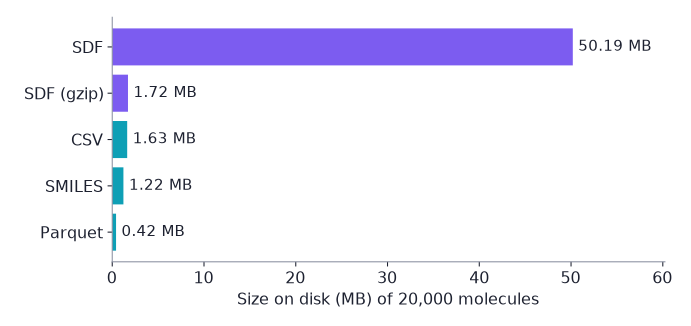
The SDF is more than 40 times the size of the SMILES file, because every atom and bond is a line
of text with coordinates, written out in full. Gzip shrinks it almost 30 times, to about the size
of the CSV, because those lines repeat so much; this is why vendors send .sdf.gz. The CSV is the
SMILES file plus the catalogue columns. Parquet is the smallest: it stores each column
together, so similar values sit side by side and compress well, and its numbers are stored as
binary numbers rather than as text. File sizes are the same every time for the same library and
the same versions of RDKit and PyArrow; other versions may differ by a few bytes.
Reading each file back into a table takes very different times. The code keeps one reading function
per format in a dictionary, times each with time.perf_counter() (a stopwatch: the time read before
and after), and prints the row count with {...:,}, which adds commas to large numbers. Three more
features:
lambda path: ...is a one-line function without a name, used here to read the SMILES file as a table whose values are separated by spaces;**mol.GetPropsAsDict()copies all of a molecule's data fields (name and value) into the dictionary being built;opener = gzip.open if ... else openpicks the gzip reader when the file name ends in.gz, and the ordinary one otherwise.
def read_sdf_table(path: Path) -> pd.DataFrame:
    """Read every record of an SDF (plain or gzipped) into a table of its name and data fields."""
    opener = gzip.open if path.suffix == ".gz" else open
    rows = []
    with opener(path, "rb") as handle:
        for mol in Chem.ForwardSDMolSupplier(handle):
            rows.append({"id": mol.GetProp("_Name"), **mol.GetPropsAsDict()})
    return pd.DataFrame(rows)


readers = {
    "SDF": read_sdf_table,
    "SMILES": lambda path: pd.read_csv(path, sep=" ", names=["smiles", "id"]),
    "CSV": pd.read_csv,
    "Parquet": pd.read_parquet,
}
tables = {}
for name, reader in readers.items():
    start = time.perf_counter()
    tables[name] = reader(files[name])
    seconds = time.perf_counter() - start
    print(f"{name:11} {seconds:6.3f} s  {len(tables[name]):,} rows")
SDF         11.803 s  20,000 rows
SMILES       0.052 s  20,000 rows
CSV          0.053 s  20,000 rows
Parquet      0.094 s  20,000 rows
Reading the SDF is about a hundred times slower, or more, because every record has to be parsed into a molecule (atoms, bonds, valences, aromaticity) before its data fields can be read. The text and Parquet tables are read as plain columns; the molecules in them are only built when something needs them.
2. What each format keeps and loses
Write a table and read it back, and check what survived (a round trip). Parquet gives back exactly
what went in, column types included, because the types are written in the file. Below, .equals
checks that two tables are identical, and dtypes lists each column's type (double and float64
are both decimal numbers, int64 a whole number, str and string text):
print(pq.read_schema(files["Parquet"]).remove_metadata())
print("Parquet round trip equal:", tables["Parquet"].equals(library))
print("CSV round trip equal:    ", tables["CSV"].equals(library))
print("SMILES file columns:     ", list(tables["SMILES"].columns))
print("SDF columns and types:   ", tables["SDF"].dtypes.astype(str).to_dict())
id: string
smiles: string
vendor: string
price_usd: double
stock_mg: int64
Parquet round trip equal: True
CSV round trip equal:     True
SMILES file columns:      ['smiles', 'id']
SDF columns and types:    {'id': 'str', 'vendor': 'str', 'price_usd': 'float64', 'stock_mg': 'int64'}
The CSV comes back equal too, but only because this table is easy: plain IDs, plain numbers, no commas in the text. Section 4 shows what happens with real catalogue data. The SMILES file has lost every column but the molecule and its name.
The SDF's data fields come back with types, but nobody wrote those types down: an SDF stores every
field as text, and RDKit's GetPropsAsDict guessed them from how the text looks. The guess is
right here. It goes wrong as soon as a field looks like a number but is not one, such as a
catalogue number with leading zeros:
mol = Chem.MolFromSmiles("CCO")
mol.SetProp("catalogue_no", "00417")
print(mol.GetPropsAsDict())
{'catalogue_no': 417}
Text also cuts the other way. Give RDKit a number to write, and it writes every digit it has.
SetDoubleProp stores the price as a number rather than as text, and io.StringIO() is a text
"file" kept in memory, so we can see what the writer writes without making a real file:
mol.SetDoubleProp("price_usd", 57.66)
buffer = io.StringIO()
with Chem.SDWriter(buffer) as writer:
    writer.write(mol)
print(buffer.getvalue().split("M  END")[1])
>  <catalogue_no>  (1)
00417

>  <price_usd>  (1)
57.659999999999997

$$$$
Computers store decimal numbers in binary, usually as a double (a 64-bit floating-point number).
57.66 has no exact binary form, and the file shows the nearest double, to 17 digits. That is why
write_sdf above formats prices as text with two decimals itself. In short:
| Format | Keeps | Loses | Use it for |
|---|---|---|---|
| SDF | The connection table with coordinates (2D or 3D); any data fields | Field types (all text); size; reading speed | Receiving and sending libraries; 3D structures for docking |
| SMILES file | The molecule and one name | Coordinates; every other column | Lists of molecules for tools; quick exchange |
| CSV | Any columns; opens anywhere | Column types; one agreed way to quote and encode | Small tables that people read and edit |
| Parquet | Columns with their types (a schema); compression; fast reads of chosen columns | Human readability (it is binary); coordinates, unless you add a column for them | Tables inside pipelines and databases |
3. Reading an SDF the way industry does
read_sdf_table above read every record into one list before making a table. That is fine for
20,000 molecules, but vendor catalogues run to millions of records and tens of gigabytes, and a
list of millions of molecules will not fit in memory. Two habits make SDF reading safe at any size:
- Stream. Reading a file in small pieces, one after another, instead of all at once, is called
streaming.
ForwardSDMolSupplierreads one record at a time from any open file, including a gzipped one, so nothing is unpacked to disk and only one molecule is in memory at once. Wrap it in a generator (explained below), and the rest of the code sees records one by one. - Expect failures, and record them. Some records will not parse (be read into a molecule): a
valence no atom can have, a record cut short. The reader returns
None(Python's "nothing") for those. Count them and keep their record number and the reason, so someone can go back to the file and the supplier.
When RDKit reads a molecule it also sanitises it: it checks the valences, perceives aromaticity and tidies up the structure. A molecule that fails these checks is not returned.
To see failures, we make a file like a careless vendor would. chemlib.add_defects damages 5% of a
2,000-molecule library in the ways real files are damaged, and adds a defect column naming the
damage: a salt or solvent mixed in, an impossible valence, an unexpected element, a SMILES that
cannot be read (invalid), or a molecule listed twice. Undamaged rows have an empty defect, so
they are the first, unnamed line of the count printed below. The writer then skips the valence
check, so impossible molecules get written. (The flags SANITIZE_ALL ^ SANITIZE_PROPERTIES mean
"every check except the valence check".) Records whose SMILES cannot be read at all never make it
into the file; the writer logs how many it wrote and how many it skipped, as a job would. Finally,
read_bytes()[:-TRUNCATED_BYTES] keeps every byte of the file except the last 300, as an
interrupted download would. The sizes, seeds and rate are set in the Setup block, and
RDLogger.DisableLog turns off RDKit's own error messages, because we record the failures
ourselves:
RDLogger.DisableLog("rdApp.*")  # we record every failure ourselves, below


def write_unchecked_sdf(df: pd.DataFrame, path: Path) -> None:
    """Write an SDF without checking valences, as some tools do; skip SMILES that cannot be read."""
    no_valence_check = Chem.SanitizeFlags.SANITIZE_ALL ^ Chem.SanitizeFlags.SANITIZE_PROPERTIES
    written = skipped = 0
    with path.open("w", encoding="utf-8", newline="\n") as handle, Chem.SDWriter(handle) as writer:
        for row in df.itertuples(index=False):
            mol = Chem.MolFromSmiles(row.smiles, sanitize=False)
            if mol is None:
                skipped += 1
                continue
            Chem.SanitizeMol(mol, no_valence_check)
            mol.SetProp("_Name", row.id)
            mol.SetProp("vendor", row.vendor)
            mol.SetProp("price_usd", f"{row.price_usd:.2f}")
            mol.SetProp("stock_mg", str(row.stock_mg))
            writer.write(mol)
            written += 1
    log.info("wrote %d records to %s; skipped %d unreadable SMILES", written, path.name, skipped)


vendor_library = chemlib.library(VENDOR_SIZE, seed=VENDOR_SEED)
received = chemlib.add_defects(vendor_library, rate=VENDOR_DEFECT_RATE, seed=VENDOR_DEFECT_SEED)
print(received["defect"].value_counts().to_string())
vendor_file = WORK / "vendor.sdf"
write_unchecked_sdf(received, vendor_file)
vendor_file.write_bytes(vendor_file.read_bytes()[:-TRUNCATED_BYTES])  # the download stopped early
defect
             1916
salt           17
invalid        17
valence        17
solvent        17
element        16
duplicate      16
INFO wrote 1999 records to vendor.sdf; skipped 17 unreadable SMILES
The reader is a generator: a function that uses yield instead of return. Each time the loop
that uses it asks for the next item, the function runs until the next yield, hands back that one
item, and waits. So the records come out one at a time, and the file is never read all at once. The
type hint Iterator[tuple[int, Chem.Mol | None, str]] says what it hands back: a record number, a
molecule or None (the | means "or"), and a reason. enumerate numbers the records from 0.
It reads without sanitising, then sanitises each molecule itself, so it can keep RDKit's reason for
every failure. When something goes wrong, Python raises an error (an exception), which normally
stops the program. try: runs some lines, and except SomeError as error: runs instead if that
error is raised, with the error's message in error. RDKit raises a MolSanitizeException (or a
more specific kind of it, such as AtomValenceException) when a molecule cannot be sanitised, and
that is the only error we catch: anything else is a bug and should stop the run.
The loop below logs a warning for each failed record, with its number and reason. Counter,
imported in the Setup block, counts the reasons: reasons[reason] += 1 adds one to that reason's
count, .total() adds up all the counts, and .most_common() lists the reasons, most common first:
def records(path: Path) -> Iterator[tuple[int, Chem.Mol | None, str]]:
    """Yield (record number, molecule or None, reason it failed) for each record of an SDF."""
    opener = gzip.open if path.suffix == ".gz" else open
    with opener(path, "rb") as handle:
        for number, mol in enumerate(Chem.ForwardSDMolSupplier(handle, sanitize=False)):
            if mol is None:
                yield number, None, "the record could not be parsed"
                continue
            try:
                Chem.SanitizeMol(mol)
            except Chem.MolSanitizeException as error:  # keep RDKit's message
                yield number, None, str(error).splitlines()[0]
                continue
            yield number, mol, ""


read, reasons = 0, Counter()
for number, mol, reason in records(vendor_file):
    if mol is None:
        log.warning("record %d failed: %s", number, reason)
        reasons[reason] += 1
    else:
        read += 1
log.info("%d molecules read; %d records failed", read, reasons.total())
for reason, count in reasons.most_common():
    print(f"{count:3}  {reason}")
WARNING record 153 failed: Explicit valence for atom # 0 C, 5, is greater than permitted
WARNING record 297 failed: Explicit valence for atom # 0 C, 5, is greater than permitted
WARNING record 392 failed: Explicit valence for atom # 0 C, 5, is greater than permitted
WARNING record 414 failed: Explicit valence for atom # 0 C, 5, is greater than permitted
WARNING record 449 failed: Explicit valence for atom # 0 C, 5, is greater than permitted
WARNING record 565 failed: Explicit valence for atom # 0 C, 5, is greater than permitted
WARNING record 615 failed: Explicit valence for atom # 0 C, 5, is greater than permitted
WARNING record 646 failed: Explicit valence for atom # 0 C, 5, is greater than permitted
WARNING record 1204 failed: Explicit valence for atom # 0 C, 5, is greater than permitted
WARNING record 1229 failed: Explicit valence for atom # 0 C, 5, is greater than permitted
WARNING record 1359 failed: Explicit valence for atom # 0 C, 5, is greater than permitted
WARNING record 1384 failed: Explicit valence for atom # 0 C, 5, is greater than permitted
WARNING record 1550 failed: Explicit valence for atom # 0 C, 5, is greater than permitted
WARNING record 1632 failed: Explicit valence for atom # 0 C, 5, is greater than permitted
WARNING record 1721 failed: Explicit valence for atom # 0 C, 5, is greater than permitted
WARNING record 1923 failed: Explicit valence for atom # 0 C, 5, is greater than permitted
WARNING record 1975 failed: Explicit valence for atom # 0 C, 5, is greater than permitted
WARNING record 1998 failed: the record could not be parsed
INFO 1981 molecules read; 18 records failed
 17  Explicit valence for atom # 0 C, 5, is greater than permitted
  1  the record could not be parsed
The 17 records with a pentavalent carbon fail with RDKit's valence message, and the last record, cut short, could not be parsed. Every other record, including the salts, solvents and the selenium compound, is read: those are valid molecules that are wrong for a screening library, and finding them is the job of validation (Module 6). The whole file was never in memory, and none of the failures stopped the reading.
Properties as typed columns
Section 2 showed that SDF data fields are text and that guessing their types goes wrong. So we convert each field ourselves, to the type we chose, and write the rows to Parquet a batch at a time with a fixed schema. Memory stays flat however long the file is, and the same code turns a ten-million-record catalogue into Parquet. Each row also gets the molecule's InChIKey (section 5).
The code is longer than before, but it does four simple things:
ROW_SCHEMAlists the columns of the output table and their types;typed_rowturns one molecule into one row (a dictionary of column name to value), converting each field withfloat(...)orint(...)ourselves;sdf_to_parquetgoes through the records withrecords, collects rows in a list calledbatch, and everyBATCH_SIZErows writes the batch to the file and empties the list. Rows left over at the end are written last. Failed records are logged and kept infailures;pq.ParquetWriterwrites the file a batch at a time. Each batch becomes one row group, the block of rows Parquet stores together, andpa.Table.from_pylistturns a list of dictionaries into a table with our schema.
ROW_SCHEMA = pa.schema(
    [
        ("record", pa.int64()),
        ("id", pa.string()),
        ("smiles", pa.string()),
        ("inchikey", pa.string()),
        ("vendor", pa.string()),
        ("price_usd", pa.float64()),
        ("stock_mg", pa.int64()),
    ]
)


def typed_row(number: int, mol: Chem.Mol) -> dict:
    """One SDF record as a row of values with the types we chose, not the types a guesser picked."""
    return {
        "record": number,
        "id": mol.GetProp("_Name"),
        "smiles": Chem.MolToSmiles(mol),
        "inchikey": Chem.MolToInchiKey(mol),
        "vendor": mol.GetProp("vendor"),
        "price_usd": float(mol.GetProp("price_usd")),
        "stock_mg": int(mol.GetProp("stock_mg")),
    }


def sdf_to_parquet(
    source: Path, target: Path, batch_size: int = BATCH_SIZE
) -> list[tuple[int, str]]:
    """Stream an SDF into Parquet one batch at a time; return the records that failed."""
    failures, batch, rows = [], [], 0
    with pq.ParquetWriter(target, ROW_SCHEMA, compression=PARQUET_COMPRESSION) as writer:
        for number, mol, reason in records(source):
            if mol is None:
                log.warning("record %d failed: %s", number, reason)
                failures.append((number, reason))
                continue
            batch.append(typed_row(number, mol))
            if len(batch) == batch_size:
                writer.write_table(pa.Table.from_pylist(batch, schema=ROW_SCHEMA))
                rows += len(batch)
                batch = []
        if batch:
            writer.write_table(pa.Table.from_pylist(batch, schema=ROW_SCHEMA))
            rows += len(batch)
    log.info("wrote %d rows to %s; %d records failed", rows, target.name, len(failures))
    return failures


keys_file = WORK / "library-keys.parquet"
sdf_to_parquet(files["SDF (gzip)"], keys_file)
print("row groups (one per batch):", pq.ParquetFile(keys_file).metadata.num_row_groups)
compounds = pd.read_parquet(keys_file)
print(compounds[["id", "inchikey", "price_usd", "stock_mg"]].head(3).to_string(index=False))
INFO wrote 20000 rows to library-keys.parquet; 0 records failed
row groups (one per batch): 4
         id                    inchikey  price_usd  stock_mg
ML-00000065 CIIMLXOJFPMAPG-UHFFFAOYSA-N     357.35       360
ML-00000098 LXXHHYGMWMRNRZ-UHFFFAOYSA-N      84.62       430
ML-00000129 BCBSZRQYWOQCCI-UHFFFAOYSA-N     134.51       420
Module 8 takes this further, for libraries far larger than memory.
4. CSV and chemistry
CSV looks simple: values separated by commas. Chemistry breaks it in several ways at once. Here is
a small catalogue of the kind that arrives by email, with catalogue numbers that start with zeros,
names that contain commas and apostrophes, a SMILES with a # (a triple bond), prices written as
text and storage temperatures with a degree sign. csv.DictWriter writes a list of dictionaries
as a CSV, one row each, with a header line of column names:
catalogue = [
    {"catalogue_no": "00417", "name": "2,4-dichlorophenol", "smiles": "Oc1ccc(Cl)cc1Cl",
     "price": "$12.50", "storage": "2–8 °C"},
    {"catalogue_no": "01203", "name": "acetonitrile", "smiles": "CC#N",
     "price": "$8.00", "storage": "15–25 °C"},
    {"catalogue_no": "00090", "name": "4'-hydroxyacetophenone", "smiles": "CC(=O)c1ccc(O)cc1",
     "price": "$1,250.00", "storage": "15–25 °C"},
]
csv_file = WORK / "catalogue.csv"
with open(csv_file, "w", encoding="utf-8", newline="") as handle:
    writer = csv.DictWriter(handle, fieldnames=list(catalogue[0]))
    writer.writeheader()
    writer.writerows(catalogue)
print(csv_file.read_text(encoding="utf-8"))
catalogue_no,name,smiles,price,storage
00417,"2,4-dichlorophenol",Oc1ccc(Cl)cc1Cl,$12.50,2–8 °C
01203,acetonitrile,CC#N,$8.00,15–25 °C
00090,4'-hydroxyacetophenone,CC(=O)c1ccc(O)cc1,"$1,250.00",15–25 °C
Python's csv module did the right thing: it put quotes around the values that contain commas.
Code that splits lines on commas by hand ignores the quotes, and the columns no longer line up.
(In the first line of the code, header, *lines = ... puts the first line in header and all the
others in the list lines.)
header, *lines = csv_file.read_text(encoding="utf-8").splitlines()
print(len(header.split(",")), "columns in the header")
for line in lines:
    print(len(line.split(",")), "fields:", line.split(",")[:3])
5 columns in the header
6 fields: ['00417', '"2', '4-dichlorophenol"']
5 fields: ['01203', 'acetonitrile', 'CC#N']
6 fields: ['00090', "4'-hydroxyacetophenone", 'CC(=O)c1ccc(O)cc1']
A CSV reader that understands quotes, like pandas, gets the columns right. It then guesses each
column's type from what the values look like, and the guesses are wrong for chemistry. The
catalogue numbers become integers and lose their leading zeros, so 00417 no longer matches the
supplier's records. The prices stay text, so they cannot be summed or compared:
guessed = pd.read_csv(csv_file)
print(guessed.dtypes.astype(str).to_dict())
print("catalogue numbers:", guessed["catalogue_no"].tolist())
print("prices:", guessed["price"].tolist())
{'catalogue_no': 'int64', 'name': 'str', 'smiles': 'str', 'price': 'str', 'storage': 'str'}
catalogue numbers: [417, 1203, 90]
prices: ['$12.50', '$8.00', '$1,250.00']
Options meant for other kinds of file do damage too. comment="#" is a common way to skip comment
lines, and it also cuts every SMILES at its first triple bond, without an error:
print(pd.read_csv(csv_file, comment="#")["smiles"].tolist())
['Oc1ccc(Cl)cc1Cl', 'CC', 'CC(=O)c1ccc(O)cc1']
Then there is the encoding: the rule that turns characters into bytes in the file. UTF-8 is
today's standard and covers every character in every language. A CSV file does not say which
encoding it uses. The same table saved by an older Windows program is often in Windows-1252 (also
called cp1252), an older encoding for Western European text, and the degree sign and the en dash
become different bytes. pandas expects UTF-8 and stops with an error; told the right encoding, it
reads the file:
old_file = WORK / "catalogue-cp1252.csv"
old_file.write_bytes(csv_file.read_text(encoding="utf-8").encode("cp1252"))
try:
    pd.read_csv(old_file)
except UnicodeDecodeError as error:
    print("UnicodeDecodeError:", error.reason)
print(pd.read_csv(old_file, encoding="cp1252")["storage"].tolist())
UnicodeDecodeError: invalid start byte
['2–8 °C', '15–25 °C', '15–25 °C']
The fix is to stop guessing. Read the CSV once, carefully, saying what each column is, turn the prices into numbers, and store the result as Parquet with a schema. From then on, every program that reads the file gets the same columns with the same types, and the text is always UTF-8.
In the code, dtype={"catalogue_no": str} tells pandas to keep the catalogue numbers as text.
clean.pop("price") takes the price column out of the table. .str.replace("[$,]", "", regex=True)
removes characters from it: [$,] is a regular expression, a small pattern language for text,
and in it square brackets mean "any one of these characters", here a dollar sign or a comma.
.astype(float) then turns the text into numbers:
clean = pd.read_csv(csv_file, dtype={"catalogue_no": str}, encoding="utf-8")
clean["price_usd"] = clean.pop("price").str.replace("[$,]", "", regex=True).astype(float)
CATALOGUE_SCHEMA = pa.schema(
    [
        ("catalogue_no", pa.string()),
        ("name", pa.string()),
        ("smiles", pa.string()),
        ("storage", pa.string()),
        ("price_usd", pa.float64()),
    ]
)
catalogue_file = WORK / "catalogue.parquet"
clean_table = pa.Table.from_pandas(clean, schema=CATALOGUE_SCHEMA, preserve_index=False)
pq.write_table(clean_table, catalogue_file)
print(pd.read_parquet(catalogue_file).to_string(index=False))
print("total price:", pd.read_parquet(catalogue_file)["price_usd"].sum())
catalogue_no                   name            smiles  storage  price_usd
       00417     2,4-dichlorophenol   Oc1ccc(Cl)cc1Cl   2–8 °C       12.5
       01203           acetonitrile              CC#N 15–25 °C        8.0
       00090 4'-hydroxyacetophenone CC(=O)c1ccc(O)cc1 15–25 °C     1250.0
total price: 1270.5
If a CSV must be sent on, write it with the csv module or pandas (never by joining strings with
commas), in UTF-8, and send its column types alongside it. Module 12 checks such tables
automatically.
5. Identity and duplicates
A library should hold each molecule once. Comparing SMILES strings does not find repeats, because
one molecule has many SMILES (Module 2). Canonical SMILES and InChIKeys both give one string per
molecule. Count the distinct values in our 20,000-molecule library each way. compounds is the
table we wrote to Parquet in section 3, with RDKit's canonical SMILES and the InChIKey of each
molecule. nunique() counts the different values in a column, and groupby("inchikey").size()
counts how many rows share each InChIKey:
print("distinct SMILES as written:", library["smiles"].nunique())
print("distinct canonical SMILES: ", compounds["smiles"].nunique())
print("distinct InChIKeys:        ", compounds["inchikey"].nunique())
sizes = compounds.groupby("inchikey").size()
print("molecules listed twice:", int((sizes == 2).sum()))
print("molecules listed more than twice:", int((sizes > 2).sum()))
distinct SMILES as written: 20000
distinct canonical SMILES:  19891
distinct InChIKeys:         19891
molecules listed twice: 109
molecules listed more than twice: 0
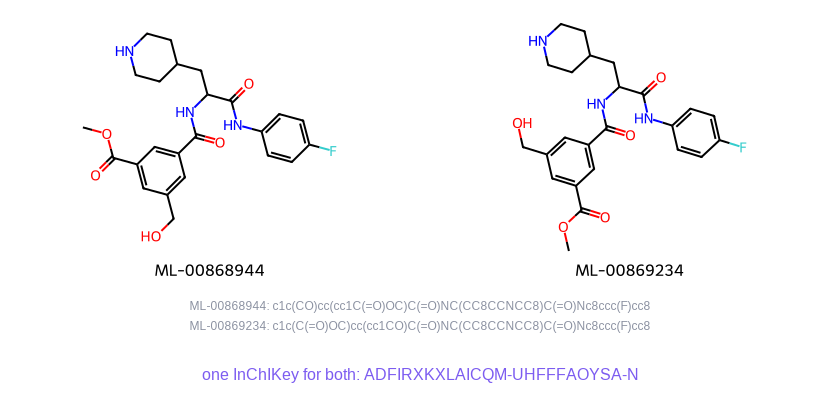
As written, every SMILES is different. Canonical SMILES and InChIKeys agree that 109 molecules
are listed twice, each under two IDs: about 0.5% of the library.
These are real duplicates of the kind every enumerated library (one made by combining building
blocks in every allowed way) has: two building blocks on symmetric positions of a scaffold,
swapped, give the same molecule. The code picks the first InChIKey listed twice, and merge adds
the SMILES as written, matching rows on their id. One pair:
first_key = sizes[sizes == 2].index[0]
pair = compounds.loc[compounds["inchikey"] == first_key, ["id", "inchikey"]]
pair = pair.merge(library[["id", "smiles"]], on="id")
print(pair.to_string(index=False))
         id                    inchikey                                                   smiles
ML-00868944 ADFIRXKXLAICQM-UHFFFAOYSA-N c1c(CO)cc(cc1C(=O)OC)C(=O)NC(CC8CCNCC8)C(=O)Nc8ccc(F)cc8
ML-00869234 ADFIRXKXLAICQM-UHFFFAOYSA-N c1c(C(=O)OC)cc(cc1CO)C(=O)NC(CC8CCNCC8)C(=O)Nc8ccc(F)cc8
The two substituents sit on a 1,3,5-substituted benzene ring, so swapping them gives the same molecule written from the other side.
The same works for duplicates that a supplier adds by mistake. add_defects adds some molecules a
second time, written as a different, randomly ordered SMILES, with -dup on the ID. Compare the
strings and you find none of them; compare InChIKeys and you find them all.
The code works on whole columns at once, each giving one True or False per row:
.map(inchikey)runs the functioninchikeyon every SMILES in the column;duplicated(keep=False)isTruefor every row whose value appears in another row too;notna()isTruewhere there is a value (the key is missing for SMILES RDKit cannot read), and&means "and";isin(added_keys)isTruewhere the value is one of those keys;.sum()on such a column counts theTrues, and[added]keeps only the rows whereaddedisTrue.
The last three lines find one added duplicate, remove -dup from its ID with removesuffix, and
print every row whose ID starts with what is left:
def inchikey(smiles: str) -> str | None:
    """The InChIKey of a SMILES, or None if RDKit cannot read it."""
    mol = Chem.MolFromSmiles(smiles)
    return Chem.MolToInchiKey(mol) if mol is not None else None


shipment_library = chemlib.library(SHIPMENT_SIZE, seed=SHIPMENT_SEED)
shipment = chemlib.add_defects(
    shipment_library, rate=SHIPMENT_DEFECT_RATE, seed=SHIPMENT_DEFECT_SEED
)
shipment["inchikey"] = shipment["smiles"].map(inchikey)
added = shipment["defect"] == "duplicate"
same_string = shipment["smiles"].duplicated(keep=False)
same_key = shipment["inchikey"].notna() & shipment["inchikey"].duplicated(keep=False)
print("duplicates added:", int(added.sum()))
print("rows sharing a SMILES string with another row:", int(same_string.sum()))
print("rows sharing an InChIKey with another row:    ", int(same_key.sum()))
print("every added duplicate found:", bool(same_key[added].all()))
added_keys = set(shipment.loc[added, "inchikey"])
from_added = same_key & shipment["inchikey"].isin(added_keys)
print("rows that are an added duplicate or its original:", int(from_added.sum()))
example = shipment.loc[added, "id"].iloc[0].removesuffix("-dup")
copies = shipment[shipment["id"].str.startswith(example)]
print(copies[["id", "smiles", "inchikey"]].to_string(index=False))
duplicates added: 30
rows sharing a SMILES string with another row: 0
rows sharing an InChIKey with another row:     68
every added duplicate found: True
rows that are an added duplicate or its original: 60
             id                                                   smiles                    inchikey
ML-00911844-dup C(c1cc(C(F)(F)F)cc(c1)C(NC(C(=O)NC1CCNCC1)Cc1ccncc1)=O)O JQHQCTSCMYNCGE-UHFFFAOYSA-N
    ML-00911844   c1c(CO)cc(cc1C(F)(F)F)C(=O)NC(Cc8ccncc8)C(=O)NC8CCNCC8 JQHQCTSCMYNCGE-UHFFFAOYSA-N
Two SMILES that look nothing alike give one key. Of the 68 rows that share a key, 60 are the 30 added duplicates and their originals; the other 8 are symmetric pairs like the one above, which were in the library before any defects were added. Which copy to keep (the cheaper, the one in stock, the first received) is a business rule, written down and applied the same way every time; Module 7 makes it part of standardisation.
6. Toolkits disagree
Canonical SMILES found the same duplicates as InChIKeys above. So why not use them as the identity? Because "canonical" means canonical for one program. Open Babel, the other widely used open-source toolkit, has its own canonical SMILES. Read the first 1,000 molecules of the library with both.
pybel is Open Babel's Python interface: pybel.readstring("smi", smiles) reads a SMILES and
.write("can") writes Open Babel's canonical SMILES. For each molecule the code records four
True/False answers, and adding up a column of them counts the Trues. The last two lines print
the two SMILES of the last molecule in the loop:
pybel.ob.obErrorLog.SetOutputLevel(0)  # quiet: we compare the results ourselves


def rdkit_canonical(smiles: str) -> str:
    """RDKit's canonical SMILES."""
    return Chem.MolToSmiles(Chem.MolFromSmiles(smiles))


def openbabel_canonical(smiles: str) -> str:
    """Open Babel's canonical SMILES (its output is the SMILES, a tab, then a title)."""
    return pybel.readstring("smi", smiles).write("can").split("\t")[0].strip()


rows = []
for smiles in library["smiles"].head(TOOLKIT_SAMPLE):
    rd, ob = rdkit_canonical(smiles), openbabel_canonical(smiles)
    rows.append(
        {
            "same canonical SMILES": rd == ob,
            "RDKit agrees with itself": rdkit_canonical(ob) == rd,
            "Open Babel agrees with itself": openbabel_canonical(rd) == ob,
            "same InChIKey": inchikey(rd) == inchikey(ob),
        }
    )
print(pd.DataFrame(rows).sum().to_string())
print("RDKit:     ", rd)
print("Open Babel:", ob)
same canonical SMILES               0
RDKit agrees with itself         1000
Open Babel agrees with itself    1000
same InChIKey                    1000
RDKit:      COc1ccc(-c2nc(-c3ccc(F)cc3)c(CO)o2)cc1
Open Babel: OCc1oc(nc1c1ccc(cc1)F)c1ccc(cc1)OC
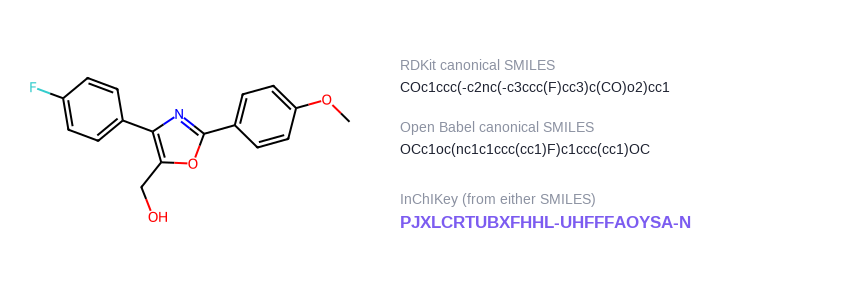
Each toolkit is consistent with itself: given the other's SMILES, it produces its own canonical form again. But the two forms are different for every one of these molecules, so a database keyed on RDKit's canonical SMILES would not recognise a single molecule sent in by an Open Babel pipeline. The canonical SMILES can also change between versions of one toolkit, when its algorithm is improved. The InChIKeys are the same whichever SMILES they are made from.
InChI avoids the problem by design: there is one InChI algorithm, maintained by IUPAC and the InChI
Trust, and toolkits call the same InChI library rather than writing their own. Open Babel can write
InChIs and InChIKeys too, when it is built with that library. You can check with
"inchikey" in pybel.outformats, which gives True or False. The package installed with pip
(Python's package installer) includes it on Linux, and so in Colab; the one for Windows, at the time
of writing, does not. Store the toolkit's canonical SMILES to rebuild the molecule, and the InChIKey
to identify it.
7. Did the file arrive unchanged?
Files are copied, downloaded, uploaded and synchronised, and somewhere along the way one can be cut short or changed. A truncated SDF still opens (section 3 lost only one record), and a single changed byte can turn chlorine into bromine. A checksum catches both. SHA-256 is a standard recipe (a hash, like the InChIKey in Module 2) that turns a file's bytes into a 64-character code of digits and the letters a to f. Change any byte and the code changes completely. Whoever sends a file publishes its checksum, and whoever receives it computes the checksum again and compares.
The code has three functions:
sha256reads the file a chunk at a time and feeds each chunk tohashlib. The linewhile chunk := handle.read(chunk_size):reads the next chunk intochunkand keeps going as long as it is not empty; the:=gives a name to a value in the middle of a line;write_checksumswrites a manifest: a small text file listing each file's checksum, two spaces, and its name;verifyreads the manifest back, computes each file's checksum again, and returns the names of the files that no longer match:
def sha256(path: Path, chunk_size: int = CHECKSUM_CHUNK) -> str:
    """The SHA-256 checksum of a file, read a chunk at a time so any size of file fits."""
    digest = hashlib.sha256()
    with path.open("rb") as handle:
        while chunk := handle.read(chunk_size):
            digest.update(chunk)
    return digest.hexdigest()


def write_checksums(paths: list[Path], manifest: Path) -> None:
    """Write a manifest: one line per file, its checksum then its name (as sha256sum writes)."""
    lines = [f"{sha256(path)}  {path.name}\n" for path in paths]
    manifest.write_text("".join(lines), encoding="utf-8")
    log.info("wrote the checksums of %d files to %s", len(lines), manifest.name)


def verify(manifest: Path) -> list[str]:
    """Check every file listed in a manifest; return the names whose checksum no longer matches."""
    changed = []
    for line in manifest.read_text(encoding="utf-8").splitlines():
        expected, name = line.split("  ", 1)
        if sha256(manifest.parent / name) != expected:
            log.warning("%s: checksum does not match the manifest", name)
            changed.append(name)
    return changed


manifest = WORK / "SHA256SUMS"
write_checksums([files["SMILES"], files["Parquet"]], manifest)
print(manifest.read_text(encoding="utf-8"), end="")
print("changed files:", verify(manifest))
INFO wrote the checksums of 2 files to SHA256SUMS
d694974ab38e5b235f1e5b9f4b8fef717b0f79e618220df5b862255f630569d5  library.smi
aed1fa33d0dcc7729d1b0527d4e73713b617d7de70d2d57aacbe73190da18f6c  library.parquet
changed files: []
Now change one character in the SMILES file, a chlorine into a bromine, the kind of change no one would spot by eye in a 20,000-line file:
text = files["SMILES"].read_text(encoding="utf-8")
files["SMILES"].write_text(text.replace("Cl", "Br", 1), encoding="utf-8", newline="\n")
print("same size:", files["SMILES"].stat().st_size == len(text.encode("utf-8")))
print("changed files:", verify(manifest))
same size: True
WARNING library.smi: checksum does not match the manifest
changed files: ['library.smi']
The file is the same size and still a valid SMILES file, so only the checksum notices. The
manifest format is the one the sha256sum command reads, so the receiver does not need Python to
check it. You do not need this for the lesson, but if you want to try it: sha256sum is a terminal
command on Linux. In Colab, run it in a new code cell, where a line starting with ! is sent to
the terminal instead of to Python:
!cd work && sha256sum -c SHA256SUMS
It prints each file's name followed by OK or FAILED (here library.smi: FAILED, because we just
changed it) and a warning line counting the failures. On macOS, type
shasum -a 256 -c SHA256SUMS in Terminal, in the work folder, without the !. Windows
PowerShell has no sha256sum.
When you download data from a data repository (a website that keeps published datasets, such as Zenodo) that publishes checksums, compare them before you use the files; Module 13 builds manifests like this one into versioning.
8. Choosing a format
- Receiving data, you take what you are given, often SDF or CSV. Stream it, record what fails and why, convert the types yourself, and check its checksum if one was published.
- Inside a pipeline, store tables as Parquet with a schema: small, fast, typed, and the same in every program. Keep a SMILES column to rebuild molecules and an InChIKey column to identify them.
- Sending data, write the format the receiver asks for, with the
csvmodule or RDKit's writers rather than by joining strings, and publish its checksum beside it.
Try it yourself
The homework is a few questions, answered by running code like the code above: in a new cell at
the end of the notebook, or in a script. It is at the end of the lesson's page, and in
homework.md in the module's folder. The answers are published after the cohort's deadline.
Further reading
- Dalby, A., Nourse, J. G., Hounshell, W. D., Gushurst, A. K. I., Grier, D. L., Leland, B. A. & Laufer, J. (1992). Description of several chemical structure file formats used by computer programs developed at Molecular Design Limited. Journal of Chemical Information and Computer Sciences, 32(3), 244–255. https://doi.org/10.1021/ci00007a012
- Heller, S. R., McNaught, A., Pletnev, I., Stein, S. & Tchekhovskoi, D. (2015). InChI, the IUPAC International Chemical Identifier. Journal of Cheminformatics, 7(1), 23. https://doi.org/10.1186/s13321-015-0068-4
- O'Boyle, N. M., Banck, M., James, C. A., Morley, C., Vandermeersch, T. & Hutchison, G. R. (2011). Open Babel: An open chemical toolbox. Journal of Cheminformatics, 3(1), 33. https://doi.org/10.1186/1758-2946-3-33
- Shafranovich, Y. (2005). Common Format and MIME Type for Comma-Separated Values (CSV) Files. RFC 4180. https://www.rfc-editor.org/rfc/rfc4180
- The Apache Parquet documentation. https://parquet.apache.org/docs/
- The RDKit documentation. Getting Started with the RDKit in Python. https://www.rdkit.org/docs/GettingStartedInPython.html
- The Open Babel documentation. https://open-babel.readthedocs.io/en/latest/
Homework
Answer each question by running code like the code in the lesson: add a new cell at the end of the lesson's notebook (in Colab, + Code) and work there. If you are in a cohort, you will be told where to send your answers; everyone can check theirs against the answers published after the cohort's deadline.
- (Section 1.) Make
chemlib.library(5_000, seed=11)and write it as SDF, gzipped SDF, SMILES, CSV and Parquet, as in section 1, with the functions defined there. How many bytes per molecule does each take? Then write the Parquet file three more times, withcompression="snappy","gzip"and"none"inpq.write_table. (These are different ways of compressing the file;"none"means not compressed.) Which is smallest, and how much does compression save over"none"? - (Section 3.) Make a damaged delivery with
chemlib.add_defects(chemlib.library(3_000,
   seed=12), rate=0.08, seed=13)
, write it withwrite_unchecked_sdf, and cut the last 500 bytes off the file, as section 3 does with 300. Read it with the generatorrecords. How many molecules are read, how many records fail, and for which reasons? Thedefectcolumn says how each row was damaged: which kinds of defect are read without any error, and why is that not the same as their being correct? - (Section 4.) A supplier's CSV has a column
salt_formwith the valuesHCl,Na,NA,NoneandTFA, and a columnlot(the batch number) with the values0012,1e3and0450. Write it with thecsvmodule and read it back withpd.read_csvand no options. Which values come back changed, and into what? (pandas shows a missing value asNaN, "not a number".) Which options toread_csvkeep every value exactly as written? Store the result as Parquet with a schema and show that it reads back unchanged. - (Section 5.) Make
chemlib.library(30_000, seed=21)and compute an InChIKey for every molecule. How many molecules appear more than once? Do canonical SMILES find exactly the same groups (compare the groups, that is which IDs are together, not only how many groups there are)? Draw or print three of the pairs and explain, from the scaffold (the core structure the building blocks are joined to), why each pair is the same molecule. - (Section 6.) Take 500 molecules of your choice from the library in question 4. For each, make a
randomly ordered SMILES with
Chem.MolToSmiles(mol, canonical=False, doRandom=True), and canonicalise both the original and the random SMILES (turn them into canonical SMILES) with RDKit and with Open Babel, usingrdkit_canonicalandopenbabel_canonical. Within each toolkit, do the two canonical forms always agree? If"inchikey" in pybel.outformatsis true on your computer (it is in Google Colab), also compare Open Babel's own InChIKeys with RDKit's: how many agree? - To think about (sections 3, 5 and 7). A partner sends you a 2 GB gzipped SDF of their catalogue every week, with a SHA-256 checksum. Design the intake, the steps that take the file in: in what order do you check the checksum, stream the records (read them one at a time), record failures and convert the data fields; what do you store, in which format, and with which key (the column that identifies each molecule); and how do you tell which molecules in this week's file are new, which have changed price, and which are no longer offered? What would go wrong if the key were RDKit's canonical SMILES, and your partner moved to a new version of their toolkit?
How was this module?
Found this module useful? ★ Star the course on GitHub: it helps other chemists find it.