
Get set up
You can read this page without running anything. To run the code yourself, the easiest way needs nothing installed, only a web browser and a free Google account:
- Open this lesson in Google Colab. Colab is Google's free service for running Python notebooks in the browser; sign in with your Google account if asked.
- Run the cells in order, from the top: click the ▶ button at the left of a cell, or click inside it and press Shift+Enter. The first cell installs what the lesson needs and takes a minute or two.
- If Colab warns "This notebook was not authored by Google", click Run anyway: the notebook comes from this course's own repository.
- Under each cell you should see what the box labelled Output under the same code on the lesson's page shows (the notebook opens with our outputs already in place; running a cell replaces them with yours). Boxes labelled Example output show timings or memory, so your numbers will differ a little.
New to notebooks, or want to run the lessons on your own computer instead (with Jupyter, Anaconda or a terminal)? Start here shows every step.
If you already work in a terminal, the short version, with uv and Git installed:
git clone https://github.com/David-Alobo/monstrous-learn.git
cd monstrous-learn/data-engineering/series-1
uv sync
uv run python 11-incremental-ingestion/code.py
or, in any Python 3.11+ environment: python -m pip install requests tenacity pydantic duckdb pandas.
Most chemical data a company uses is not made in-house. Bioactivity values come from ChEMBL, structures and properties from PubChem, and both grow every release. Both can be read by programs through an API (application programming interface): a web address that answers a program's request with data instead of a web page for people. Reading data from a source into your own database is called ingestion.
A pipeline that downloads everything again every night is slow, puts needless load on services that are free and shared, and cannot tell you what is new. Industry pipelines load incrementally: they remember how far they got (a high-water mark, like the line a flood leaves on a wall), ask only for what came after it, and write in a way that makes a repeated request harmless. They are also defensive about the source: an API can change its fields, send a value as text, or fail for an hour, and the pipeline must notice instead of filling the database with nonsense.
This module loads IC50 values for one kinase, IKK-epsilon (ChEMBL target CHEMBL3529, an inflammation and oncology target), from the ChEMBL web services, and compound properties from PubChem. To make the lesson run offline and give the same output every time, it replays responses recorded from the real services; one switch makes it call them live instead. (pChEMBL, which appears throughout, is ChEMBL's way of putting IC50 and similar values on one scale: −log10 of the value in mol/L, so 1 µM is 6 and 10 nM is 8.)
By the end of this module you will be able to:
- ask ChEMBL and PubChem for data politely: say who you are, give up on an answer that never comes, keep to a number of requests per second, and try again when the service is only busy;
- save real answers once and replay them, so the code can be tested without the internet;
- fetch a large result one page at a time, and know where that can go wrong;
- check every record against a written description of what it must look like, so a change in the service stops the run with a clear message;
- fetch only the records added since the last run, store them so that fetching one twice does no harm, and fetch an older range again on purpose when it needs fixing;
- say under which licence each source's data may be used, and keep that with the stored data.
From earlier modules we use the retries with back-off, upserts, quarantine and atomic writes of Module 10, and DuckDB from Module 8. Module 10 is the one to have done first.
The lesson uses these packages:
- requests sends requests to web services and receives their answers;
- tenacity tries a failed request again, with waits in between (as in Module 10);
- Pydantic checks each record against a model of what it must look like;
- DuckDB is a database kept in one file, good at answering questions about whole tables;
- pandas prints query results as tables.
The answers the services gave are saved as small JSON files (JSON is a text format for nested lists
and dictionaries, the format most web services answer in) in the module's recorded/ folder, made
by the module's record.py script. In Colab the first cell downloads them next to the notebook.
Setup
Everything this lesson needs is imported and set here, so the settings can be changed in one place.
Pipeline steps report with log; print is kept for showing you results; Module 1 explains why.
The query itself, and the ids the lesson's runs use, stay with the sections that explain them.
Leave LIVE = False for now: the lesson then needs no internet and prints what the page shows.
Section 2 explains the settings for being polite to the services.
import hashlib
import json
import logging
import math
import time
from collections import Counter
from collections.abc import Callable, Iterator
from pathlib import Path
from typing import Any
from urllib.parse import parse_qsl, urlencode, urljoin, urlsplit, urlunsplit

import duckdb
import requests
from pydantic import BaseModel, ConfigDict, Field, ValidationError, model_validator
from tenacity import (
    RetryCallState,
    Retrying,
    retry_if_exception_type,
    stop_after_attempt,
    wait_random_exponential,
)

# log lines: level and message only, so the lesson's outputs are the same on every run
# (a real job would add "%(asctime)s" to the format)
logging.basicConfig(level=logging.INFO, format="%(levelname)s %(message)s", force=True)
log = logging.getLogger(__name__)

LIVE = False  # False: replay the recorded responses. True: call ChEMBL and PubChem for real.

# files
RECORDED = Path("recorded")  # the recorded responses (made by record.py)
WORK = Path("work")  # every file the lesson writes goes here
CACHE = WORK / "http-cache"  # live responses are kept here, so a rerun asks again for nothing
DB_PATH = WORK / "ingest.duckdb"  # the database the lesson loads

# being polite to the services
USER_AGENT = "chem-ingest-tutorial/1.0 (mailto:[email protected])"  # put your own contact here
TIMEOUT = (10, 60)  # seconds to connect, seconds to wait for the answer
CHEMBL_PER_SECOND = 2  # requests per second to ChEMBL (our own, conservative choice)
PUBCHEM_PER_SECOND = 5  # requests per second to PubChem (the most its usage policy allows)
TRANSIENT_STATUS = {429, 500, 502, 503, 504}  # HTTP statuses worth retrying
MAX_ATTEMPTS = 5  # requests in all before a transient failure is given up
MAX_WAIT_S = 60  # the longest wait between retries, in seconds

# the services
CHEMBL_HOST = "https://www.ebi.ac.uk"
CHEMBL_ACTIVITY = f"{CHEMBL_HOST}/chembl/api/data/activity.json"
PAGE_SIZE = 100  # ChEMBL records per page (its `limit`)
PUBCHEM_PROPERTIES = ("https://pubchem.ncbi.nlm.nih.gov/rest/pug/compound/cid/{cids}"
                      "/property/Title,MolecularFormula,MolecularWeight,SMILES,InChIKey/JSON")
CHUNK_SIZE = 5  # CIDs per PubChem request: 5 to show the chunking, hundreds in real use

# the source and licence stored with every row (section 1)
SOURCE_CHEMBL = "ChEMBL (CC BY-SA 3.0)"
SOURCE_PUBCHEM = "PubChem (NCBI: no restrictions on use)"

WORK.mkdir(exist_ok=True)
1. Before you download: licences
Public does not mean free of conditions. Check the licence of every source before the first request, and store it with the data, because the person who uses a table in two years will not know where it came from.
- ChEMBL data are made available under the Creative Commons Attribution-ShareAlike 3.0 Unported licence (CC BY-SA 3.0; Attribution means you must credit the source, ShareAlike that what you build from it must be shared under the same terms), as stated on the ChEMBL website. You may use, change and redistribute them, including commercially, if you credit ChEMBL and, when you share a database derived from them, share it under the same licence.
- PubChem is run by NCBI, whose policy is that NCBI "places no restrictions on the use or distribution of the data", while noting that some submitters may claim rights in what they submitted. PubChem asks to be cited.
Both ask to be cited in publications (the papers are in the further reading). In the tables below,
every row carries a source column saying where it came from and under which licence.
2. A polite client
ChEMBL and PubChem are free services shared by everyone. A program talks to them with HTTP, the same way a web browser does: it sends a request for a web address (a URL), and the service sends back a response with a status code, a number saying how it went, and a body, here JSON. The codes that matter here: 200 means success; 400 to 499 mean the request was wrong (404: "not found"; 429: "too many requests", slow down); 500 to 599 mean the service itself failed (503: "unavailable for now"). PubChem's usage policy asks that no user make more than 5 requests per second, and it rejects requests above its limits with HTTP 503; users who keep exceeding them are blocked for a while. A program that sends requests is called a client. A polite client does four things:
- says who it is, in a User-Agent header (a line of information sent with each request), with a contact address, so the service can contact you rather than block you;
- sets a timeout, so a request that hangs does not hang the pipeline for ever;
- keeps to a rate limit, by waiting before a request if the last one was too recent;
- retries transient failures (429 "too many requests", and 500, 502, 503, 504) with exponential back-off and jitter, as in Module 10, and does not retry the others: a 404 or a 400 means the request is wrong, and asking again will not fix it.
The rate limiter takes its clock and its sleep function as arguments, so here it runs on a pretend
clock and the lesson does not have to wait. It remembers the earliest time the next request is
allowed (next_allowed, which starts at minus infinity, -math.inf, so the first request never
waits). Before each request, wait() sleeps until that time if it has not come yet, then moves it
one interval (0.2 s at five per second) further on. time.monotonic is a clock that only ever goes
forward, which is what you want for measuring gaps; for _ in range(12) repeats 12 times, the _
saying we do not need the loop's counter:
class RateLimiter:
    """Allow at most `per_second` requests per second, by waiting before a request when needed."""

    def __init__(self, per_second: float, clock: Callable[[], float] = time.monotonic,
                 sleep: Callable[[float], None] = time.sleep) -> None:
        self.interval = 1 / per_second
        self.clock = clock
        self.sleep = sleep
        self.next_allowed = -math.inf

    def wait(self) -> None:
        """Wait until the next request is allowed, then reserve the slot after it."""
        now = self.clock()
        if now < self.next_allowed:
            self.sleep(self.next_allowed - now)
            now = self.next_allowed
        self.next_allowed = now + self.interval


class PretendClock:
    """A clock that only moves when something sleeps: for showing waits without waiting."""

    def __init__(self) -> None:
        self.now = 0.0

    def time(self) -> float:
        """The current pretend time, in seconds."""
        return self.now

    def sleep(self, seconds: float) -> None:
        """Move the pretend time on."""
        self.now += seconds


clock = PretendClock()
limiter = RateLimiter(per_second=PUBCHEM_PER_SECOND, clock=clock.time, sleep=clock.sleep)
sent = []
for _ in range(12):
    limiter.wait()
    sent.append(round(clock.now, 1))
print("12 requests sent at (s):", sent)
12 requests sent at (s): [0.0, 0.2, 0.4, 0.6, 0.8, 1.0, 1.2, 1.4, 1.6, 1.8, 2.0, 2.2]
Twelve requests at five per second take 2.2 seconds; without the limiter a loop would send them in a few milliseconds. In live use there is one limiter per service: 5 per second for PubChem, as its policy asks, and 2 per second for ChEMBL, a conservative choice of ours.
Now the request itself, with tenacity retrying what is transient. A requests.Session keeps one
connection to a service open across many requests, which is faster than opening a new one each
time; session.get(url, ...) sends one request. urlsplit(url).netloc picks the host name out of
a URL (www.ebi.ac.uk from https://www.ebi.ac.uk/chembl/...), so each service gets its own rate
limiter. The function takes the session as an argument so we can try it against a pretend server
that answers with chosen status codes, first two transient failures and then success, then a 404.
In Module 10 tenacity was used as a decorator. Here it is written as a loop instead, with
Retrying, imported in the Setup block: for attempt in retrying: followed by with attempt:
runs the block inside once per attempt; if the block raises one of the errors named in retry=,
tenacity waits and goes round again, and once the block returns, the loop ends. You can read it as
"try this, up to five times". before_sleep=log_retry is a function tenacity calls before each
wait: each retry is logged as a warning, because someone reading a nightly job's log wants to know
a service was struggling, even when it recovered. response.raise_for_status() raises an error
for any status of 400 or more, and response.json() turns the JSON body into Python lists and
dictionaries:
SESSION = requests.Session()
LIMITERS = {urlsplit(CHEMBL_HOST).netloc: RateLimiter(CHEMBL_PER_SECOND),
            urlsplit(PUBCHEM_PROPERTIES).netloc: RateLimiter(PUBCHEM_PER_SECOND)}


class TransientHTTPError(Exception):
    """A response worth retrying: rate limited, or the server failed."""


def log_retry(state: RetryCallState) -> None:
    """Log a failed attempt before tenacity waits and tries again."""
    log.warning("attempt %d failed (%s); retrying", state.attempt_number,
                state.outcome.exception())


def polite_get(url: str, session: Any = SESSION, limiter: RateLimiter | None = None,
               sleep: Callable[[float], None] = time.sleep) -> dict:
    """GET a URL politely and return its JSON, retrying transient failures with back-off.

    Args:
        url: The full URL.
        session: The HTTP session: a requests.Session, or anything with the same `get`.
        limiter: The rate limiter for the URL's service (by default, the one for its host).
        sleep: How to wait between retries.

    Returns:
        The response's JSON.

    Raises:
        requests.HTTPError: For a permanent failure (4xx other than 429), at once.
        TransientHTTPError: If every attempt failed.
    """
    limiter = limiter or LIMITERS[urlsplit(url).netloc]
    retrying = Retrying(
        retry=retry_if_exception_type(
            (TransientHTTPError, requests.ConnectionError, requests.Timeout)
        ),
        stop=stop_after_attempt(MAX_ATTEMPTS),
        wait=wait_random_exponential(multiplier=1, max=MAX_WAIT_S),
        before_sleep=log_retry,
        sleep=sleep,
        reraise=True,
    )
    for attempt in retrying:
        with attempt:
            limiter.wait()
            response = session.get(url, headers={"User-Agent": USER_AGENT}, timeout=TIMEOUT)
            if response.status_code in TRANSIENT_STATUS:
                raise TransientHTTPError(f"HTTP {response.status_code} from {urlsplit(url).netloc}")
            response.raise_for_status()  # any other 4xx or 5xx: permanent, raised at once
            return response.json()


class PretendResponse:
    """Just enough of a requests.Response for polite_get."""

    def __init__(self, status_code: int) -> None:
        self.status_code = status_code

    def json(self) -> dict:
        """The body."""
        return {"answer": "the data"}

    def raise_for_status(self) -> None:
        """Raise for 4xx and 5xx, like requests does."""
        if self.status_code >= 400:
            raise requests.HTTPError(f"{self.status_code} Client Error")


class PretendServer:
    """Answers each request with the next status code from a list."""

    def __init__(self, statuses: list[int]) -> None:
        self.statuses = list(statuses)
        self.requests = 0

    def get(self, url: str, headers: dict, timeout: tuple[float, float]) -> PretendResponse:
        """Answer one request (the arguments are those of requests.Session.get, unused here)."""
        self.requests += 1
        return PretendResponse(self.statuses.pop(0))


quiet = RateLimiter(PUBCHEM_PER_SECOND, clock=clock.time, sleep=clock.sleep)
server = PretendServer([503, 429, 200])
answer = polite_get("https://example.org/x", server, quiet, sleep=clock.sleep)
print(f"{answer} after {server.requests} requests")

server = PretendServer([404])
try:
    polite_get("https://example.org/x", server, quiet, sleep=clock.sleep)
except requests.HTTPError as err:
    log.error("not retried (%d request): %s", server.requests, err)
WARNING attempt 1 failed (HTTP 503 from example.org); retrying
WARNING attempt 2 failed (HTTP 429 from example.org); retrying
{'answer': 'the data'} after 3 requests
ERROR not retried (1 request): 404 Client Error
The pretend server answered 503 and 429, which were retried, then 200, and the data came back. The 404 was raised at once, after one request.
Servers that are overloaded sometimes say how long to wait in a Retry-After header; a client that
honours it is more polite still. tenacity's wait can be any function, so it can read that header.
3. Record and replay
Tests and lessons should not depend on a web service being up, being fast, or returning the same data as yesterday. (While this module was written, the ChEMBL web services answered some requests with HTTP 500 for long stretches; the retry logic above is not theory.) The industry pattern is record and replay: call the real service once, save each response with the request that produced it, and let the code under test read the saved responses. Libraries such as vcrpy and pytest-recording do this for test suites (collections of automatic checks on code); here it is in a few lines.
A request to these services is a URL with query parameters after a ?, such as
activity.json?target_chembl_id=CHEMBL3529&limit=100: each name=value pair, joined by &, says
what we want. The same request can be written with its parameters in any order, so every request
is first written in one canonical form, its parameters sorted, and the same request always has the
same name on disk. That name comes from a hash of the URL: a short code computed from it (the
same URL always gives the same code), so the file name is short and safe whatever the URL holds. fetch_json is the only function in the module that touches the
network. With LIVE = False it reads recorded/; with LIVE = True it calls the service
politely and keeps each response in work/http-cache/ (a disk cache: a second live run makes no
requests it has made before). Either way the caller gets the same JSON. params: dict | None = None
means the argument is a dictionary or None (nothing), and is None unless given; {**QUERY,
"limit": "50"}, used later, makes a copy of the dictionary QUERY with one entry added or changed:
def canonical_url(url: str, params: dict | None = None) -> str:
    """One spelling for a request: an absolute URL with its query parameters sorted.

    Args:
        url: The URL, absolute or a path on the ChEMBL host (as in ChEMBL's `next` links).
        params: Extra query parameters.

    Returns:
        The canonical URL.
    """
    parts = urlsplit(urljoin(CHEMBL_HOST, url))
    query = sorted(parse_qsl(parts.query) + [(k, str(v)) for k, v in (params or {}).items()])
    return urlunsplit((parts.scheme, parts.netloc, parts.path, urlencode(query), ""))


def recording_name(url: str) -> str:
    """The file a canonical URL is recorded under: the service and a hash of the URL."""
    service = "chembl" if "ebi.ac.uk" in url else "pubchem"
    return f"{service}-{hashlib.sha256(url.encode()).hexdigest()[:12]}.json"


requests_made = []


def fetch_json(url: str, params: dict | None = None) -> dict:
    """The JSON for a request: replayed from recorded/, or fetched live and cached on disk.

    Args:
        url: The URL.
        params: Its query parameters.

    Returns:
        The response's JSON, the same in both modes.
    """
    url = canonical_url(url, params)
    requests_made.append(url)
    name = recording_name(url)
    if not LIVE:
        path = RECORDED / name
        if not path.exists():
            raise FileNotFoundError(f"{url} was never recorded: run record.py")
        return json.loads(path.read_text(encoding="utf-8"))["body"]
    cached = CACHE / name
    if cached.exists():
        return json.loads(cached.read_text(encoding="utf-8"))["body"]
    body = polite_get(url)
    CACHE.mkdir(parents=True, exist_ok=True)
    tmp = cached.with_name(cached.name + ".tmp")  # an atomic write, as in Module 10
    tmp.write_text(json.dumps({"url": url, "body": body}), encoding="utf-8")
    tmp.replace(cached)
    return body


recordings = sorted(RECORDED.glob("*.json"))
size_kib = sum(p.stat().st_size for p in recordings) / 1024
log.info("%d recorded responses, %.0f KiB in all", len(recordings), size_kib)
INFO 10 recorded responses, 171 KiB in all
Live mode is not a different program: when this module was written, the whole lesson was also run
with LIVE = True against the real services, and every output was the same as the replayed one
except the line near the end that reports the mode. (Once ChEMBL publishes new IKK-epsilon data,
a live run will rightly find more records than the recordings hold.)
Each recording holds the URL it answers, the date it was recorded and the body, so it can be read
and refreshed by hand. A disk cache in live mode matters for the same reason as Module 10's
joblib.Memory: a pipeline that crashes at page 40 should not ask the service for pages 1 to 39
again when it restarts. Keep in mind what a cache does to freshness: a cached response is as old as
the day it was fetched, so production caches have an expiry (hours, or until the next release).
4. Pages: limit, offset and next
ChEMBL never returns a large result in one response. Its activity endpoint (the URL that
answers questions about activities) returns limit records starting at offset (the number of
records to skip first), plus a page_meta block that says how many records match and gives the URL
of the next page. So limit=100&offset=200 asks for records 201 to 300. Here is our query: IC50 values with a
pChEMBL value for IKK-epsilon, ordered by activity_id, 100 per page, with only naming the fields
we need (smaller responses, kinder to the server). The page size, PAGE_SIZE, is set in the Setup
block. In the query, __isnull, __gt (greater than) and __lte (less than or equal) are
ChEMBL's way of writing conditions: "pchembl_value__isnull": "false" asks for records that have a
pChEMBL value. json.dumps(..., indent=1) prints the JSON laid out over several lines:
QUERY = {
    "target_chembl_id": "CHEMBL3529",  # IKK-epsilon
    "standard_type": "IC50",
    "pchembl_value__isnull": "false",
    "order_by": "activity_id",
    "only": "activity_id,molecule_chembl_id,standard_type,standard_relation,standard_value,"
    "standard_units,pchembl_value,document_chembl_id",
    "limit": str(PAGE_SIZE),
}
FIRST_RUN_CUTOFF = 18811464  # explained in section 6

page = fetch_json(CHEMBL_ACTIVITY,
                  {**QUERY, "activity_id__gt": "0", "activity_id__lte": str(FIRST_RUN_CUTOFF)})
print(json.dumps(page["page_meta"], indent=1))
print(json.dumps(page["activities"][0], indent=1))
{
 "limit": 100,
 "next": "/chembl/api/data/activity.json?limit=100&offset=100&activity_id__gt=0&activity_id__lte=18811464&only=activity_id%2Cmolecule_chembl_id%2Cstandard_type%2Cstandard_relation%2Cstandard_value%2Cstandard_units%2Cpchembl_value%2Cdocument_chembl_id&order_by=activity_id&pchembl_value__isnull=false&standard_type=IC50&target_chembl_id=CHEMBL3529",
 "offset": 0,
 "previous": null,
 "total_count": 276
}
{
 "activity_id": 1812436,
 "document_chembl_id": "CHEMBL1146152",
 "molecule_chembl_id": "CHEMBL375787",
 "pchembl_value": "6.10",
 "relation": "=",
 "standard_relation": "=",
 "standard_type": "IC50",
 "standard_units": "nM",
 "standard_value": "794.33",
 "type": "Log IC50",
 "units": null,
 "value": "-6.1"
}
Two things to notice in the record. Numbers arrive as text ("standard_value": "794.33"), so
something must turn them into numbers and complain if one is not. And the response holds fields we
did not ask for: services add fields over time, which a loader should ignore rather than fail on.
Following next until it is empty walks through every page. pages is a generator: instead
of return, it has yield, which hands one page to the for loop that is using it and pauses
until the loop asks for the next one. So only one page is fetched and held at a time, and the loop
can stop early. (Iterator[dict] in the type hint says "gives dictionaries one at a time"; in the
print, {meta['offset']:>3} writes the offset right-aligned in three characters.)
def pages(params: dict) -> Iterator[dict]:
    """Every page of a ChEMBL activity query, following page_meta.next.

    Args:
        params: The query.

    Yields:
        One page (the parsed JSON) at a time.
    """
    url, extra = CHEMBL_ACTIVITY, params
    while url:
        page = fetch_json(url, extra)
        yield page
        url, extra = page["page_meta"]["next"], None


for each in pages({**QUERY, "activity_id__gt": "0", "activity_id__lte": str(FIRST_RUN_CUTOFF)}):
    meta = each["page_meta"]
    print(f"offset {meta['offset']:>3}: {len(each['activities'])} records, next page: "
          f"{'yes' if meta['next'] else 'none'}")
offset   0: 100 records, next page: yes
offset 100: 100 records, next page: yes
offset 200: 76 records, next page: none
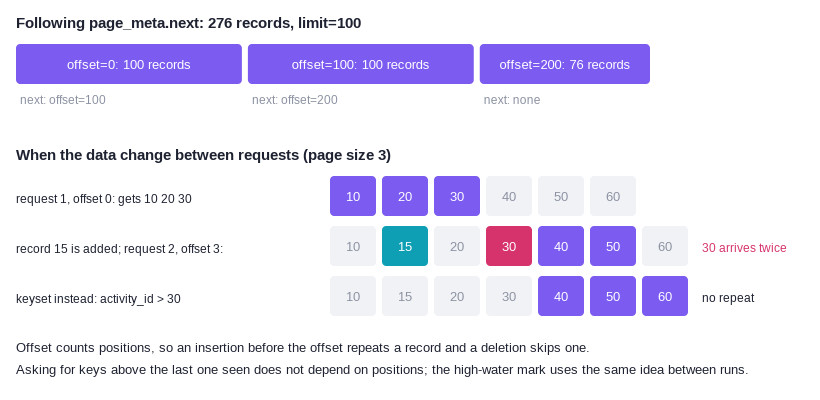
Offset paging has one weakness: the offset counts positions, not records. If records are added or
removed while you page, everything after the change shifts, and a record can be skipped or seen
twice. ChEMBL's data change only between releases, so paging through a result in one go is safe.
For a source that changes all the time, keyset paging is safer: order by a key and ask for
records after the last key you saw (activity_id__gt=…), which is exactly what the high-water mark
in section 6 does between runs.
5. Check every record at the door
A loader (the part of a pipeline that stores what it fetched) that trusts its source stores
whatever arrives. If ChEMBL renamed molecule_chembl_id
tomorrow, or a value arrived as "n/a", such a loader would store empty or broken rows, and the
first person to notice would be a chemist whose model behaves strangely months later. A Pydantic
model states what a record must look like; every record is checked against it before anything
is stored. Module 12 covers Pydantic in depth; here is the model for one activity,
with a chemistry check: pChEMBL is −log10 of the molar value, so for a value in nM it must equal
9 − log10(value). BaseModel and the other Pydantic names are imported in the Setup block.
How to read the model, as in Module 10's settings class: each line name: type is a field the
record must have, with its type. str | None means text or nothing (ChEMBL sends null, which
Python reads as None, when a value is missing). Field(gt=0) adds a limit (gt greater than,
ge and le greater or less than or equal). Field(pattern=r"^CHEMBL\d+$") gives a regular
expression, a pattern the text must match: ^ the start, CHEMBL those letters, \d+ one or
more digits, $ the end, so CHEMBL375787 passes and 375787 does not (the r before the quotes keeps the backslash
as it is). extra="ignore" in model_config drops fields the model does not list, and
frozen=True means a checked record cannot be changed afterwards. @model_validator marks
a check that looks at several fields together. Activity.model_validate(record) checks a
dictionary and returns an Activity, or raises ValidationError saying what is wrong.
class Activity(BaseModel):
    """One ChEMBL bioactivity record, as this pipeline needs it."""

    model_config = ConfigDict(extra="ignore", frozen=True)  # new fields are ignored, not errors

    activity_id: int = Field(gt=0)
    molecule_chembl_id: str = Field(pattern=r"^CHEMBL\d+$")
    document_chembl_id: str = Field(pattern=r"^CHEMBL\d+$")
    standard_type: str
    standard_relation: str | None
    standard_value: float | None = Field(gt=0)
    standard_units: str | None
    pchembl_value: float | None = Field(default=None, ge=0, le=15)

    @model_validator(mode="after")
    def pchembl_agrees_with_value(self) -> "Activity":
        """pChEMBL is -log10(molar value): for nM values it must be 9 - log10(value)."""
        known = self.pchembl_value is not None and self.standard_value is not None
        if known and self.standard_units == "nM":
            expected = 9 - math.log10(self.standard_value)
            if abs(expected - self.pchembl_value) > 0.01:
                raise ValueError(f"pchembl_value {self.pchembl_value} but the value gives "
                                 f"{expected:.2f}")
        return self


record = page["activities"][0]
activity = Activity.model_validate(record)
print(activity)
activity_id=1812436 molecule_chembl_id='CHEMBL375787' document_chembl_id='CHEMBL1146152' standard_type='IC50' standard_relation='=' standard_value=794.33 standard_units='nM' pchembl_value=6.1
The text values became numbers, and the fields we do not use were dropped. Now three records that
must not get in: a value that is not a number, a record from an API that renamed a field, and a
record whose pChEMBL does not match its value. Each broken record is a copy of the good one with
one change; the second is built with a dictionary comprehension, {new_key: v for k, v in
record.items()}, which makes a new dictionary from the old one key by key, here renaming one key:
broken = {
    "value is not a number": {**record, "standard_value": "n/a"},
    "field renamed by the API": {k.replace("molecule_chembl_id", "molecule_id"): v
                                 for k, v in record.items()},
    "pChEMBL disagrees": {**record, "pchembl_value": "8.10"},
}
for label, bad in broken.items():
    try:
        Activity.model_validate(bad)
    except ValidationError as err:
        problem = err.errors()[0]
        print(f"{label}: {'.'.join(map(str, problem['loc'])) or 'record'}: {problem['msg']}")
value is not a number: standard_value: Input should be a valid number, unable to parse string as a number
field renamed by the API: molecule_chembl_id: Field required
pChEMBL disagrees: record: Value error, pchembl_value 8.1 but the value gives 6.10
What to do with a record that fails depends on why. For a curated source like ChEMBL, a record that fails means the API or our understanding of it has changed, so the whole page is refused and the run stops with the error: nothing is stored until a person has looked. For one bad record among good ones, from a source with known messy records, Module 10's quarantine is the better answer; section 8 has an example.
def validate_page(page: dict) -> list[Activity]:
    """Every activity of a page, checked; any invalid record stops the run before storing."""
    return [Activity.model_validate(record) for record in page["activities"]]
6. Incremental loads with a high-water mark
The data go into DuckDB (Module 8; Module 4 introduces it with the
other databases), in two tables: activities, keyed by activity_id, and
load_state, one row per source holding its high-water mark: the largest activity_id loaded
so far. Each run asks ChEMBL only for activities above the mark (activity_id__gt), upserts them,
and moves the mark. The upsert and the new mark are written in one transaction, page by page, so a
crash halfway through a run loses at most the page in flight and the next run resumes after the
last page stored.
The connection stays open across the next few sections and is closed at the end of section 9.
The SQL is the same as Module 10's, with DuckDB's types (BIGINT for large whole numbers,
VARCHAR for text, DOUBLE for decimals) and ? as the placeholder for each value, filled in
order from a list. con.begin() starts a transaction (a group of changes saved together or not at
all) and con.commit() saves it. The # fmt: skip comment only tells the course's code formatter
to leave that line's layout alone.
DB_PATH.unlink(missing_ok=True)
con = duckdb.connect(str(DB_PATH))
con.execute("""
    CREATE TABLE activities (
        activity_id BIGINT PRIMARY KEY, molecule_chembl_id VARCHAR, document_chembl_id VARCHAR,
        standard_type VARCHAR, standard_relation VARCHAR, standard_value DOUBLE,
        standard_units VARCHAR, pchembl_value DOUBLE, source VARCHAR);
    CREATE TABLE load_state (source VARCHAR PRIMARY KEY, high_water_mark BIGINT);
""")
UPSERT = """
    INSERT INTO activities VALUES (?, ?, ?, ?, ?, ?, ?, ?, ?)
    ON CONFLICT (activity_id) DO UPDATE SET
        molecule_chembl_id = excluded.molecule_chembl_id,
        document_chembl_id = excluded.document_chembl_id,
        standard_type = excluded.standard_type, standard_relation = excluded.standard_relation,
        standard_value = excluded.standard_value, standard_units = excluded.standard_units,
        pchembl_value = excluded.pchembl_value, source = excluded.source
"""


def upsert(con: duckdb.DuckDBPyConnection, activities: list[Activity]) -> None:
    """Insert new activities and overwrite ones already stored (idempotent)."""
    rows = [(a.activity_id, a.molecule_chembl_id, a.document_chembl_id, a.standard_type,
             a.standard_relation, a.standard_value, a.standard_units, a.pchembl_value,
             SOURCE_CHEMBL) for a in activities]  # fmt: skip
    if rows:
        con.executemany(UPSERT, rows)


def high_water_mark(con: duckdb.DuckDBPyConnection) -> int:
    """The largest activity_id loaded so far (0 before the first run)."""
    row = con.execute("SELECT high_water_mark FROM load_state WHERE source = 'chembl'").fetchone()
    return row[0] if row else 0


def load_increment(con: duckdb.DuckDBPyConnection, until: int | None = None) -> str:
    """Fetch and store every activity above the high-water mark, page by page.

    Args:
        con: The DuckDB connection.
        until: Only for the lesson's first run: ignore activities above this id.

    Returns:
        A one-line report of the run.
    """
    start = high_water_mark(con)
    params = {**QUERY, "activity_id__gt": str(start)}
    if until is not None:
        params["activity_id__lte"] = str(until)
    n_pages = n_records = 0
    for page in pages(params):
        activities = validate_page(page)
        mark = max([high_water_mark(con)] + [a.activity_id for a in activities])
        con.begin()  # the page's rows and the new mark: together or not at all
        upsert(con, activities)
        con.execute("INSERT OR REPLACE INTO load_state VALUES ('chembl', ?)", [mark])
        con.commit()
        n_pages, n_records = n_pages + 1, n_records + len(activities)
    stored = con.execute("SELECT COUNT(*) FROM activities").fetchone()[0]
    return (f"mark {start} -> {high_water_mark(con)}; pages: {n_pages}, records fetched: "
            f"{n_records}; stored: {stored}")
In real use every run is the same call, load_increment(con): the first run has a mark of 0 and
fetches everything, and later runs fetch what has been added since. To see a second run find new
records without waiting months for a ChEMBL release, the lesson's first run stops at activity id
18,811,464, as if it had run before the later records were added. Each run prints its old and
new mark, the pages and records fetched, and the rows now stored:
log.info("run 1: %s", load_increment(con, until=FIRST_RUN_CUTOFF))
log.info("run 2: %s", load_increment(con))
log.info("run 3: %s", load_increment(con))
INFO run 1: mark 0 -> 18811464; pages: 3, records fetched: 276; stored: 276
INFO run 2: mark 18811464 -> 28800434; pages: 2, records fetched: 117; stored: 393
INFO run 3: mark 28800434 -> 28800434; pages: 1, records fetched: 0; stored: 393
The second run asked only for activities above the first run's mark and found the newer ones; the
third found nothing and cost one small request. Requests are cheap to repeat because the load is
idempotent. Here the first page of run 1 is fetched and loaded again, as happens after a crash
between storing a page and moving on, and the table does not change ({before[1]:.2f} prints the
total with two decimals):
before = con.execute("SELECT COUNT(*), SUM(pchembl_value) FROM activities").fetchone()
again = fetch_json(CHEMBL_ACTIVITY,
                   {**QUERY, "activity_id__gt": "0", "activity_id__lte": str(FIRST_RUN_CUTOFF)})
upsert(con, validate_page(again))
after = con.execute("SELECT COUNT(*), SUM(pchembl_value) FROM activities").fetchone()
print(f"rows and pChEMBL total before: {before[0]}, {before[1]:.2f}; after: {after[0]}, "
      f"{after[1]:.2f}; unchanged: {before == after}")
rows and pChEMBL total before: 393, 2541.97; after: 393, 2541.97; unchanged: True
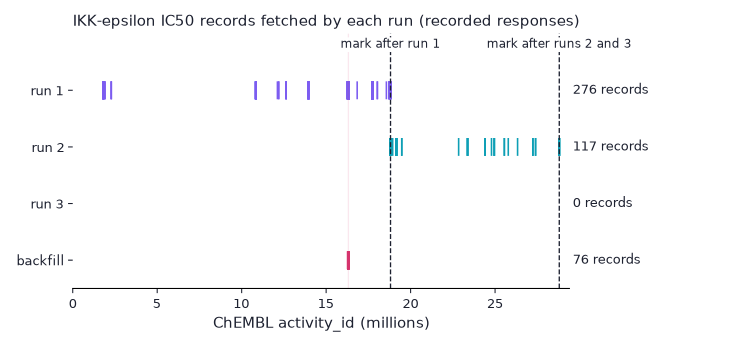
A high-water mark sees only what is added above it. It does not see a record that was corrected
in place (ChEMBL flags doubtful values in a data_validity_comment field, and a new release can
change existing records) or deleted. For those you
need either a source that publishes changes (some APIs offer an "updated since" filter or a change
log), a periodic full comparison, or a backfill.
7. Backfills
A backfill re-fetches a range of old records on purpose: after a release corrects old data, after you fix a bug in your loader, or when you add a field to the model and need it for records already stored. Because the load is idempotent, a backfill is the same upsert over a range given explicitly, and it leaves the high-water mark alone, so the next incremental run carries on as before.
To make the effect visible, we pretend an earlier version of our loader lost the pChEMBL values
of some records, then backfill that range. BETWEEN ? AND ? in SQL means "from the first value to
the second, both included", and backfill(con, *BACKFILL) unpacks the pair BACKFILL into the
function's two arguments, first_id and last_id:
BACKFILL = (16279324, 16354699)  # the range of activity ids to fetch again


def backfill(con: duckdb.DuckDBPyConnection, first_id: int, last_id: int) -> int:
    """Re-fetch and upsert every activity with an id in [first_id, last_id]; the mark is unchanged.

    Args:
        con: The DuckDB connection.
        first_id: The first activity id of the range.
        last_id: The last activity id of the range.

    Returns:
        How many records were fetched.
    """
    params = {**QUERY, "activity_id__gte": str(first_id), "activity_id__lte": str(last_id)}
    n_records = 0
    for page in pages(params):
        activities = validate_page(page)
        upsert(con, activities)
        n_records += len(activities)
    return n_records


con.execute("UPDATE activities SET pchembl_value = NULL WHERE activity_id BETWEEN ? AND ?",
            list(BACKFILL))  # the pretend bug
missing = "SELECT COUNT(*) FROM activities WHERE pchembl_value IS NULL"
print("records missing pChEMBL before the backfill:", con.execute(missing).fetchone()[0])
mark = high_water_mark(con)
log.info("records re-fetched: %d", backfill(con, *BACKFILL))
print("records missing pChEMBL after:", con.execute(missing).fetchone()[0])
print("high-water mark unchanged:", high_water_mark(con) == mark)
print("rows:", con.execute("SELECT COUNT(*) FROM activities").fetchone()[0])
records missing pChEMBL before the backfill: 76
INFO records re-fetched: 76
records missing pChEMBL after: 0
high-water mark unchanged: True
rows: 393
A backfill over the whole history is just the widest range. For large ranges, run it in chunks with checkpoints, exactly as in Module 10, and at a quiet time: it is a heavy load on the source.
8. PubChem: properties for a list of compounds
PubChem's PUG REST interface (PUG is PubChem's name for its interface for programs; REST means it
is used through plain URLs, as ChEMBL's is) returns a table of properties for a comma-separated
list of CIDs (PubChem's compound ids; aspirin is 2244) in one request, such as
/rest/pug/compound/cid/2244,2519/property/MolecularFormula,MolecularWeight,SMILES,InChIKey/JSON.
Sending several CIDs per request means fewer requests, which is what the usage policy asks for;
very long lists should be split into chunks (CHUNK_SIZE is 5 here to show the chunking; real
pipelines use hundreds). Incremental here means asking only for CIDs not stored yet. Note that
PubChem sends the molecular weight as text, "180.16"; the model turns it into a number. PubChem
names its fields in capitals (MolecularWeight), so each field in the model gives that name as an
alias and uses a shorter Python name (mol_wt) itself. [*CIDS_FIRST, 54678486, ...] makes a new
list holding everything in CIDS_FIRST followed by the extra CIDs, and .df() turns a DuckDB
result into a pandas table for printing.
class Compound(BaseModel):
    """One row of a PubChem property table."""

    model_config = ConfigDict(extra="ignore", frozen=True)

    cid: int = Field(alias="CID", gt=0)
    title: str = Field(alias="Title")
    formula: str = Field(alias="MolecularFormula")
    mol_wt: float = Field(alias="MolecularWeight", gt=0)  # sent as text, e.g. "180.16"
    smiles: str = Field(alias="SMILES")
    inchikey: str = Field(alias="InChIKey", pattern=r"^[A-Z]{14}-[A-Z]{10}-[A-Z]$")


con.execute("""
    CREATE TABLE compounds (cid BIGINT PRIMARY KEY, title VARCHAR, formula VARCHAR,
        mol_wt DOUBLE, smiles VARCHAR, inchikey VARCHAR, source VARCHAR);
    CREATE TABLE compound_rejects (cid BIGINT PRIMARY KEY, reason VARCHAR);
""")


def load_compounds(con: duckdb.DuckDBPyConnection, cids: list[int]) -> str:
    """Fetch properties for the CIDs not stored yet, in chunks; bad records go to rejects.

    Args:
        con: The DuckDB connection.
        cids: The PubChem compound ids wanted.

    Returns:
        A one-line report.
    """
    stored = {row[0] for row in con.execute("SELECT cid FROM compounds").fetchall()}
    new = [cid for cid in cids if cid not in stored]
    n_requests = n_rejected = 0
    for i in range(0, len(new), CHUNK_SIZE):
        chunk = new[i : i + CHUNK_SIZE]
        table = fetch_json(PUBCHEM_PROPERTIES.format(cids=",".join(map(str, chunk))))
        n_requests += 1
        for record in table["PropertyTable"]["Properties"]:  # a KeyError here: the API changed
            try:
                c = Compound.model_validate(record)
            except ValidationError as err:
                reason = f"{err.error_count()} problems, e.g. {err.errors()[0]['loc'][0]} missing"
                log.warning("rejected CID %s: %s", record.get("CID"), reason)
                con.execute("INSERT OR REPLACE INTO compound_rejects VALUES (?, ?)",
                            [record.get("CID"), reason])
                n_rejected += 1
                continue
            con.execute("INSERT OR REPLACE INTO compounds VALUES (?, ?, ?, ?, ?, ?, ?)",
                        [c.cid, c.title, c.formula, c.mol_wt, c.smiles, c.inchikey,
                         SOURCE_PUBCHEM])
    total = con.execute("SELECT COUNT(*) FROM compounds").fetchone()[0]
    return (f"CIDs asked for: {len(cids)}, not yet stored: {len(new)}; requests: {n_requests}, "
            f"rejected: {n_rejected}; stored: {total}")


CIDS_FIRST = [2244, 2519, 3672, 1983, 156391, 3033, 4091, 60823, 4594, 33613]
CIDS_SECOND = [*CIDS_FIRST, 54678486, 5090, 2662, 999999999]
log.info("run 1: %s", load_compounds(con, CIDS_FIRST))
log.info("run 2: %s", load_compounds(con, CIDS_SECOND))
print(con.execute("SELECT * FROM compound_rejects").df().to_string(index=False))
print(con.execute("SELECT cid, title, formula, mol_wt FROM compounds ORDER BY cid LIMIT 5")
      .df().to_string(index=False))
INFO run 1: CIDs asked for: 10, not yet stored: 10; requests: 2, rejected: 0; stored: 10
WARNING rejected CID 999999999: 5 problems, e.g. Title missing
INFO run 2: CIDs asked for: 14, not yet stored: 4; requests: 1, rejected: 1; stored: 13
      cid                         reason
999999999 5 problems, e.g. Title missing
 cid         title       formula  mol_wt
1983 Acetaminophen       C8H9NO2  151.16
2244       Aspirin        C9H8O4  180.16
2519      Caffeine     C8H10N4O2  194.19
2662     Celecoxib C17H14F3N3O2S  381.40
3033    Diclofenac  C14H11Cl2NO2  296.10
The second list had a mistyped CID, 999999999. PubChem did not answer with an error: it returned a
record holding only the CID and no properties. Without a model, that would have become a row of
empty values; with it, the record went to compound_rejects with a reason, and the rest of the run
carried on. Here a reject is the right answer rather than stopping: the response is the shape we
expect, and the fault is in one input, not in the API.
9. Keeping the source with the data, and writing Parquet
Every stored row says where it came from and under which licence, so the attribution travels with
the data into every export. Analysts and the next pipeline usually read Parquet files (the compact file format for tables
from Module 3) rather than the database; DuckDB writes them directly,
with COPY table TO 'file' (FORMAT parquet), and can read them back as if they were tables. At the end, Counter (from collections, imported in
the Setup block) counts the requests made to each service: it counts and sorts in one step.
for table in ("activities", "compounds"):
    path = WORK / f"{table}.parquet"
    con.execute(f"COPY {table} TO '{path.as_posix()}' (FORMAT parquet)")
    check = con.execute(f"SELECT COUNT(*), ANY_VALUE(source) FROM '{path.as_posix()}'").fetchone()
    log.info("wrote %s: %d rows, source: %s", path.name, check[0], check[1])
con.close()
log.info("requests made in this lesson: %d, all replayed: %s", len(requests_made), not LIVE)
per_service = Counter(urlsplit(url).netloc for url in requests_made)
for host, n in per_service.most_common():
    print(f"{host:26} {n}")
INFO wrote activities.parquet: 393 rows, source: ChEMBL (CC BY-SA 3.0)
INFO wrote compounds.parquet: 13 rows, source: PubChem (NCBI: no restrictions on use)
INFO requests made in this lesson: 15, all replayed: True
www.ebi.ac.uk              12
pubchem.ncbi.nlm.nih.gov   3
For a dataset you publish (a benchmark built from ChEMBL, say), ChEMBL's ShareAlike condition
applies: publish it under CC BY-SA 3.0 or a compatible licence, credit ChEMBL and cite the release
you used. Keep the release number (ChEMBL's status endpoint reports it) and the retrieval date in
your load state, so the data can be traced to their source years later.
At scale, the same design holds. For all of ChEMBL's activities (millions of records), the bulk downloads (SQL dumps per release: the whole database as one file you load into your own) are the better first load, and the web services serve the incremental top-ups between releases. dlt, which Series 2 uses, provides incremental cursors, pagination helpers and merge (upsert) loading as configuration; this module is what it does underneath.
Try it yourself
The homework is a few questions, answered by running code like the code above: in a new cell at
the end of the notebook, or in a script. It is at the end of the lesson's page, and in
homework.md in the module's folder. The answers are published after the cohort's deadline.
Further reading
- Zdrazil, B. et al. (2024). The ChEMBL Database in 2023: a drug discovery platform spanning multiple bioactivity data types and time periods. Nucleic Acids Research, 52(D1), D1180–D1192. https://doi.org/10.1093/nar/gkad1004
- Kim, S. et al. (2023). PubChem 2023 update. Nucleic Acids Research, 51(D1), D1373–D1380. https://doi.org/10.1093/nar/gkac956
- The ChEMBL documentation. ChEMBL Data Web Services. https://chembl.gitbook.io/chembl-interface-documentation/web-services/chembl-data-web-services
- PubChem. PUG-REST, the reference for PubChem's REST interface, with its usage policy. https://pubchem.ncbi.nlm.nih.gov/docs/pug-rest
- PubChem. Dynamic Request Throttling. https://pubchem.ncbi.nlm.nih.gov/docs/dynamic-request-throttling
- NCBI. Website and Data Usage Policies. https://www.ncbi.nlm.nih.gov/home/about/policies/
- Creative Commons. Attribution-ShareAlike 3.0 Unported (CC BY-SA 3.0). https://creativecommons.org/licenses/by-sa/3.0/
Homework
Answer each question by running code like the code in the lesson: add a new cell at the end of the
lesson's notebook (in Colab, + Code) and work there. Run the whole lesson first, so the functions
it defines (load_increment, fetch_json and so on) exist. The lesson closes its database
connection at the end of section 9, so open a new one where a question needs it, for example
con = duckdb.connect(str(DB_PATH)). If you are in a cohort, you will be told where to send your
answers; everyone can check theirs against the answers published after the cohort's deadline.
- (Builds on sections 3 and 6; needs the internet.) Set
LIVE = True, sofetch_jsonasks ChEMBL itself instead of replaying the recorded answers (Colab has internet access, so this works there). Load the activities into a fresh DuckDB database, as section 6 does, but with the first run cut off at activity id 16,354,699 (until=16354699) instead of the lesson'sFIRST_RUN_CUTOFF, then runload_increment(con)twice more. How many records does each of the three runs fetch, and in how many pages? Run all three again on a new database: how many requests reach ChEMBL the second time (look atwork/http-cache/), and why? - (Builds on section 6.) Which molecule has the highest pChEMBL value for IKK-epsilon in your
database, how many IC50 values does it have, and from how many documents (different
document_chembl_idvalues)? Write the query in SQL against DuckDB, withcon.execute(...). - (Builds on sections 4 and 6.) Load the same pages a second time, into a new database, in a
different order: last page first. (Collect the pages with
list(pages(...)), then go through the list backwards withreversed(...), upserting each.) Show with a query that the table is identical to a load in the normal order. What property of the load makes this so, and what would break it? - (Builds on section 5.) Add a
standard_relationcheck to theActivitymodel: only=,<,>,<=and>=are allowed. (The relation says whether the reported value is exact or only a bound:>10000 nM means "less active than we could measure".) Show a record with"~"being rejected. Then explain why a pChEMBL value is only meaningful for records whose relation is=. - (Builds on section 2.) Using the
RateLimiterandPretendClockfrom the lesson, how long do 50 PubChem requests take at the policy's limit of five per second? Write a second limiter that also allows at most 400 requests per minute (keep both limits), and report how long 1,000 requests take with it. - To think about. (Builds on sections 6, 7 and 9; no code needed.) Your company wants a nightly table of every ChEMBL IC50 value for 200 kinases, kept up to date. Between ChEMBL releases nothing changes; at a release, records are added, some are corrected and a few are removed. Design the loading: what you use for the first load and for later ones, what your load-state table records (think about the release number and the retrieval date), how you notice corrections and removals, and how the licence and attribution reach the people who use the table.
How was this module?
Found this module useful? ★ Star the course on GitHub: it helps other chemists find it.