
Get set up
You can read this page without running anything. To run the code yourself, the easiest way needs nothing installed, only a web browser and a free Google account:
- Open this lesson in Google Colab. Colab is Google's free service for running Python notebooks in the browser; sign in with your Google account if asked.
- Run the cells in order, from the top: click the ▶ button at the left of a cell, or click inside it and press Shift+Enter. The first cell installs what the lesson needs and takes a minute or two.
- If Colab warns "This notebook was not authored by Google", click Run anyway: the notebook comes from this course's own repository.
- Under each cell you should see what the box labelled Output under the same code on the lesson's page shows (the notebook opens with our outputs already in place; running a cell replaces them with yours). Boxes labelled Example output show timings or memory, so your numbers will differ a little.
New to notebooks, or want to run the lessons on your own computer instead (with Jupyter, Anaconda or a terminal)? Start here shows every step.
If you already work in a terminal, the short version, with uv and Git installed:
git clone https://github.com/David-Alobo/monstrous-learn.git
cd monstrous-learn/data-engineering/series-1
uv sync
uv run python 13-versioning-everything/code.py
or, in any Python 3.11+ environment: python -m pip install pandas duckdb dvc.
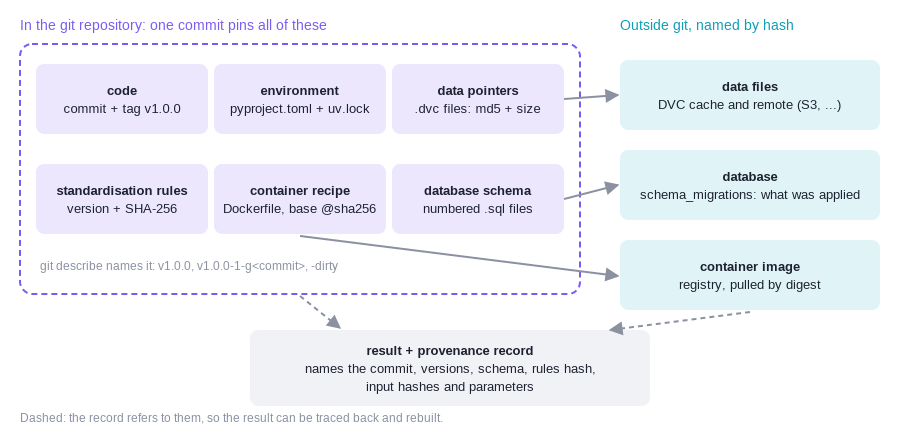
A report says the median pIC50 of a series against EGFR is 7.2. A year later a reviewer asks how that number was made, or a colleague gets 7.0 from what they believe is the same data. To answer, you need five things exactly as they were on the day: the code that computed it, the environment it ran in (Python, RDKit, pandas and their versions), the database schema it read from, the rules that standardised the molecules, and the data itself. If any one of them has changed since and nobody recorded which version was used, the number cannot be checked, and an argument about whether 7.2 or 7.0 is right has nothing to stand on.
Data engineers solve this by versioning all five (keeping every version, each with a name, so any one can be brought back) and writing, next to every result, a small record of which versions made it. This module does each in turn, by hand first, then with the tool industry uses for it.
Much of it rests on one idea, the hash. A hash function such as SHA-256 reads any amount of
data (a file, a text, a whole folder) and gives back a short fixed-length code, its fingerprint:
SHA-256 gives 64 characters from 0-9 and a-f (hexadecimal, counting in sixteens). Change
one byte of the data and the hash is completely different, so two things with the same hash have,
for any practical purpose, the same contents. A hash is therefore a name for exact contents.
By the end of this module you will be able to:
- save versions of your code with Git, give the important ones a name, and read back which version produced a result;
- fix the exact package versions a project uses (a lock file, with uv), record the versions that were really installed when a result was made, and see how a Docker image fixes the rest;
- change a database's tables with numbered files (migrations) that are applied once each, in order;
- give standardisation rules a version number and a hash, so that a change nobody recorded is caught;
- record the hash of every data file in a list (a manifest), and, in an optional part, keep versions of large data files with DVC;
- write a record of everything that made a result (its provenance) next to the result, and check it later.
From earlier modules we use standardisation rules (Module 7), idempotent steps, which give the same result however many times they run (Module 10), and database tables in DuckDB and Docker, from Module 4. Module 12 gave its data contract a version number in the same way as we version code here.
The lesson uses these tools:
- Git, the program that keeps the history of a folder of files; the Start here page shows how to install it on your own computer, and Colab already has it;
- uv, the tool that installs Python packages at exact versions (the course's own tests use it);
- Docker, which runs programs in a packaged form that works the same on every computer (only described here, not run);
- DVC (Data Version Control), which keeps versions of large data files; the lesson's first cell installs it;
- pandas for tables, DuckDB for the database of section 3, and chemlib, the course's package that makes a teaching library of molecules.
The code runs in a browser notebook (Google Colab) or on any laptop. Where the lesson shows a command to type in a terminal, it says where, and whether it works in Colab.
Setup
Everything this lesson needs is imported and set here, so the settings can be changed in one
place. Pipeline steps report with log; print is kept for showing you results;
Module 1 explains why.
Besides pandas, DuckDB and chemlib, the block imports tools that come with Python itself:
hashlib, for hashes; subprocess, which runs another program (here Git and DVC) from Python and
collects what it prints; os, shutil and stat, for deleting folders and files; platform,
sys and metadata, which tell us the Python and package versions; re, for regular expressions
(patterns that match pieces of text); datetime, for the time a result was made; json, for
writing dictionaries to text files; Path, for file names; and Callable, used in a type hint
(the notes after a colon or -> that say what kind of value a function takes or returns).
import hashlib
import json
import logging
import os
import platform
import re
import shutil
import stat
import subprocess
import sys
from collections.abc import Callable
from datetime import datetime, timezone
from importlib import metadata
from pathlib import Path

import duckdb
import pandas as pd

import chemlib

# log lines: level and message only, so the lesson's outputs are the same on every run
# (a real job would add "%(asctime)s" to the format)
logging.basicConfig(level=logging.INFO, format="%(levelname)s %(message)s", force=True)
log = logging.getLogger(__name__)

# where the lesson writes its files (git-ignored); change it to write somewhere else
WORK = Path("work")
REPO = WORK / "pipeline-code"  # the small git repository of section 1
MIGRATIONS = WORK / "migrations"  # the numbered SQL files of section 3
DB_PATH = WORK / "chem.duckdb"  # the database they are applied to
DATA = WORK / "data"  # the data files of section 5
DVC_PROJECT = WORK / "dvc-project"  # the git + DVC repository of section 5
DVC_STORE = WORK / "dvc-store"  # the folder that stands in for a DVC remote
RESULTS = WORK / "results"  # results and their provenance records (section 6)
# the name and e-mail git writes on the lesson's commits, whatever your own git settings are
GIT_NAME = "Course"
GIT_EMAIL = "[email protected]"
# the packages whose versions every provenance record names
PACKAGES = ["pandas", "numpy", "duckdb", "dvc"]
# the data: how many compounds, the seed that makes them, and how many have a price file row
LIBRARY_SIZE = 5_000
LIBRARY_SEED = 21
N_PRICES = 1_000
# files are hashed this many bytes at a time (1 MiB), so a large file is never all in memory
HASH_CHUNK_BYTES = 1 << 20
# the run parameter of section 6: the smallest stock, in mg, for a compound to count
MIN_STOCK_MG = 100

WORK.mkdir(exist_ok=True)
1. Code: commits and tags
Git keeps the history of a folder of files. A folder that Git looks after is a repository
(often shortened to repo); the course's own files are one, on GitHub. Saving a version takes two
steps: git add picks the files to include, and git commit saves them, with a short message
saying what changed. Each saved version is a commit, named by a hash of its contents and
history, so a commit can never be changed without getting a new name. A tag is a readable
name for one commit, such as v1.0.0, used for versions that matter: a release, the code behind
a paper.
Normally you type Git commands in a terminal, inside the repository's folder: git commit -m
"Convert activities to nM", for example. So that the lesson runs the same way on every computer,
in Colab too, we run Git from Python instead, in a small repository under work/. Our helper
git(REPO, "commit", "-m", "Convert activities to nM") does exactly what typing git commit -m
"Convert activities to nM" in the folder REPO would do, and returns what Git prints. In its
first line, *args collects all the words after repo into one tuple, however many there are;
[..., *args] then puts them back into the command, and subprocess.run runs it. The helper
also gives Git a name and e-mail for the commits, so it does not depend on how Git is set up on
your machine.
The first helper, remove_tree, only deletes a folder left over from an earlier run (with a
workaround for files that Git makes read-only on Windows); you can read past it. In the rest of
the code, git init makes an empty repository (its main line of history is called main), and
--quiet stops Git from printing progress messages:
def remove_tree(path: Path) -> None:
    """Delete a folder if it exists, including the read-only files git leaves on Windows."""

    def make_writable_and_retry(func: Callable[[str], object], failed_path: str,
                                _error: object) -> None:
        """Make a file that could not be deleted writable, and delete it again."""
        os.chmod(failed_path, stat.S_IWRITE)
        func(failed_path)

    if path.exists():
        if sys.version_info >= (3, 12):
            shutil.rmtree(path, onexc=make_writable_and_retry)
        else:
            shutil.rmtree(path, onerror=make_writable_and_retry)


def git(repo: Path, *args: str) -> str:
    """Run a git command in repo and return what it prints."""
    identity = ["-c", f"user.name={GIT_NAME}", "-c", f"user.email={GIT_EMAIL}"]
    result = subprocess.run(
        ["git", *identity, "-c", "core.autocrlf=false", *args],  # keep files byte for byte
        cwd=repo, capture_output=True, text=True, check=True,
    )
    return result.stdout.strip()


remove_tree(REPO)
REPO.mkdir()
git(REPO, "init", "--quiet", "--initial-branch=main")
version_1 = 'def to_nm(value, units):\n    return value * {"nM": 1, "uM": 1_000}[units]\n'
(REPO / "convert.py").write_text(version_1, encoding="utf-8", newline="\n")
git(REPO, "add", "convert.py")
git(REPO, "commit", "--quiet", "-m", "Convert activities to nM")
git(REPO, "tag", "v1.0.0")
print("version:", git(REPO, "describe", "--tags", "--always", "--dirty"))
version: v1.0.0
git describe names the code a result was made with. It gives the tag when the code is exactly
the tagged commit; when the code has been changed and not committed, it adds -dirty:
version_2 = version_1.replace('"uM": 1_000', '"µM": 1_000, "mM": 1_000_000')
(REPO / "convert.py").write_text(version_2, encoding="utf-8", newline="\n")
print("after an edit:", git(REPO, "describe", "--tags", "--always", "--dirty"))
after an edit: v1.0.0-dirty
A result made by "dirty" code cannot be rebuilt: the code that made it exists only until the next
edit. A careful pipeline refuses to write results from dirty code, or at least says so loudly in
every result it writes. Commit the change, and the name says how far the code is from the tag.
(commit -am adds every file Git already knows and commits it in one step; rev-parse HEAD prints
the full name of the latest commit, which Git calls HEAD; and re.sub replaces the part of the
name that differs on every computer with <commit>, so the output below is the same for
everyone.)
git(REPO, "commit", "--quiet", "-am", "Accept µM and mM")
described = git(REPO, "describe", "--tags", "--always", "--dirty")
commit = git(REPO, "rev-parse", "HEAD")
print("after a commit:", re.sub(r"g[0-9a-f]+$", "g<commit>", described))
print("a commit's full name is", len(commit), "hexadecimal characters")
print("v1.0.0 is still there:", git(REPO, "show", "v1.0.0:convert.py") + "\n" == version_1)
after a commit: v1.0.0-1-g<commit>
a commit's full name is 40 hexadecimal characters
v1.0.0 is still there: True
v1.0.0-1-g<commit> reads "one commit after v1.0.0, at commit …" (the hash differs on every
computer, because it includes the time of the commit). git show v1.0.0:convert.py brings back
the code exactly as it was at the tag: if a result says it was made with v1.0.0, that is the
code to read.
2. Environments: lock files, recorded versions and images
The same code gives different answers in different environments. A new RDKit release can change a canonical SMILES, an aromaticity model or a descriptor; a new pandas can give the same column a different type (pandas 3 reads text columns as a new string type). So the environment is versioned too, in three layers.
Lock files
A Python project usually has a file called pyproject.toml that says what the project needs,
usually as ranges (rdkit>=2024.9, "RDKit 2024.9 or newer"). A lock file says exactly what was
installed: every package, including the ones nobody asked for directly (the packages that RDKit
itself needs, for example), at one version, with the hash of every file that may be downloaded.
This course's own environment is locked in uv.lock, in the Series 1 folder; here is part of its
entry for RDKit. It is written in TOML, a plain-text settings format: [[package]] starts one
package's entry, and each wheel is a ready-built package file for one operating system and
Python version, downloaded from PyPI, the public index of Python packages:
[[package]]
name = "rdkit"
version = "2026.9.2"
source = { registry = "https://pypi.org/simple" }
dependencies = [
    { name = "numpy", ... },
    { name = "pillow" },
]
wheels = [
    { url = ".../rdkit-2026.9.2-cp311-cp311-win_amd64.whl", hash = "sha256:020a72efc524e872..." },
    ... one line per operating system and Python version
]
uv lock writes the lock file from pyproject.toml; uv sync --locked installs exactly what it
says, and fails if the lock file no longer matches the project, instead of quietly installing
something newer. The lock file is committed with the code, so a commit pins the environment too.
With pip (Python's standard installer, which Colab uses), the nearest equivalent is a
requirements file (a list of packages, one per line) with every version pinned and
--require-hashes.
These two commands are typed in a terminal on your own computer, in the folder that holds
pyproject.toml (for the course, monstrous-learn/data-engineering/series-1, as on the Start
here page). They are not needed in Colab, which installs packages with pip. Everything after a
# is a comment, not part of the command:
uv lock            # resolve pyproject.toml into uv.lock
uv sync --locked   # install exactly uv.lock, or fail if it is out of date
uv lock prints a line such as Resolved 147 packages in 2ms. uv sync --locked installs what
is missing and says how many packages it checked or installed; if pyproject.toml has changed
since the lock file was written, it stops with an error saying that the lock file needs to be
updated, and installs nothing.
Recording versions at run time
A lock file says what should be installed. What was installed when a result was made is
another question (someone ran pip install --upgrade in the environment last week), so a
pipeline records it while it runs, with importlib.metadata from the standard library
(imported in the Setup block). metadata.version("pandas") gives the installed version of pandas,
and metadata.distributions() lists every installed package. In the dictionary that
environment returns, **{...} adds the entries of a second dictionary, one per package:
def environment(packages: list[str]) -> dict[str, str]:
    """The Python version and the installed version of each package, as they are right now."""
    return {"python": platform.python_version(), **{p: metadata.version(p) for p in packages}}


print(json.dumps(environment(PACKAGES), indent=2))
everything = sorted(f"{d.metadata['Name']}=={d.version}" for d in metadata.distributions())
installed = WORK / "installed.txt"
installed.write_text("\n".join(everything) + "\n", encoding="utf-8")
log.info("wrote %d installed packages to %s", len(everything), installed.as_posix())
{
  "python": "3.11.17",
  "pandas": "3.1.1",
  "numpy": "2.4.6",
  "duckdb": "2.0.0",
  "dvc": "3.67.1"
}
INFO wrote 140 installed packages to work/installed.txt
Your versions will differ from these, which is the point: without the record nobody can tell.
Container images: tags and digests
This part has no code to run: it describes Docker, which needs your own computer, and nothing in Colab uses it.
The lock file pins Python packages (fixes them at one version), but not Python itself, nor the
operating system libraries under it. A container image pins all of it. An image is Docker's
packaged form of a program: a small operating system (usually a Linux such as Debian), Python and
the packages, frozen together; a container is a running copy of an image. Module 4 runs its
database this way. A Dockerfile is the recipe for an image, one step per line: FROM names the
image to start from, RUN runs a command while building, WORKDIR picks the folder to work in,
COPY copies the project's files in, and CMD is the command the container runs when it starts:
FROM python:3.12-slim@sha256:<the digest of the exact image>
RUN pip install --no-cache-dir uv==0.13.4
WORKDIR /app
COPY pyproject.toml uv.lock ./
RUN uv sync --locked --no-dev
COPY src/ ./src/
CMD ["uv", "run", "python", "-m", "src.pipeline"]
The first line is the one that matters here. python:3.12-slim is a tag: a name that the
image's publisher moves to a new image whenever Python 3.12 gets a patch release or Debian a
security fix. Building the same Dockerfile next month can give a different image. The digest
after @sha256: is a hash of the image's contents, like a commit hash: it can only ever mean one
image.
Two Docker commands use digests. They are typed in a terminal on a computer with Docker installed
(the database guide linked from Module 4 shows how), in any folder; they do not work in Colab.
docker images --digests prints a table of the images you have, one per line, with columns
REPOSITORY, TAG, DIGEST (the sha256:... code), IMAGE ID, CREATED and SIZE.
docker pull python@sha256:… (with the full digest in place of …) downloads exactly that image
again, and prints its digest when it finishes.
Pin by digest for anything a result depends on, and update the digest on purpose, in a commit, like any other version. (The databases this course runs in Docker are pinned to exact release tags; a digest would pin them further.)
3. Database schemas: numbered migrations
A database's schema (its tables, columns and constraints) changes as a project grows: a column for pChEMBL is added, an index is built, a table is split. If those changes are made by hand, typed one at a time into the database, nobody knows which version of the schema a database has, and a new copy of the database cannot be made the same way.
Migrations fix this. Each change is a numbered SQL file (SQL is the language databases are given instructions in, as in Module 4), committed with the code, applied in order, and recorded in a table in the database itself. Applying them is then idempotent: running it again applies only what is new. Tools such as Alembic, Flyway and Liquibase do this for large projects; the idea fits in one function.
The SQL in our three files reads almost as English. CREATE TABLE makes a table with the columns
listed (TEXT for text, DOUBLE for numbers with decimals); PRIMARY KEY marks the column that
names each row, so no two rows can share it; NOT NULL means the column may not be empty;
REFERENCES compounds (compound_id) says that every value must exist in the compounds table (a
foreign key); CHECK (value_nm > 0) is a rule the database enforces; and ALTER TABLE ... ADD
COLUMN adds a column to a table that already exists.
migrate keeps its record in a table called schema_migrations: one row per migration applied,
with its number, its file name and the hash of its text. It applies each new file inside a
transaction: the database either makes all of the changes between BEGIN TRANSACTION and
COMMIT, or, if anything fails, ROLLBACK undoes them all, so a migration is never left half
done. The with duckdb.connect(...) as db: block at the end opens the database file and closes it
again when the block ends, even if something in it fails:
def sha256_text(text: str) -> str:
    """The SHA-256 hash of a text, as 64 hexadecimal characters."""
    return hashlib.sha256(text.encode("utf-8")).hexdigest()


remove_tree(MIGRATIONS)
MIGRATIONS.mkdir()
FIRST_MIGRATIONS = {
    "0001_create_compounds.sql": (
        "CREATE TABLE compounds (\n"
        "    compound_id TEXT PRIMARY KEY,\n"
        "    smiles TEXT NOT NULL,\n"
        "    inchikey TEXT NOT NULL\n"
        ");\n"
    ),
    "0002_create_measurements.sql": (
        "CREATE TABLE measurements (\n"
        "    measurement_id TEXT PRIMARY KEY,\n"
        "    compound_id TEXT NOT NULL REFERENCES compounds (compound_id),\n"
        "    target_id TEXT NOT NULL,\n"
        "    value_nm DOUBLE NOT NULL CHECK (value_nm > 0)\n"
        ");\n"
    ),
    "0003_add_pchembl.sql": "ALTER TABLE measurements ADD COLUMN pchembl DOUBLE;\n",
}
for name, sql in FIRST_MIGRATIONS.items():
    (MIGRATIONS / name).write_text(sql, encoding="utf-8", newline="\n")


def migrate(db: duckdb.DuckDBPyConnection, folder: Path) -> list[str]:
    """Apply, in order, every migration in folder that the database has not had yet.

    Each one runs in a transaction with its record in schema_migrations, so it is applied
    completely or not at all. A migration that was changed after it was applied is refused.
    """
    db.execute(
        "CREATE TABLE IF NOT EXISTS schema_migrations "
        "(version INTEGER PRIMARY KEY, name TEXT NOT NULL, sha256 TEXT NOT NULL)"
    )
    applied = dict(db.execute("SELECT version, sha256 FROM schema_migrations").fetchall())
    done = []
    for path in sorted(folder.glob("*.sql")):
        version = int(path.name.split("_")[0])
        sql = path.read_text(encoding="utf-8")
        if version in applied:
            if applied[version] != sha256_text(sql):
                raise RuntimeError(f"{path.name} was changed after it was applied")
            continue
        db.execute("BEGIN TRANSACTION")
        try:
            db.execute(sql)
            db.execute("INSERT INTO schema_migrations VALUES (?, ?, ?)",
                       [version, path.name, sha256_text(sql)])
            db.execute("COMMIT")
        except Exception:
            db.execute("ROLLBACK")
            raise
        log.info("applied %s", path.name)
        done.append(path.name)
    return done


def schema_version(db: duckdb.DuckDBPyConnection) -> int:
    """The number of the last migration the database has had."""
    return db.execute("SELECT max(version) FROM schema_migrations").fetchone()[0]


DB_PATH.unlink(missing_ok=True)
with duckdb.connect(str(DB_PATH)) as db:
    migrate(db, MIGRATIONS)
    print("second run applied:", migrate(db, MIGRATIONS))
    print("schema version:", schema_version(db))
INFO applied 0001_create_compounds.sql
INFO applied 0002_create_measurements.sql
INFO applied 0003_add_pchembl.sql
second run applied: []
schema version: 3
The second run changes nothing, so the same command is safe to run every time the pipeline
starts. A new change is a new file with the next number; it is the only one applied. This one
builds an index, a sorted list the database keeps so that it can find a compound's rows
without reading the whole table (like the index of a book). Afterwards we ask the database for the
columns of measurements, from information_schema.columns, a table every SQL database keeps
about its own tables:
(MIGRATIONS / "0004_index_measurements_by_compound.sql").write_text(
    "CREATE INDEX measurements_by_compound ON measurements (compound_id);\n",
    encoding="utf-8", newline="\n",
)
with duckdb.connect(str(DB_PATH)) as db:
    migrate(db, MIGRATIONS)
    columns = db.execute(
        "SELECT column_name FROM information_schema.columns "
        "WHERE table_name = 'measurements' ORDER BY ordinal_position"
    ).fetchall()
print("measurements:", [c[0] for c in columns])
INFO applied 0004_index_measurements_by_compound.sql
measurements: ['measurement_id', 'compound_id', 'target_id', 'value_nm', 'pchembl']
An applied migration is never edited: other copies of the database (a colleague's, or the one
the team's real pipeline uses) have already run the old text, and editing it would leave them
different with no record of how. The hash in schema_migrations catches it. Here we edit the
first file (the InChIKey may now be empty), try to migrate, and then put the file back as it was:
first = MIGRATIONS / "0001_create_compounds.sql"
first.write_text(FIRST_MIGRATIONS["0001_create_compounds.sql"].replace(
    "inchikey TEXT NOT NULL", "inchikey TEXT"), encoding="utf-8", newline="\n")
with duckdb.connect(str(DB_PATH)) as db:
    try:
        migrate(db, MIGRATIONS)
    except RuntimeError as error:
        log.error("refused: %s", error)
first.write_text(FIRST_MIGRATIONS["0001_create_compounds.sql"], encoding="utf-8", newline="\n")
ERROR refused: 0001_create_compounds.sql was changed after it was applied
To change a column that already exists, write a new migration that changes it.
4. Standardisation rules: a version and a hash
Module 7 wrote standardisation as a function driven by rules: which fragments to strip, whether to neutralise, which tautomer to choose. Change a rule and the same input gives different molecules, so the rules are versioned like code. A version string is for people; a hash of the rules is for machines, and catches the change someone made without raising the version.
The hash must not depend on how the rules happen to be written down, so it is taken over a
canonical form (one fixed way of writing them): JSON, the plain-text format for dictionaries and
lists, with the keys in alphabetical order and no spaces. To show that the order does not matter,
the code also writes the same rules in reverse order (reversed) and compares the hashes. [:16]
prints only the first 16 characters of a hash, which is enough to tell hashes apart by eye.
RULES = {
    "version": "2.1.0",
    "keep_largest_fragment": True,
    "neutralise": True,
    "canonical_tautomer": False,
    "allowed_elements": ["C", "N", "O", "S", "F", "Cl", "Br", "H"],
}


def rules_hash(rules: dict) -> str:
    """The SHA-256 of the rules in a canonical form: sorted keys, no spaces."""
    return sha256_text(json.dumps(rules, sort_keys=True, separators=(",", ":")))


print("rules", RULES["version"], "hash", rules_hash(RULES)[:16])
reordered = dict(reversed(list(RULES.items())))
print("same rules written in another order, same hash:", rules_hash(reordered) == rules_hash(RULES))
rules 2.1.0 hash ee10b28747d2965b
same rules written in another order, same hash: True
A pipeline keeps a register of the versions it has released and their hashes, and checks the
rules against it before it runs. The last two lines try two kinds of change: one rule changed
with the version left alone, and the same change under a new version that was never released
({**RULES, "canonical_tautomer": True} is a copy of RULES with that one entry changed):
RELEASED_RULES = {"2.1.0": rules_hash(RULES)}


def check_rules(rules: dict) -> str:
    """'ok' if these rules are the released ones for their version, otherwise why not."""
    known = RELEASED_RULES.get(rules["version"])
    if known is None:
        return f"version {rules['version']} was never released"
    if known != rules_hash(rules):
        return f"rules changed but the version is still {rules['version']}"
    return "ok"


print(check_rules(RULES))
print(check_rules({**RULES, "canonical_tautomer": True}))
print(check_rules({**RULES, "version": "2.2.0", "canonical_tautomer": True}))
ok
rules changed but the version is still 2.1.0
version 2.2.0 was never released
5. Data: content hashes and a manifest
The same idea names data. A file's SHA-256 hash changes if any byte of the file changes, and two files with the same hash have, for any practical purpose, the same contents. So "the data" in a report becomes a list of files and their hashes: a manifest.
We write two data files from chemlib. Large files are hashed in chunks, so the whole file is
never in memory at once. In file_sha256, path.open("rb") opens the file to read its raw bytes,
inside a with block that closes it at the end. The line while block := handle.read(chunk):
reads the next chunk, calls it block, and carries on as long as there was something to read
(:= gives a name to a value in the middle of a line). In the printing loop, :14 pads the file
name to 14 characters, and :>8, puts a number on the right of 8 characters with commas between
the thousands:
remove_tree(DATA)
DATA.mkdir()
library = chemlib.library(LIBRARY_SIZE, seed=LIBRARY_SEED)
library.to_csv(DATA / "compounds.csv", index=False, lineterminator="\n")
library[["id", "price_usd"]].head(N_PRICES).to_csv(DATA / "prices.csv", index=False,
                                                    lineterminator="\n")


def file_sha256(path: Path, chunk: int = HASH_CHUNK_BYTES) -> str:
    """The SHA-256 of a file, read one chunk at a time."""
    digest = hashlib.sha256()
    with path.open("rb") as handle:
        while block := handle.read(chunk):
            digest.update(block)
    return digest.hexdigest()


def build_manifest(folder: Path) -> list[dict]:
    """Every file under folder with its path, size in bytes and SHA-256, in path order."""
    return [
        {"path": p.relative_to(folder).as_posix(), "bytes": p.stat().st_size,
         "sha256": file_sha256(p)}
        for p in sorted(folder.rglob("*")) if p.is_file()
    ]


manifest = build_manifest(DATA)
(WORK / "manifest.json").write_text(json.dumps(manifest, indent=2), encoding="utf-8")
for entry in manifest:
    print(f"{entry['path']:14} {entry['bytes']:>8,} bytes  sha256 {entry['sha256'][:16]}...")
compounds.csv   402,818 bytes  sha256 6201fe7ddc7ec6b1...
prices.csv       18,772 bytes  sha256 f5dbfd2d533fab04...
The end of each line in a text file is marked by an invisible character: \n on macOS and Linux,
and two characters, \r\n, on Windows. The files are written with \n line endings on every
system, so the bytes, and therefore the hashes, are the same on Windows, macOS and Linux; the
hashes you get should match these. (Write
a CSV with the system's own line endings and Windows gives different bytes and a different hash
for the same table.)
Checking data against its manifest finds any file that changed, went missing or appeared. Here
one price is corrected, the kind of edit nobody remembers making. (In the last lines,
next(... for e in manifest if ...) finds the first manifest entry for prices.csv.)
def check_manifest(folder: Path, manifest: list[dict]) -> list[str]:
    """What differs between the files under folder and the manifest (empty if nothing)."""
    expected = {e["path"]: e["sha256"] for e in manifest}
    found = {e["path"]: e["sha256"] for e in build_manifest(folder)}
    problems = [f"missing: {p}" for p in expected if p not in found]
    problems += [f"new: {p}" for p in found if p not in expected]
    problems += [f"changed: {p}" for p in expected if p in found and found[p] != expected[p]]
    return problems


print("before:", check_manifest(DATA, manifest))
prices = pd.read_csv(DATA / "prices.csv")
prices.loc[0, "price_usd"] = prices.loc[0, "price_usd"] + 0.01
prices.to_csv(DATA / "prices.csv", index=False, lineterminator="\n")
print("after: ", check_manifest(DATA, manifest))
new_hash = file_sha256(DATA / "prices.csv")
old_hash = next(e["sha256"] for e in manifest if e["path"] == "prices.csv")
print("old hash", old_hash[:16], "new hash", new_hash[:16])
before: []
after:  ['changed: prices.csv']
old hash f5dbfd2d533fab04 new hash 59487a5df85bd55c
One cent in one row out of a thousand gives a completely different hash, which is what makes hashes useful as names: there is no "nearly the same" hash to be fooled by. The manifest is small and is committed with the code, so a commit says exactly which data the code expected.
Large data: DVC
This part is optional: it shows the tool teams use to version large data. If it is too much at first, skip to section 6: nothing later in the course depends on it.
A manifest says what the data should be, but Git cannot hold the data itself once it runs to
gigabytes, and plain hashes do not say where to fetch a file with a given hash. DVC (Data
Version Control) does both: it keeps the data in a cache (a hidden folder of copies, inside the
project) and a shared store, outside Git, and commits to Git only a small .dvc file holding the
data's hash and size. Git then versions this pointer, and DVC fetches the data the pointer names.
DVC is a command-line tool: normally you type its commands in a terminal, inside the project's
folder, after installing it with pip install dvc (or uv add dvc). It works the same on
Windows, macOS and Linux. Here we call it from Python, with a helper like git: dvc(DVC_PROJECT,
"add", "data/compounds.csv") does what typing dvc add data/compounds.csv in that folder would
do. We start a fresh Git repository, turn on DVC in it (dvc init), copy in the compounds file and
dvc add it. DVC then tells Git to ignore the data file itself, through a file called
.gitignore (a list of files Git should not track):
def dvc(repo: Path, *args: str) -> str:
"""Run a DVC command in repo and return what it prints."""
result = subprocess.run(
[sys.executable, "-m", "dvc", *args],
cwd=repo, capture_output=True, text=True, check=True,
env={**os.environ, "DVC_NO_ANALYTICS": "1"},
)
return result.stdout.strip()
remove_tree(DVC_PROJECT)
remove_tree(DVC_STORE)
(DVC_PROJECT / "data").mkdir(parents=True)
git(DVC_PROJECT, "init", "--quiet", "--initial-branch=main")
dvc(DVC_PROJECT, "init", "--quiet")
shutil.copy(DATA / "compounds.csv", DVC_PROJECT / "data" / "compounds.csv")
dvc(DVC_PROJECT,
"add", "data/compounds.csv")
pointer = (DVC_PROJECT / "data" / "compounds.csv.dvc").read_text(encoding="utf-8")
ignored = (DVC_PROJECT / "data" / ".gitignore").read_text(encoding="utf-8").strip()
print(pointer)
print("git ignores the data itself:", ignored)
print("the md5 is the file's own:",
hashlib.md5((DATA / "compounds.csv").read_bytes()).hexdigest() in pointer)
git(DVC_PROJECT, "add", ".")
git(DVC_PROJECT, "commit", "--quiet", "-m", "Track compounds.csv with DVC")
outs:
- md5: 0a2710734954cb22e937671f0a9dad4d
  size: 402818
  hash: md5
  path: compounds.csv

git ignores the data itself: /compounds.csv
the md5 is the file's own: True
The .dvc file is all Git sees: an MD5 hash (an older, shorter hash than SHA-256, DVC's choice)
and a size. For the same bytes it is the same on every computer. Now the data is pushed (copied)
to a remote, the shared store that the team (or the paper's readers) fetch from. Here the
remote is a folder, so the lesson needs no account anywhere. To show that the data can come back,
we then delete the file and DVC's cache, and dvc pull fetches it from the remote:
dvc(DVC_PROJECT, "remote", "add", "--default", "store", str(DVC_STORE.resolve()))
dvc(DVC_PROJECT, "push")
(DVC_PROJECT / "data" / "compounds.csv").unlink()
remove_tree(DVC_PROJECT / ".dvc" / "cache")
dvc(DVC_PROJECT, "pull")
restored = file_sha256(DVC_PROJECT / "data" / "compounds.csv")
print("restored from the remote, same bytes:", restored == file_sha256(DATA / "compounds.csv"))
restored from the remote, same bytes: True
In a real project the remote is cloud storage (Amazon S3, Google Cloud Storage, Azure), a server
reached over SSH (a secure way of connecting to another computer), or a shared drive, set once with
dvc remote add and committed in .dvc/config. For publishing, the usual route is to archive the
exact files of a release, with their manifest, in a public data archive such as Zenodo, which
gives them a DOI (a permanent identifier, like a paper's) that the paper cites.
When the data changes, dvc add again gives a new hash, and the commit records it. Every earlier
version can come back: check out the old .dvc file with Git, and dvc checkout puts the
matching data in place. In the code, HEAD~1 means "the commit before the latest one", and
git checkout HEAD~1 -- data/compounds.csv.dvc brings back that one file as it was there; the
last two lines return to the latest version:
changed = pd.read_csv(DVC_PROJECT / "data" / "compounds.csv").head(4_000)  # 1,000 withdrawn
changed.to_csv(DVC_PROJECT / "data" / "compounds.csv", index=False, lineterminator="\n")
dvc(DVC_PROJECT, "add", "data/compounds.csv")
git(DVC_PROJECT, "commit", "--quiet", "-am", "Withdraw 1,000 compounds")


def tracked_md5(project: Path) -> str:
    """The md5 that the .dvc pointer of compounds.csv names."""
    text = (project / "data" / "compounds.csv.dvc").read_text(encoding="utf-8")
    return re.search(r"md5: ([0-9a-f]+)", text).group(1)


def rows(project: Path) -> int:
    """How many compounds the data file in the project holds."""
    return len(pd.read_csv(project / "data" / "compounds.csv"))


print("now: ", tracked_md5(DVC_PROJECT), rows(DVC_PROJECT), "rows")
git(DVC_PROJECT, "checkout", "--quiet", "HEAD~1", "--", "data/compounds.csv.dvc")
dvc(DVC_PROJECT, "checkout")
print("back:", tracked_md5(DVC_PROJECT), rows(DVC_PROJECT), "rows")
git(DVC_PROJECT, "checkout", "--quiet", "HEAD", "--", "data/compounds.csv.dvc")
dvc(DVC_PROJECT, "checkout")
now:  c118af6987c871d874c832a0068486ab 4000 rows
back: 0a2710734954cb22e937671f0a9dad4d 5000 rows
6. Results: a provenance record next to every output
Everything so far gives each ingredient a version. The last step ties them to the result. Provenance means where something came from, as for a painting or a sample in a lab notebook. Every output is written together with a small provenance record that names the code version, the environment, the schema version, the rules and their hash, the hash of every input file, and the parameters of the run. With it, a result can be traced to exactly what made it, and checked.
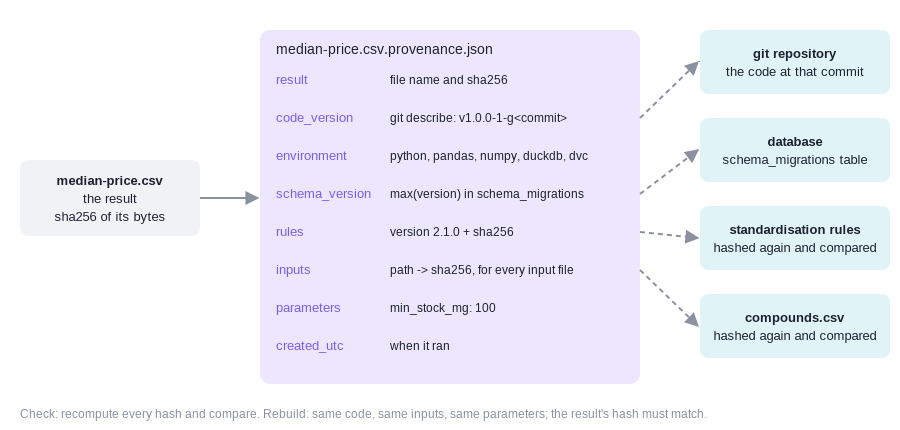
The result here is a small one: the median price per vendor of the compounds with at least a
given amount in stock. The function that writes it writes the record beside it, with the same
name and .provenance.json on the end. It gathers every piece from the earlier sections: the code
version from Git (section 1), the package versions (section 2), the schema version (section 3),
the rules and their hash (section 4) and the hash of each input file (section 5). The time is
recorded in UTC (Coordinated Universal Time, the same as GMT), so that records made in different
countries can be compared. In the last lines, **params passes the entries of the dictionary
params to the function as named values, so min_stock_mg=100:
def median_price_by_vendor(compounds: Path, min_stock_mg: int) -> pd.DataFrame:
    """The median price and the number of compounds per vendor, for compounds in stock."""
    table = pd.read_csv(compounds)
    in_stock = table[table["stock_mg"] >= min_stock_mg]
    summary = in_stock.groupby("vendor")["price_usd"].agg(["median", "count"])
    return summary.reset_index()


def write_with_provenance(result: pd.DataFrame, path: Path, inputs: list[Path],
                          parameters: dict) -> dict:
    """Write a result as CSV and, next to it, a record of everything that made it."""
    result.to_csv(path, index=False, lineterminator="\n")
    with duckdb.connect(str(DB_PATH), read_only=True) as db:
        version = schema_version(db)
    record = {
        "result": {"file": path.name, "sha256": file_sha256(path)},
        "code_version": git(REPO, "describe", "--tags", "--always", "--dirty"),
        "environment": environment(PACKAGES),
        "schema_version": version,
        "rules": {"version": RULES["version"], "sha256": rules_hash(RULES)},
        "inputs": {p.as_posix(): file_sha256(p) for p in inputs},
        "parameters": parameters,
        "created_utc": datetime.now(timezone.utc).isoformat(timespec="seconds"),
    }
    record_path = path.with_name(path.name + ".provenance.json")
    record_path.write_text(json.dumps(record, indent=2), encoding="utf-8")
    log.info("wrote %s and %s", path.name, record_path.name)
    return record


remove_tree(RESULTS)
RESULTS.mkdir()
params = {"min_stock_mg": MIN_STOCK_MG}
summary = median_price_by_vendor(DATA / "compounds.csv", **params)
record = write_with_provenance(summary, RESULTS / "median-price.csv", [DATA / "compounds.csv"],
                               params)
print(summary.to_string(index=False))
INFO wrote median-price.csv and median-price.csv.provenance.json
  vendor  median  count
Vendor A 269.930   1351
Vendor B 264.250   1373
Vendor C 247.425   1370
The record is plain JSON, readable by people and by code. Its environment, code version and time are those of your run, so yours will differ from this one:
print(json.dumps(record, indent=2))
{
  "result": {
    "file": "median-price.csv",
    "sha256": "d078fc3080aeffd7f35220c8d32b0a251cdfe40385646db73d89b50a3dd76e7c"
  },
  "code_version": "v1.0.0-1-g8690c5f",
  "environment": {
    "python": "3.11.17",
    "pandas": "3.1.1",
    "numpy": "2.4.6",
    "duckdb": "2.0.0",
    "dvc": "3.67.1"
  },
  "schema_version": 4,
  "rules": {
    "version": "2.1.0",
    "sha256": "ee10b28747d2965b882d3241b52e67b7fbfc3ae51d5d72e778320b3135064fa2"
  },
  "inputs": {
    "work/data/compounds.csv": "6201fe7ddc7ec6b125d068e53521102f30e1849c8245dd7727e5279c9cd253f2"
  },
  "parameters": {
    "min_stock_mg": 100
  },
  "created_utc": "2026-11-21T11:25:19+00:00"
}
The parts that come from the data, the rules and the parameters are the same on every computer:
print("schema_version:", record["schema_version"])
print("rules:", record["rules"]["version"], record["rules"]["sha256"][:16] + "...")
for name, digest in record["inputs"].items():
    print("input:", name, digest[:16] + "...")
print("parameters:", record["parameters"])
print("result:", record["result"]["file"], record["result"]["sha256"][:16] + "...")
schema_version: 4
rules: 2.1.0 ee10b28747d2965b...
input: work/data/compounds.csv 6201fe7ddc7ec6b1...
parameters: {'min_stock_mg': 100}
result: median-price.csv d078fc3080aeffd7...
Checking a result means reading its record, hashing the inputs and the rules as they are now, and comparing. Rebuilding it means running the same code on the same inputs with the same parameters, and comparing the result's hash:
def check_provenance(record_path: Path) -> list[str]:
    """What has changed since the result was made (empty if nothing)."""
    record = json.loads(record_path.read_text(encoding="utf-8"))
    problems = []
    for name, digest in record["inputs"].items():
        if not Path(name).exists():
            problems.append(f"input missing: {name}")
        elif file_sha256(Path(name)) != digest:
            problems.append(f"input changed: {name}")
    if rules_hash(RULES) != record["rules"]["sha256"]:
        problems.append("standardisation rules changed")
    if record["code_version"].endswith("-dirty"):
        problems.append("made with uncommitted code")
    return problems


record_path = RESULTS / "median-price.csv.provenance.json"
print("check:", check_provenance(record_path))
rebuilt = median_price_by_vendor(DATA / "compounds.csv", **record["parameters"])
rebuilt.to_csv(WORK / "rebuilt.csv", index=False, lineterminator="\n")
print("rebuilt, same bytes:", file_sha256(WORK / "rebuilt.csv") == record["result"]["sha256"])
check: []
rebuilt, same bytes: True
And when an input changes after the fact, the check says which:
stock = pd.read_csv(DATA / "compounds.csv")
stock.loc[stock.index[:50], "stock_mg"] = 0  # 50 compounds sold out
stock.to_csv(DATA / "compounds.csv", index=False, lineterminator="\n")
print("check:", check_provenance(record_path))
check: ['input changed: work/data/compounds.csv']
The median price in median-price.csv is still right for the data it was made from, and the
record says which data that was; it is simply not the answer for today's data. Without the record
the two would look the same.
In practice the pipeline writes the record for every output, never a person by hand. Workflow
tools (programs that run the steps of a pipeline for you) keep similar records: DVC's own
pipelines, for one, write a dvc.lock file with the hash of every stage's inputs and outputs. A
run history (Module 14) can keep these records for every run, and
the capstone (Module 15) versions its output in the same way.
Try it yourself
The homework is a few questions, answered by running code like the code above: in a new cell at
the end of the notebook, or in a script. It is at the end of the lesson's page, and in
homework.md in the module's folder. The answers are published after the cohort's deadline.
Further reading
- Chacon, S. & Straub, B. Pro Git, 2nd edition. Apress. The free online book, in particular the chapters on tagging and on Git internals. https://git-scm.com/book/en/v2
- The uv documentation. Structure and files, the section on the lockfile. https://docs.astral.sh/uv/concepts/projects/layout/#the-lockfile
- The Docker documentation. docker image pull, including pulling an image by digest. https://docs.docker.com/reference/cli/docker/image/pull/
- The DVC documentation. Get Started with DVC: data versioning. https://dvc.org/doc/start/data-management/data-versioning
- Sandve, G. K., Nekrutenko, A., Taylor, J. & Hovig, E. (2013). Ten Simple Rules for Reproducible Computational Research. PLoS Computational Biology, 9(10), e1003285. https://doi.org/10.1371/journal.pcbi.1003285
- Wilkinson, M. D. et al. (2016). The FAIR Guiding Principles for scientific data management and stewardship. Scientific Data, 3(1), 160018. https://doi.org/10.1038/sdata.2016.18
Homework
Answer each question by running code like the code in the lesson: add a new cell at the end of the
lesson's notebook (in Colab, + Code) and work there. Run the whole lesson first, so that its
helpers (git, migrate, rules_hash, write_with_provenance and the others) exist. If you are
in a cohort, you will be told where to send your answers; everyone can check theirs against the
answers published after the cohort's deadline.
- (Builds on section 1.) Make a new repository in a new folder under
work/(for examplework/homework-repo, made with.mkdir()andgit(folder, "init", "--quiet", "--initial-branch=main"), as the lesson does). Commit a filefilters.py(any short Python code will do) and tag itv0.1.0; then make two more commits that change it, and tag the secondv0.2.0. What doesgit describe --tagsprint after each step, and what does it print if you then editfilters.pywithout committing (add--dirty, as the lesson does)? Usegit showto printfilters.pyas it was atv0.1.0. - (Builds on section 3.) Write a migration
0005_add_activity_type.sqlthat adds anactivity_typecolumn (text) tomeasurements, put it in theMIGRATIONSfolder, and apply it with the lesson'smigrate(). What does theschema_migrationstable hold afterwards (read it withdb.execute("SELECT * FROM schema_migrations").fetchall())? Now write a migration0006_...with a mistake in its SQL (a misspelt word, for example): what happens to the database and toschema_migrationswhen it fails, and why? (Hint: the transaction.) - (Builds on section 5.) Make a library with
chemlib.library(3_000, seed=41)and write it as CSV twice: once withlineterminator="\n"and once withlineterminator="\r\n"(the two ways of ending a line, explained in section 5). Are the two SHA-256 hashes fromfile_sha256equal? Read both back withpd.read_csv: are the tables equal (.equals)? What does this mean for a manifest? - (Builds on section 4.) Add a rule to a copy of the lesson's
RULES(for example"max_heavy_atoms": 50) without changing the version. What doescheck_rules()say? Then release it properly as version2.2.0, by giving the copy that version and adding its hash toRELEASED_RULES, and show that both versions now pass. - (Builds on section 6.) Use the lesson's
write_with_provenance()to write a second result: the number of compounds per vendor in each stock band. A stock band is a range of stock, for example 0 to 99 mg, 100 to 999 mg and 1,000 mg or more (pd.cutsorts numbers into ranges). Choose your own bands and pass them as parameters, so they are in the record. Then change one parameter and rebuild: which fields of the record change, and which stay the same? - To think about (no code): a colleague's paper reports a model trained on "ChEMBL 34 kinase data, standardised". List everything you would need to rebuild their training set exactly, which of those a provenance record like the lesson's would capture, and which it would not. What would you add to the record so that someone could rebuild your numbers in five years' time?
How was this module?
Found this module useful? ★ Star the course on GitHub: it helps other chemists find it.