
Get set up
You can read this page without running anything. To run the code yourself, the easiest way needs nothing installed, only a web browser and a free Google account:
- Open this lesson in Google Colab. Colab is Google's free service for running Python notebooks in the browser; sign in with your Google account if asked.
- Run the cells in order, from the top: click the ▶ button at the left of a cell, or click inside it and press Shift+Enter. The first cell installs what the lesson needs and takes a minute or two.
- If Colab warns "This notebook was not authored by Google", click Run anyway: the notebook comes from this course's own repository.
- Under each cell you should see what the box labelled Output under the same code on the lesson's page shows (the notebook opens with our outputs already in place; running a cell replaces them with yours). Boxes labelled Example output show timings or memory, so your numbers will differ a little.
New to notebooks, or want to run the lessons on your own computer instead (with Jupyter, Anaconda or a terminal)? Start here shows every step.
If you already work in a terminal, the short version, with uv and Git installed:
git clone https://github.com/David-Alobo/monstrous-learn.git
cd monstrous-learn/data-engineering/series-2
uv sync
uv run python 05-tests-and-contracts/code.py
or, in any Python 3.11+ environment: python -m pip install dlt[duckdb] dbt-core dbt-duckdb duckdb pandas numpy rdkit pandera pandera-chem.
The warehouse of Module 4 builds without an error. That says the SQL ran; it says nothing about the data. A resent file with new IDs, a compound measured twice on the same well, a unit nobody has seen, a structure that is not a molecule: each of these builds without complaint and reaches the dashboards, where a chemist finds it, or does not.
Series 1, Module 12 checked data in Python, with Pandera,
before loading it. A warehouse needs the same idea at every layer, because each layer is built from
the one before and can go wrong in its own way. In dbt a check is a test: a query that returns
the rows that break a rule. No rows means the test passes. Tests are declared next to the models
they check, and dbt build runs each model's tests as soon as the model is built, before anything
is built from it. That order is the point of this module: when a test fails, dbt skips
everything downstream, so the marts keep their last good data instead of taking in bad data.
By the end of this module you will be able to:
- add dbt's four built-in tests (
unique,not_null,accepted_values,relationships) to models and columns; - write your own tests: a reusable generic test for the grain, and singular tests for rules that belong to one model, with a severity;
- put an enforced contract on a model, so that its columns and types cannot change by accident;
- check the compound dimension's chemistry with pandera-chem, and quarantine what fails;
- read what a failing build did, and why the marts were left as they were.
Setup
The raw layer comes from Module 2's pipeline, for the first six weeks, as before.
labstack.dbt_project copies the dbt project as Module 4 finished it (it is saved in the series'
stages/ folder), and labstack.dbt runs a dbt command on it and logs one line per model, seed or
test, as the dbt function of Module 4 did. Two more packages check the chemistry: Pandera
(pa) and pandera-chem (pc), the plugin from Series 1.
import logging
import shutil
from pathlib import Path

import duckdb
import pandas as pd
import pandera.pandas as pa
import pandera_chem as pc

import labdata
import labstack

logging.basicConfig(level=logging.INFO, format="%(levelname)s %(message)s", force=True)
log = logging.getLogger(__name__)

# where the lesson writes its files (git-ignored); change it to write somewhere else
WORK = Path("work")
WAREHOUSE = WORK / "lab.duckdb"
PROJECT = WORK / "lab_dbt"
WEEKS = 6  # the lab is at the end of week 6; weeks 7 and 8 arrive in section 6

shutil.rmtree(WORK, ignore_errors=True)  # start clean
lab = labdata.Lab()
pipeline = labstack.load_raw(lab, WEEKS, WORK / "inbox", WAREHOUSE, WORK / "dlt")
labstack.dbt_project(PROJECT, after=4)


def write(name: str, text: str) -> None:
    """Save one file of the dbt project (made, with its folders, if it is new)."""
    path = PROJECT / name
    path.parent.mkdir(parents=True, exist_ok=True)
    path.write_text(text.lstrip("\n"), encoding="utf-8", newline="\n")


def dbt(*args: str):
    """Run a dbt command on the lab's project and log what it did (labstack.dbt)."""
    return labstack.dbt(PROJECT, *args, log=log)


def query(sql: str) -> pd.DataFrame:
    """Run one SQL query on the warehouse and return the answer as a table."""
    with duckdb.connect(str(WAREHOUSE)) as db:
        return db.sql(sql).df()
First, the warehouse as Module 4 left it:
built = dbt("build")
INFO model dim_date: success
INFO model stg_compounds: success
INFO seed targets: success
INFO seed unit_to_nm: success
INFO model dim_compound: success
INFO model dim_target: success
INFO model stg_results: success
INFO model fact_measurement: success
INFO model measurements_wide: success
Nine models and seeds, and no tests yet.
1. dbt's four built-in tests
dbt comes with four tests that cover most of what goes wrong with keys and values:
unique: no value appears twice in the column;not_null: no value is empty;accepted_values: every value is one of a list;relationships: every value exists in a column of another model (a foreign key, checked).
Tests are declared under data_tests: in the same YAML files that hold the descriptions. A test
that needs settings (the list of values, the other model) takes them under arguments:. Here are
tests for the staging models, in a new file:
write("models/staging/_staging.yml", """
models:
  - name: stg_compounds
    description: The current registry, one row per compound.
    columns:
      - name: compound_id
        data_tests: [unique, not_null]
  - name: stg_results
    description: One row per result, every value in nanomolar.
    columns:
      - name: result_id
        data_tests: [unique, not_null]
      - name: compound_id
        data_tests:
          - not_null
          - relationships:
              arguments:
                to: ref('stg_compounds')
                field: compound_id
      - name: relation
        data_tests:
          - accepted_values:
              arguments:
                values: ['=', '>']
      - name: ic50_nm
        description: Empty if the unit is not in the unit_to_nm seed.
        data_tests: [not_null]
""")
Each line is a rule the lab has already met. relationships catches a result for a compound the
registry does not know (a typing error in an ID, or a registry export that is out of date).
accepted_values catches a relation nobody has defined, such as <. not_null on ic50_nm
catches a new unit spelling: Module 1 made the unit table a
decision on record, and this test is what makes a new spelling stop the build instead of slipping
through as an empty value.
The marts' YAML file already exists, and dbt allows each model to be described in one file only, so we write it again, with its descriptions as before and tests added: keys that must be unique and present, the fact table's keys checked against the dimensions, and the target roles.
write("models/marts/_marts.yml", """
models:
  - name: dim_compound
    description: One row per compound in the current registry, with its chemical series and
      properties worked out once with RDKit.
    columns:
      - name: compound_key
        description: The warehouse's key for the compound (a surrogate key).
        data_tests: [unique, not_null]
      - name: compound_id
        description: The lab's ID for the compound (the natural key), e.g. LAB-0042.
        data_tests: [unique, not_null]
      - name: series
        description: The series whose core the parent contains; empty if none or several, for a
          person to check.
      - name: clogp
        description: Crippen's estimate of the octanol-water partition coefficient (RDKit).
  - name: dim_target
    columns:
      - name: target_key
        data_tests: [unique, not_null]
      - name: role
        data_tests:
          - accepted_values:
              arguments:
                values: [primary, panel]
  - name: dim_date
    columns:
      - name: date_key
        data_tests: [unique, not_null]
  - name: fact_measurement
    description: One row per measurement of one compound on one target, in one well of one plate.
    columns:
      - name: compound_key
        data_tests:
          - relationships:
              arguments:
                to: ref('dim_compound')
                field: compound_key
      - name: target_key
        data_tests:
          - relationships:
              arguments:
                to: ref('dim_target')
                field: target_key
      - name: run_date
        data_tests:
          - relationships:
              arguments:
                to: ref('dim_date')
                field: date_key
      - name: relation
        description: "'=' for a measured value; '>' when the compound was weaker than the highest
          concentration tested, so ic50_nm is only a bound."
      - name: pic50
        description: 9 - log10(ic50_nm). Average potencies as pIC50, over measured values only.
  - name: measurements_wide
    description: The star joined once, for dashboards. Built from the star; never edit it.
""")
results = dbt("test")
print(sum(r.status == "pass" for r in results), "of", len(results), "tests passed")
INFO test accepted_values_dim_target_role__primary__panel: pass
INFO test accepted_values_stg_results_relation______: pass
INFO test not_null_dim_compound_compound_id: pass
INFO test not_null_dim_compound_compound_key: pass
INFO test not_null_dim_date_date_key: pass
INFO test not_null_dim_target_target_key: pass
INFO test not_null_stg_compounds_compound_id: pass
INFO test not_null_stg_results_compound_id: pass
INFO test not_null_stg_results_ic50_nm: pass
INFO test not_null_stg_results_result_id: pass
INFO test relationships_fact_measurement_compound_key__compound_key__ref_dim_compound_: pass
INFO test relationships_fact_measurement_run_date__date_key__ref_dim_date_: pass
INFO test relationships_fact_measurement_target_key__target_key__ref_dim_target_: pass
INFO test relationships_stg_results_compound_id__compound_id__ref_stg_compounds_: pass
INFO test unique_dim_compound_compound_id: pass
INFO test unique_dim_compound_compound_key: pass
INFO test unique_dim_date_date_key: pass
INFO test unique_dim_target_target_key: pass
INFO test unique_stg_compounds_compound_id: pass
INFO test unique_stg_results_result_id: pass
20 of 20 tests passed
dbt test runs the tests alone, on the tables as they are. dbt names each test after its rule, its
model and its column, so a failure says where to look. In Module
3 the database itself enforced the star's keys; dbt-built tables
carry no constraints of their own, so these tests now do that job (and they work the same on
warehouses that do not enforce keys at all).
2. Your own tests
Two of the lab's rules are not on dbt's list. The first is the grain of Module 3: one row per
compound, target, plate and replicate. unique checks one column; the grain is four. dbt lets you
write your own generic test, a test that any model can use, as a macro between {% test %} and
{% endtest %}. Its arguments are the model and any settings; its query returns the rows that
break the rule. This one returns each combination of the columns that appears more than once:
write("macros/unique_combination.sql", """
{% test unique_combination(model, columns) %}
-- every combination of the columns appears once: the rows returned are the ones that repeat
select {{ columns | join(', ') }}, count(*) as copies
from {{ model }}
group by {{ columns | join(', ') }}
having count(*) > 1
{% endtest %}
""")
text = (PROJECT / "models" / "staging" / "_staging.yml").read_text(encoding="utf-8")
write("models/staging/_staging.yml", text.replace(
    """  - name: stg_results
    description: One row per result, every value in nanomolar.
""",
    """  - name: stg_results
    description: One row per result, every value in nanomolar.
    data_tests:
      - unique_combination:  # the grain: one result per compound, target and well
          arguments:
            columns: [compound_id, target, plate, replicate]
""",
))
{{ columns | join(', ') }} is Jinja: the list of columns written out with commas between them.
The test sits under the model, not under a column, because it is about rows.
The second kind of rule belongs to one model only. dbt calls such a test singular: a SQL file
in the project's tests/ folder that returns the rows breaking the rule. One checks that every
pIC50 is what its IC50 says it is (9 − log₁₀ of the value in nanomolar), a rule a change to the
staging model could break without anyone noticing:
write("tests/pic50_matches_ic50.sql", """
-- every pIC50 is 9 - log10 of its IC50 in nanomolar
select result_id, ic50_nm, pic50
from {{ ref('fact_measurement') }}
where abs(pic50 - (9 - log10(ic50_nm))) > 1e-9
""")
Not every rule should stop a build. A measured pIC50 above 10 (an IC50 below 0.1 nM) is possible,
but rare enough that a person should look. A test's severity decides: error (the default)
fails the build, warn reports and carries on. The config line at the top of a singular test sets
it:
write("tests/potency_in_plausible_range.sql", """
{{ config(severity='warn') }}
-- measured potencies outside 3 to 10 are possible but rare: a person should look
select result_id, compound_key, target_key, pic50
from {{ ref('fact_measurement') }}
where relation = '=' and (pic50 < 3 or pic50 > 10)
""")
results = dbt("test", "--select", "unique_combination_stg_results_compound_id__target__plate"
              "__replicate pic50_matches_ic50 potency_in_plausible_range")
INFO test pic50_matches_ic50: pass
INFO test potency_in_plausible_range: pass
INFO test unique_combination_stg_results_compound_id__target__plate__replicate: pass
--select takes several names at once, separated by spaces. All three pass on the first six weeks.
3. A contract
Tests check a table's content after it is built. A contract checks its shape before it is built: the names of its columns, their order and their types. With an enforced contract, dbt compares the model's query with the contract first, and refuses to build the table if they differ. That protects everything that reads the table (a dashboard, a model, another team's code) from a change nobody announced: the same job dlt's frozen schema contract did for the raw layer in Module 2, section 4.
A contract is declared in the model's YAML, with contract: {enforced: true} and a data_type for
every column. Constraints such as not_null can be added too, and dbt builds them into the table
where the database supports them. We add one to the fact table, in the marts' YAML:
CONTRACT = """
  - name: fact_measurement
    description: One row per measurement of one compound on one target, in one well of one plate.
    config:
      contract:
        enforced: true
    columns:
      - name: result_id
        data_type: varchar
        constraints: [{type: not_null}, {type: primary_key}]
      - name: compound_key
        data_type: bigint
        constraints: [{type: not_null}]
        data_tests:
          - relationships:
              arguments:
                to: ref('dim_compound')
                field: compound_key
      - name: target_key
        data_type: bigint
        constraints: [{type: not_null}]
        data_tests:
          - relationships:
              arguments:
                to: ref('dim_target')
                field: target_key
      - name: run_date
        data_type: date
        data_tests:
          - relationships:
              arguments:
                to: ref('dim_date')
                field: date_key
      - name: plate
        data_type: varchar
      - name: replicate
        data_type: integer
      - name: relation
        data_type: varchar
        description: "'=' for a measured value; '>' when the compound was weaker than the highest
          concentration tested, so ic50_nm is only a bound."
      - name: ic50_nm
        data_type: double
      - name: pic50
        data_type: double
        description: 9 - log10(ic50_nm). Average potencies as pIC50, over measured values only.
      - name: source_file
        data_type: varchar
"""
text = (PROJECT / "models" / "marts" / "_marts.yml").read_text(encoding="utf-8")
start = text.index("  - name: fact_measurement")
end = text.index("  - name: measurements_wide")
write("models/marts/_marts.yml", text[:start] + CONTRACT.lstrip("\n") + text[end:])
built = dbt("build", "--select", "fact_measurement")
INFO model fact_measurement: success
INFO test pic50_matches_ic50: pass
INFO test potency_in_plausible_range: pass
INFO test relationships_fact_measurement_compound_key__compound_key__ref_dim_compound_: pass
INFO test relationships_fact_measurement_run_date__date_key__ref_dim_date_: pass
INFO test relationships_fact_measurement_target_key__target_key__ref_dim_target_: pass
The fact table was rebuilt under its contract, and its tests ran after it. Now suppose someone
changes the model so that replicate becomes text. The build stops before the table is touched,
and dbt's message is a table of exactly what differs:
model = PROJECT / "models" / "marts" / "fact_measurement.sql"
good = model.read_text(encoding="utf-8")
model.write_text(good.replace("r.replicate,", "r.replicate::varchar as replicate,"),
                 encoding="utf-8", newline="\n")
try:
    dbt("build", "--select", "fact_measurement")
except RuntimeError as error:
    print("\n".join(line for line in str(error).splitlines() if line.strip().startswith("|")))
model.write_text(good, encoding="utf-8", newline="\n")  # put the model back
INFO model fact_measurement: error
INFO test pic50_matches_ic50: skipped
INFO test potency_in_plausible_range: skipped
INFO test relationships_fact_measurement_compound_key__compound_key__ref_dim_compound_: skipped
INFO test relationships_fact_measurement_run_date__date_key__ref_dim_date_: skipped
INFO test relationships_fact_measurement_target_key__target_key__ref_dim_target_: skipped
  | column_name | definition_type | contract_type | mismatch_reason    |
  | ----------- | --------------- | ------------- | ------------------ |
  | replicate   | VARCHAR         | INTEGER       | data type mismatch |
The old table, with the right types, is still there for everyone who reads it. Contracts suit the tables other people depend on, the marts; staging models change often and are read only by the project itself, so most teams leave them without.
4. Checking the chemistry
dbt's tests are SQL, and SQL cannot tell a valid structure from an invalid one. pandera-chem can.
Its checks go in a Pandera schema, as in Series 1, and pc.split sorts a table into the rows that
pass and the rows that do not (the quarantine), with a report that accounts for every row. The
schema for the compound dimension says what every compound in the warehouse must be: a valid
SMILES with no salt left in it (one fragment), made of the elements the lab's chemistry uses, of a
sensible size, never registered twice, and in a series. nullable=False is Pandera's own check
that a column has no empty values:
compound_rules = pa.DataFrameSchema({
    "parent_smiles": pa.Column(str, [
        pc.valid_smiles(),
        pc.single_fragment(),
        pc.allowed_elements({"H", "C", "N", "O", "F", "S", "Cl", "Br"}),
        pc.heavy_atoms(10, 60),
        pc.mol_weight(700),
        pc.unique_molecules(),
    ]),
    "series": pa.Column(str, nullable=False),
})
compounds = query("SELECT * FROM marts.dim_compound ORDER BY compound_key")
checked = pc.split(compounds, compound_rules)
print(checked.report)
print(checked.quarantined[["compound_id", "parent_smiles", "reasons"]].to_string(index=False))
240 rows in: 239 valid, 1 quarantined
       1  series: not_nullable
compound_id                   parent_smiles              reasons
   LAB-0042 O=C(Cc1ccc(O)cc1)Nc2ccc(C#N)nc2 series: not_nullable
One compound in quarantine, for the reason Module 3 found by hand: LAB-0042 is in no series. The
check now runs on every build, so it will be noticed every time instead of once. Where it runs
matters too. Here it runs after dbt build, in Python, which is how Module
7 will run it: as a step of the pipeline, after the build and before
anything is published. Everything else about the structures passed: they are valid, salt-free,
unique and of a sensible size.
5. Two more weeks
The lab moves on. Weeks 7 and 8 bring their files: a new registry, and the assay results of both
weeks. labstack.load_raw carries on the same dlt pipeline from week 7 (dlt remembers which files
it has loaded), and then the warehouse is built as usual:
labstack.load_raw(lab, range(7, 9), WORK / "inbox", WAREHOUSE, WORK / "dlt")
built = dbt("build")
INFO model dim_date: success
INFO model stg_compounds: success
INFO seed targets: success
INFO seed unit_to_nm: success
INFO test not_null_dim_date_date_key: pass
INFO test unique_dim_date_date_key: pass
INFO test not_null_stg_compounds_compound_id: pass
INFO test unique_stg_compounds_compound_id: pass
INFO model dim_target: success
INFO model stg_results: success
INFO model dim_compound: success
INFO test accepted_values_dim_target_role__primary__panel: pass
INFO test not_null_dim_target_target_key: pass
INFO test unique_dim_target_target_key: pass
INFO test accepted_values_stg_results_relation______: pass
INFO test not_null_stg_results_compound_id: pass
INFO test not_null_stg_results_ic50_nm: pass
INFO test not_null_stg_results_result_id: pass
INFO test relationships_stg_results_compound_id__compound_id__ref_stg_compounds_: pass
INFO test unique_combination_stg_results_compound_id__target__plate__replicate: fail
INFO test unique_stg_results_result_id: pass
INFO test not_null_dim_compound_compound_id: pass
INFO test not_null_dim_compound_compound_key: pass
INFO test unique_dim_compound_compound_id: pass
INFO test unique_dim_compound_compound_key: pass
INFO model fact_measurement: skipped
INFO test pic50_matches_ic50: skipped
INFO test potency_in_plausible_range: skipped
INFO test relationships_fact_measurement_compound_key__compound_key__ref_dim_compound_: skipped
INFO test relationships_fact_measurement_run_date__date_key__ref_dim_date_: skipped
INFO test relationships_fact_measurement_target_key__target_key__ref_dim_target_: skipped
INFO model measurements_wide: skipped
The grain test failed, and dbt did what it should: it built the staging layer, ran its tests, and when one failed it skipped the fact table, its tests and the wide view, all of which are built from the failing model. The marts were not rebuilt, so they still hold the measurements of weeks 1 to 6, correct but a week behind:
print(query("SELECT count(*) AS measurements, max(run_date) AS latest FROM marts.fact_measurement")
      .to_string(index=False))
 measurements     latest
          656 2026-10-14
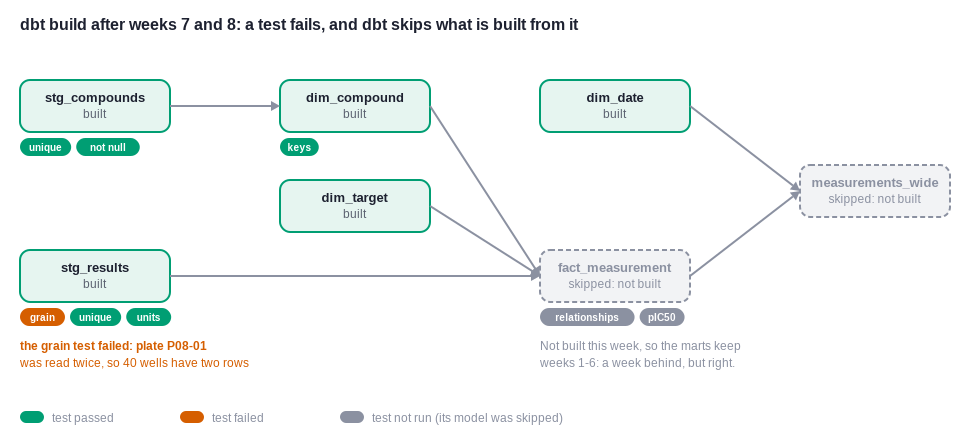
Stale data with a failing test beside it is a much better state than fresh data that is wrong: the chemists can be told the dashboards are paused, and nobody makes a decision on numbers that are counted twice. The test's query shows what broke it, and the raw table shows why:
print(query("""
    SELECT compound_id, target, plate, replicate, count(*) AS copies
    FROM staging.stg_results
    GROUP BY ALL HAVING count(*) > 1
    ORDER BY plate, compound_id, target, replicate
""").head(4).to_string(index=False))
print(query("""
    SELECT result_id, compound_id, target, replicate, value, status
    FROM raw.assay
    WHERE compound_id = 'LAB-0202' AND target = 'ABL1' AND plate = 'P08-01'
    ORDER BY replicate, result_id
""").to_string(index=False))
compound_id target  plate  replicate  copies
   LAB-0202   ABL1 P08-01          1       2
   LAB-0202   ABL1 P08-01          2       2
   LAB-0202   BRAF P08-01          1       2
   LAB-0202   BRAF P08-01          2       2
result_id compound_id target replicate value     status
  R-00809    LAB-0202   ABL1         1  25.1 superseded
R-00809-c    LAB-0202   ABL1         1  12.6  corrected
  R-00810    LAB-0202   ABL1         2  30.0 superseded
R-00810-c    LAB-0202   ABL1         2  15.0  corrected
Plate P08-01 was read twice in week 8. Its first reading is marked superseded in a new status
column, and the corrected reading follows with new result IDs (ending in -c) and new values. So
every well of that plate now has two results: the grain test counted 40 repeats. The staging model
was written before the lab had a status column, so it passes both readings on. dlt followed the
new column into the raw layer (Module 2, section 4) without complaint; it took a test on the grain
to notice that it changed what a row means.
The chemistry check, run again, gives the other news of weeks 7 and 8:
compounds = query("SELECT * FROM marts.dim_compound ORDER BY compound_key")
checked = pc.split(compounds, compound_rules)
print(checked.report)
print(compounds.loc[compounds["compound_id"] == "LAB-0042", ["compound_id", "parent_smiles",
                                                                "series"]].to_string(index=False))
320 rows in: 320 valid, 0 quarantined
compound_id                   parent_smiles series
   LAB-0042 O=C(Nc1ccc(O)cc1)Nc2ccc(C#N)nc2  ureas
dim_compound was rebuilt (it does not depend on the results), and the quarantine is empty:
LAB-0042 was registered again in week 7 with the right structure, and it is a urea after all. The
registry export is a snapshot, so the old, wrong structure is gone from the warehouse without a
trace, along with any way to say which structure a dashboard showed last week.
Both stories end in the same question: when the lab corrects something, what should the warehouse keep? The superseded plate readings should leave the potencies but stay on record; the old structure of LAB-0042 should leave the dimension but stay in its history. That is Module 6: snapshots that keep every version, and models that use only the current one.
Try it yourself
The homework is a few questions, answered by running code like the code above: in a new cell at
the end of the notebook, or in a script. It is at the end of the lesson's page, and in
homework.md in the module's folder. The answers are published after the cohort's deadline.
Further reading
- The dbt documentation. Add data tests to your DAG: generic and singular tests, severity and storing failures. https://docs.getdbt.com/docs/build/data-tests
- The dbt documentation. Model contracts: enforced columns and types, constraints, and which warehouses enforce which. https://docs.getdbt.com/docs/mesh/govern/model-contracts
- The pandera-chem documentation. Every check,
split()and the report card. https://github.com/David-Alobo/pandera-chem/blob/main/docs/usage.md - Bantilan, N. (2020). pandera: Statistical Data Validation of Pandas Dataframes. Proceedings of the 19th Python in Science Conference, 116–124. https://doi.org/10.25080/Majora-342d178e-010
- Reis, J. & Housley, M. (2022). Fundamentals of Data Engineering. O'Reilly Media. Chapter 2, on the undercurrents of data engineering, among them data quality and DataOps.
Homework
Answer each question by running code like the code in the lesson: add a new cell at the end of the
lesson's notebook (in Colab, + Code) and work there. Run the whole lesson first, so that its
warehouse (now holding weeks 1 to 8 in the raw layer), its dbt project and the write, dbt and
query functions exist. If you are in a cohort, you will be told where to send your answers;
everyone can check theirs against the answers published after the cohort's deadline.
- (Builds on section 1.) Add an
accepted_valuestest onstg_results.targetwith the five kinases of the project, and arelationshipstest fromstg_results.targetto thetargetsseed. Which of the two would you keep, and why? (Think about what happens when the lab adds a sixth kinase.) - (Builds on section 2.) dbt can save the rows a test found, so that they can be examined after
the build: add
config: {store_failures: true}under the grain test, rundbt("test"), and find the table it wrote (look ininformation_schema.tablesfor a schema whose name ends indbt_test__audit). How many rows does it hold, and which plates appear in it? - (Builds on section 2.) Write a singular test that fails if any compound was measured on a panel kinase without ever being measured on EGFR (the lab's rule: the panel comes after EGFR). Does it pass on weeks 1 to 8? Choose its severity, and give your reason in a comment in the test.
- (Builds on section 3.) Try to put an enforced contract on
dim_compound, which is a Python model. Does dbt accept it, and does the build check it? Then put one ondim_target, and break it by renaming a column in the model's SQL. What does the message show? - (Builds on section 4.) Add a rule to
compound_rulesthat no compound may contain a reactive group, usingpc.no_substructureswith at least the acyl halide and aldehyde patterns of pandera-chem's documentation. Run it on weeks 1 to 8. Then save the report card as a web page,Path("work/compounds.html").write_text(pc.report_html(checked), encoding="utf-8"), and open it in a browser (in Colab, download it from the Files panel first). - (Builds on section 5.) Without changing anything else, make the grain test a warning instead
of an error, and run
dbt("build")again. What does the build do now, and what doesmarts.fact_measurementhold? Explain in two or three sentences why that would be the wrong choice for this test, and name one test in the project for which a warning would be right. - To think about (no code; builds on sections 1, 3 and 5): tests, contracts, pandera-chem's checks, and dlt's schema contract of Module 2 each stop a different kind of problem at a different place. Make a table with one row per problem the lab has met so far (unit spellings, the resent file, the renamed column, LAB-0042's structure, the re-read plate) and say which of them would catch it first, and where in the pipeline.
How was this module?
Found this module useful? ★ Star the course on GitHub: it helps other chemists find it.