
Get set up
You can read this page without running anything. To run the code yourself, the easiest way needs nothing installed, only a web browser and a free Google account:
- Open this lesson in Google Colab. Colab is Google's free service for running Python notebooks in the browser; sign in with your Google account if asked.
- Run the cells in order, from the top: click the ▶ button at the left of a cell, or click inside it and press Shift+Enter. The first cell installs what the lesson needs and takes a minute or two.
- If Colab warns "This notebook was not authored by Google", click Run anyway: the notebook comes from this course's own repository.
- Under each cell you should see what the box labelled Output under the same code on the lesson's page shows (the notebook opens with our outputs already in place; running a cell replaces them with yours). Boxes labelled Example output show timings or memory, so your numbers will differ a little.
New to notebooks, or want to run the lessons on your own computer instead (with Jupyter, Anaconda or a terminal)? Start here shows every step.
If you already work in a terminal, the short version, with uv and Git installed:
git clone https://github.com/David-Alobo/monstrous-learn.git
cd monstrous-learn/data-engineering/series-2
uv sync
uv run python 07-orchestration/code.py
or, in any Python 3.11+ environment: python -m pip install dlt[duckdb] dbt-core dbt-duckdb duckdb pandas numpy rdkit pandera pandera-chem prefect.
By the end of Module 6 the warehouse could keep history, handle corrections and build incrementally. But every week someone had to run five things in the right order: put the files in the inbox, load them with dlt, take a snapshot, build and test with dbt, and check the chemistry. Forget the snapshot one week and that week's changes are lost for good; run the build before the load and the dashboards show last week's data while everyone believes it is new.
An orchestrator runs that sequence for you. It starts it on a schedule (or when files arrive), runs each step after the steps it depends on, retries the steps that fail for passing reasons, stops before anything is published if a step fails for a real one, and keeps a record of every run that anyone can look at. In Series 1, Module 10 we wrote much of that by hand: retries with backoff, a checkpoint file, a log of every run. Here Prefect, an open-source orchestrator written in Python, does it.
By the end of this module you will be able to:
- turn Python functions into Prefect tasks and a flow, and run the flow;
- give a task retries for the failures that pass, and let real failures stop the flow;
- cache an expensive task, so that a rerun reuses its work;
- read the record Prefect keeps of every flow run and task run;
- schedule the flow to run every week, and know the ways a flow can be started by new data.
Setup
Prefect reads its settings when it is imported, so this Setup does two things before importing it.
It empties work/, so that the lesson starts clean, and makes the folder where Prefect keeps its
own files (its database of runs, and the results it caches); and it sets two environment
variables: PREFECT_HOME, which points Prefect to that folder, and one that turns off the
anonymous usage statistics Prefect's server would otherwise send.
The warehouse comes from labstack.warehouse_at, which runs the first eight weeks as Module 6
did (the files of each week loaded and snapshotted in turn, then one build), with the dbt project
Module 6 finished. Weeks 9 to 12 are this module's.
import logging
import os
import shutil
from collections import Counter
from pathlib import Path

WORK = Path("work")  # where the lesson writes its files (git-ignored)
shutil.rmtree(WORK, ignore_errors=True)  # start clean, before Prefect keeps its files in work/
(WORK / "prefect").mkdir(parents=True)
os.environ["PREFECT_HOME"] = str((WORK / "prefect").resolve())
os.environ["PREFECT_SERVER_ANALYTICS_ENABLED"] = "false"

import duckdb
import pandas as pd
import pandera.pandas as pa
import pandera_chem as pc
from prefect import flow, get_run_logger, task
from prefect.cache_policies import INPUTS
from prefect.client.orchestration import get_client
from rdkit import Chem, RDLogger
from rdkit.Chem import Draw

import labdata
import labstack

RDLogger.DisableLog("rdApp.*")
logging.basicConfig(level=logging.INFO, format="%(levelname)s %(message)s", force=True)
log = logging.getLogger(__name__)
logging.getLogger("httpx").setLevel(logging.WARNING)  # not every request Prefect makes
quiet = logging.getLogger("dbt-lines")  # labstack.dbt logs one line per model here: unseen
quiet.propagate = False


def named(record: logging.LogRecord) -> bool:
    """Start each of Prefect's lines with its run's name, and leave out tracebacks."""
    name = getattr(record, "task_run_name", None) or getattr(record, "flow_run_name", None)
    if name:
        record.msg, record.args = f"{name}: {record.getMessage()}", ()
    record.exc_info = record.exc_text = None  # the full traceback stays in Prefect's record
    return True


def no_server_notice(record: logging.LogRecord) -> bool:
    """Hide Prefect's notice of the temporary server it starts (its time and port vary)."""
    return "temporary server" not in record.getMessage()


for name in ("prefect.flow_runs", "prefect.task_runs"):
    logging.getLogger(name).addFilter(named)
logging.getLogger("prefect").addFilter(no_server_notice)

INBOX = WORK / "inbox"
WAREHOUSE = WORK / "lab.duckdb"
PUBLISHED = WORK / "published"  # what the dashboards of Module 10 read
SHARE_FAILS_ONCE = {9}  # weeks in which the lab's file share fails at the first attempt

lab = labdata.Lab()
PROJECT = labstack.warehouse_at(lab, 8, WORK)
pipeline = labstack.lab_pipeline(WAREHOUSE, WORK / "dlt")
attempts = Counter()  # how often each week's files have been asked for
named and no_server_notice are logging filters: functions that see each log record before
it is printed and can change it or drop it. named puts the name of the flow run or task run in
front of each of Prefect's lines, so you can tell which step said what. The others only make the
lesson's outputs the same on every computer; leave them out in your own work. SHARE_FAILS_ONCE
is how this lesson makes a flaky network happen on cue: the lab's file share will fail the first
time week 9's files are asked for.
1. Tasks and a flow
In Prefect, a task is a Python function marked with @task: one step of the pipeline, which
Prefect runs, records and, if told to, retries or caches. A flow is a function marked with
@flow that calls tasks: the pipeline itself. Nothing else changes: the functions are ordinary
Python, the flow decides the order by calling the tasks in order, and a task's result is passed to
the next as an ordinary value.
The first two tasks receive the week's files and load them. Receiving reads from the lab's file
share, which sometimes does not answer, so it gets retries=2: if it raises an error, Prefect waits
retry_delay_seconds and runs it again, up to twice more. task_run_name names each run after its
week, so the record says which week a run was for. get_run_logger() returns a logger whose lines
go to the screen and to Prefect's record of the run.
@task(retries=2, retry_delay_seconds=1, task_run_name="receive week {week}")
def receive(week: int) -> list[str]:
    """Copy the week's files from the lab's share into the inbox."""
    attempts[week] += 1
    if week in SHARE_FAILS_ONCE and attempts[week] == 1:
        raise ConnectionError("the lab's file share did not answer")
    files = [path.name for path in lab.write_week(week, INBOX)]
    get_run_logger().info("received %s", ", ".join(files))
    return files


@task(task_run_name="load week {week}")
def load(week: int, files: list[str]) -> dict[str, int]:
    """Load what is new in the inbox into the raw layer, with Module 2's dlt pipeline."""
    rows = labstack.load_inbox(INBOX, pipeline)
    get_run_logger().info("loaded %s", rows)
    if not any(name.startswith("assay_") for name in files):
        get_run_logger().warning("no assay file arrived for week %d", week)
    return rows
load takes the list of files although it reads the inbox itself: passing it makes the order
explicit (Prefect knows load needs what receive returned) and lets load warn when no assay
file came. The next tasks take the snapshot and build. A build whose tests fail must stop the
flow, so build raises an error when any test fails, and when a model cannot be built
(labstack.dbt raises a BuildError then, whose short is dbt's reason in one line):
@task(task_run_name="snapshot")
def snapshot() -> None:
    """Take this week's snapshot of the registry (Module 6), before anything else changes it."""
    labstack.dbt(PROJECT, "snapshot", log=quiet)


@task(task_run_name="build")
def build() -> dict[str, int]:
    """Build and test the warehouse with dbt; fail if any test fails."""
    try:
        results = labstack.dbt(PROJECT, "build", log=quiet)
    except labstack.BuildError as error:  # a model could not be built: say which, and why
        raise RuntimeError(error.short) from None
    counts = dict(sorted(Counter(str(r.status) for r in results).items()))
    get_run_logger().info("dbt build: %s", counts)
    failed = [r.node.name for r in results if r.status == "fail"]
    if failed:
        raise RuntimeError(f"tests failed: {failed}")
    return counts
The chemistry check of Module 5 becomes a task that warns but does not stop the flow: a compound
in quarantine is a question for a chemist, not a reason to hold every dashboard. The dashboards of
Module 10 show each compound's structure, so a task draws the compounds registered this week, as
SVG pictures, with RDKit. Drawing is slow when there are many compounds, and its result depends
only on the compounds, so it is cached: cache_policy=INPUTS tells Prefect that a run with the
same inputs as an earlier one can reuse that run's result instead of running again. Last, publish
saves the wide table for the dashboards, as a Parquet file (Series 1, Module
3):
COMPOUND_RULES = pa.DataFrameSchema({
    "parent_smiles": pa.Column(str, [pc.valid_smiles(), pc.single_fragment()]),
    "series": pa.Column(str, nullable=False),
})


def query(sql: str) -> pd.DataFrame:
    """Run one SQL query on the warehouse and return the answer as a table."""
    with duckdb.connect(str(WAREHOUSE)) as db:
        return db.sql(sql).df()


@task(task_run_name="check chemistry")
def check_chemistry() -> list[str]:
    """Check every compound's structure and series with pandera-chem; warn about any that fail."""
    checked = pc.split(query("SELECT * FROM marts.dim_compound"), COMPOUND_RULES)
    quarantined = sorted(checked.quarantined["compound_id"])
    if quarantined:
        get_run_logger().warning("for a chemist to look at: %s", quarantined)
    return quarantined


@task(cache_policy=INPUTS, task_run_name="draw week {week}'s compounds")
def draw(week: int, compounds: dict[str, str]) -> int:
    """Draw each new compound as an SVG picture for the dashboards."""
    folder = PUBLISHED / "structures"
    folder.mkdir(parents=True, exist_ok=True)
    for compound_id, smiles in compounds.items():
        svg = Draw.MolsToGridImage([Chem.MolFromSmiles(smiles)], subImgSize=(300, 220),
                                   useSVG=True)
        (folder / f"{compound_id}.svg").write_text(svg, encoding="utf-8")
    get_run_logger().info("drew %d compounds", len(compounds))
    return len(compounds)


@task(task_run_name="publish")
def publish() -> int:
    """Save the wide table, the dashboards' source, as a Parquet file."""
    PUBLISHED.mkdir(exist_ok=True)
    wide = query("SELECT * FROM marts.measurements_wide")
    wide.to_parquet(PUBLISHED / "measurements.parquet", index=False)
    return len(wide)
The flow calls them in order. flow_run_name names each run after its week, and name is the
flow's own name. The registry's new compounds are those registered in this week, read from the
compound dimension the build has just made:
@flow(name="lab-weekly", flow_run_name="week {week}")
def weekly(week: int) -> dict:
    """The lab's weekly pipeline: receive, load, snapshot, build and test, check, draw, publish."""
    files = receive(week)
    load(week, files)
    snapshot()
    counts = build()
    quarantined = check_chemistry()
    new = query(f"""
        SELECT compound_id, parent_smiles FROM marts.dim_compound
        WHERE registered_on >= DATE '{labdata.monday(week)}'
          AND registered_on < DATE '{labdata.monday(week + 1)}'
    """)
    drawn = draw(week, dict(zip(new["compound_id"], new["parent_smiles"])))
    rows = publish()
    summary = {"tests": counts.get("pass", 0), "drawn": drawn, "published": rows,
               "quarantined": len(quarantined)}
    get_run_logger().info("%s", summary)
    return summary
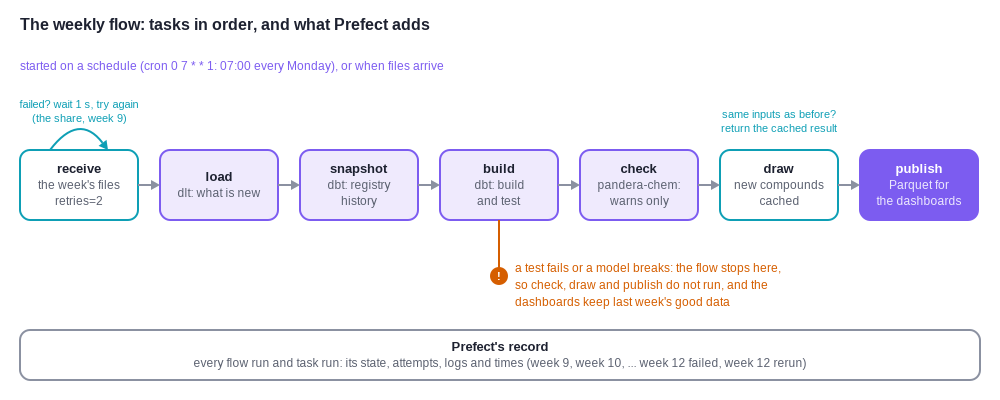
2. Running it
A flow is called like a function. The first run of the lesson takes a little longer: Prefect starts a temporary local server to keep its record, and sets up its database. Week 9:
summary = weekly(9)
INFO week 9: Beginning flow run 'week 9' for flow 'lab-weekly'
INFO receive week 9: Task run failed with exception: ConnectionError("the lab's file share did not answer") - Retry 1/2 will start 1 second(s) from now
INFO receive week 9: received registry_2026-11-02.csv, assay_2026-11-02.csv
INFO receive week 9: Finished in state Completed()
INFO load week 9: loaded {'assay': 144, 'registry': 360}
INFO load week 9: Finished in state Completed()
INFO snapshot: Finished in state Completed()
INFO build: dbt build: {'pass': 24, 'success': 11}
INFO build: Finished in state Completed()
INFO check chemistry: Finished in state Completed()
INFO draw week 9's compounds: drew 40 compounds
INFO draw week 9's compounds: Finished in state Completed()
INFO publish: Finished in state Completed()
INFO week 9: {'tests': 24, 'drawn': 40, 'published': 1136, 'quarantined': 0}
INFO week 9: Finished in state Completed()
Read the lines in order. The file share failed and Prefect retried receive a second later, as
its settings say; the second attempt worked and the flow carried on, without anyone doing
anything. Every task logged under its own name and finished in state Completed, and the flow's
summary is the last line: every test passed, 40 new compounds were drawn, and the wide table was
published.
Weeks 10 to 12 follow. Task lines are useful once; from here on we show only each flow's own lines.
return_state=True makes the flow return its final state (Completed, Failed and so on)
instead of its result, so the loop can report it:
logging.getLogger("prefect.task_runs").setLevel(logging.WARNING)  # task warnings only, from here
for week in (10, 11, 12):
    state = weekly(week, return_state=True)
    log.info("week %d: %s", week, state.name)
INFO week 10: Beginning flow run 'week 10' for flow 'lab-weekly'
WARNING load week 10: no assay file arrived for week 10
INFO week 10: {'tests': 24, 'drawn': 40, 'published': 1136, 'quarantined': 0}
INFO week 10: Finished in state Completed()
INFO week 10: Completed
INFO week 11: Beginning flow run 'week 11' for flow 'lab-weekly'
INFO week 11: {'tests': 24, 'drawn': 40, 'published': 1464, 'quarantined': 0}
INFO week 11: Finished in state Completed()
INFO week 11: Completed
INFO week 12: Beginning flow run 'week 12' for flow 'lab-weekly'
INFO week 12: {'tests': 24, 'drawn': 40, 'published': 1640, 'quarantined': 0}
INFO week 12: Finished in state Completed()
INFO week 12: Completed
Week 10 came with a warning from load: no assay file arrived. That is one of the lab's planted
problems (Module 1, section 1): week 10's results come a week late,
with week 11's. The flow still completed (the registry was loaded, the snapshot taken, the build
passed), which is right: nothing was wrong with what did arrive. Whether a missing file should
alert someone is Module 8's question. In week 11 both assay files arrived,
and dlt loaded both, because the late file's name was new to it.
3. When a step fails
Now suppose a colleague changes a model and makes a mistake: a misspelt column in the wide view. The next run of week 12 (a rerun, as after any fix to the pipeline) meets it at the build:
wide_sql = PROJECT / "models" / "marts" / "measurements_wide.sql"
good = wide_sql.read_text(encoding="utf-8")
wide_sql.write_text(good.replace("c.chemist,", "c.chemst,"), encoding="utf-8", newline="\n")
state = weekly(12, return_state=True)
log.info("week 12: %s", state.name)
INFO week 12: Beginning flow run 'week 12' for flow 'lab-weekly'
ERROR build: Task run failed with exception: RuntimeError('measurements_wide: Binder Error: Table "c" does not have a column named "chemst"')
ERROR build: Finished in state Failed('Task run encountered an exception RuntimeError: measurements_wide: Binder Error: Table "c" does not have a column named "chemst"')
ERROR week 12: Encountered exception during execution: RuntimeError('measurements_wide: Binder Error: Table "c" does not have a column named "chemst"')
INFO week 12: Finished in state Failed('Flow run encountered an exception: RuntimeError: measurements_wide: Binder Error: Table "c" does not have a column named "chemst"')
INFO week 12: Failed
The build task failed with dbt's reason, and the flow stopped there: check_chemistry, draw and
publish never ran, so the published file still holds the last good build. Prefect does not retry
build, because it has no retries: a broken model will not fix itself, and retrying would only
hide it. Choosing which tasks get retries is choosing which failures are passing ones.
The colleague fixes the model, and week 12 is run again:
wide_sql.write_text(good, encoding="utf-8", newline="\n")
logging.getLogger("prefect.task_runs").setLevel(logging.INFO)  # every task's lines again
summary = weekly(12)
INFO week 12: Beginning flow run 'week 12' for flow 'lab-weekly'
INFO receive week 12: received registry_2026-11-23.csv, assay_2026-11-23.csv
INFO receive week 12: Finished in state Completed()
INFO load week 12: loaded {'registry': 480}
INFO load week 12: Finished in state Completed()
INFO snapshot: Finished in state Completed()
INFO build: dbt build: {'pass': 24, 'success': 11}
INFO build: Finished in state Completed()
INFO check chemistry: Finished in state Completed()
INFO draw week 12's compounds: Finished in state Cached(type=COMPLETED)
INFO publish: Finished in state Completed()
INFO week 12: {'tests': 24, 'drawn': 40, 'published': 1640, 'quarantined': 0}
INFO week 12: Finished in state Completed()
Everything ran again except draw, which finished in state Cached: its inputs (week 12 and the
same 40 compounds) were the same as in the earlier run of week 12 that reached it, so Prefect
returned that run's result without drawing anything. load loaded no assay rows this time:
dlt remembers that week 12's file was loaded by the failed run, and loads each file once. (It
loaded the registry again, as it does on every run, because the registry is a snapshot that
replaces the last.) So rerunning a whole week is safe, and that is what makes reruns cheap to
decide on. dbt's build is not cached: it is how we know the warehouse is right, so it runs every
time.
4. The record
Every flow run and task run, its state, its start and end and its logs, is in Prefect's database. On a server it is shown in Prefect's web interface; here we ask the same database from Python, with a client that talks to the Prefect server:
with get_client(sync_client=True) as client:
    runs = client.read_flow_runs()
for run in sorted(runs, key=lambda r: r.expected_start_time):
    print(f"{run.name:8} {run.state_name}")
week 9   Completed
week 10  Completed
week 11  Completed
week 12  Completed
week 12  Failed
week 12  Completed
Six runs of the flow, one for each call, the failed run of week 12 among them, each with its
state. The record also holds every task run of each flow run, with its logs, its state and how
many attempts it took (the receive of week 9 took two). When a chemist asks "why did the
dashboard not change on Tuesday?", this record answers it. To see it as Prefect's web interface shows it, run
prefect server start in a terminal (with the same PREFECT_HOME) and open
http://127.0.0.1:4200.
5. On a schedule, or when files arrive
So far we called the flow ourselves. In production a deployment runs it: a flow, plus when and
where to run it. The simplest way is serve, run in a long-lived process on a server (the kind of
machine Series 1, Module 10, section 9, used
for long jobs): it registers the flow with a schedule and runs it each time the schedule comes
round. A schedule is written as a cron expression, five fields for minute, hour, day of the
month, month and day of the week; 0 7 * * 1 is 07:00 every Monday. The flow then needs to work
out the week itself, from the date:
# lab_pipeline.py, on the lab's server (not run by this lesson): python lab_pipeline.py
from datetime import date

import labdata
from weekly import weekly  # the flow of this module, saved in its own file


def this_week() -> int:
    """The project week that has just ended (the flow runs on Monday morning)."""
    return (date.today() - labdata.START).days // 7


if __name__ == "__main__":
    weekly.serve(name="every-monday", cron="0 7 * * 1",
                 parameters={"week": this_week()})
A schedule runs the flow whether or not anything has arrived, which suits a lab whose files come on a known day. When they do not (a plate reader that exports whenever a plate is done), the flow can instead be started by the data. There are three common ways, from simplest:
- Run often, and let reruns be cheap. Schedule the flow every hour. Because loading is incremental and the build is idempotent (running it twice gives the same result as once), a run that finds nothing new costs little. This is what this lab's flow already supports.
- A sensor. A small flow, run every few minutes, that checks the inbox and starts the weekly flow only when a new file is there.
- Events. The instrument, or the storage the files land in, sends an event when a file arrives, and an automation on the Prefect server starts a deployment in response. Prefect calls these triggers; they need a running Prefect server, which is why this lesson only describes them.
Whichever starts the flow, what it runs is the same: the tasks of section 1, in their order, with their retries and their record. In Module 8 the flow learns to notice what is wrong without failing: a file that did not arrive, a table that stopped growing, molecules that drift from the usual.
Try it yourself
The homework is a few questions, answered by running code like the code above: in a new cell at
the end of the notebook, or in a script. It is at the end of the lesson's page, and in
homework.md in the module's folder. The answers are published after the cohort's deadline.
Further reading
- The Prefect documentation. Write and run flows and Write and run tasks: retries, caching, results and states. https://docs.prefect.io/v3/develop/write-flows
- The Prefect documentation. Configure task caching: cache policies, keys and expiry. https://docs.prefect.io/v3/develop/task-caching
- The Prefect documentation. Run deployments on a schedule and Event triggers:
serve, cron schedules and automations. https://docs.prefect.io/v3/automate/add-schedules - Reis, J. & Housley, M. (2022). Fundamentals of Data Engineering. O'Reilly Media. Chapter 2, on orchestration as one of the undercurrents of data engineering.
Homework
Answer each question by running code like the code in the lesson: add a new cell at the end of the
lesson's notebook (in Colab, + Code) and work there. Run the whole lesson first, so that its
warehouse (weeks 1 to 12), the tasks, the weekly flow and Prefect's record of its runs exist. If
you are in a cohort, you will be told where to send your answers; everyone can check theirs
against the answers published after the cohort's deadline.
- (Builds on section 1.) Change
receiveso that the share fails at every attempt for week 12, and runweekly(12, return_state=True). How many attempts did Prefect make, how long did it wait between them, and which tasks ran afterreceive? Then givereceiveretries=3, retry_delay_seconds=[1, 2, 4](a list) and explain what that changes, and why waiting longer each time suits a share that is down. - (Builds on section 1.) Prefect can run tasks at the same time.
check_chemistryanddrawdo not depend on each other: call them with.submit(...)instead of calling them directly, and get their results with.result(). Does the flow give the same summary? What would have to be true of two tasks for running them at the same time to be safe? - (Builds on section 3.) Delete the drawings of week 12 (
work/published/structures), then runweekly(12)again. Diddrawrun, or did it return its cached result? What does that tell you about whatcache_policy=INPUTSchecks, and what it does not? Change the cache so that it expires after one day (cache_expiration=timedelta(days=1), fromdatetime). - (Builds on section 3.) Make the chemistry check fail the flow when more than five compounds
are in quarantine, and only warn below that. Test it with a stricter rule that some compounds
break: add
pc.mol_weight(400)toCOMPOUND_RULESand runweekly(12, return_state=True). How many compounds were quarantined, did the flow fail, and which tasks did not run? - (Builds on section 4.) With the client, read the task runs of the failed run of week 12 only
(
client.read_task_runs(flow_run_filter=...); see Prefect's documentation for the filter, or filter in Python onflow_run_id). Which tasks ran, and in which state did each finish? - (Builds on section 5.) Write the cron expression for each of these, and check it with a cron website or by reasoning field by field: (a) 06:30 every weekday; (b) every hour on the hour; (c) midnight on the first day of every month; (d) every 15 minutes between 08:00 and 18:00 on weekdays. Which would suit the "run often" approach of section 5 for this lab, and why?
- To think about (no code; builds on sections 2 and 5): in week 10 the flow completed although the week's assay file never came. List the people who should know that a week's file is missing, and how quickly. Should the flow fail, warn, or do something else? (Module 8 takes this up.)
How was this module?
Found this module useful? ★ Star the course on GitHub: it helps other chemists find it.