
Get set up
You can read this page without running anything. To run the code yourself, the easiest way needs nothing installed, only a web browser and a free Google account:
- Open this lesson in Google Colab. Colab is Google's free service for running Python notebooks in the browser; sign in with your Google account if asked.
- Run the cells in order, from the top: click the ▶ button at the left of a cell, or click inside it and press Shift+Enter. The first cell installs what the lesson needs and takes a minute or two.
- If Colab warns "This notebook was not authored by Google", click Run anyway: the notebook comes from this course's own repository.
- Under each cell you should see what the box labelled Output under the same code on the lesson's page shows (the notebook opens with our outputs already in place; running a cell replaces them with yours). Boxes labelled Example output show timings or memory, so your numbers will differ a little.
New to notebooks, or want to run the lessons on your own computer instead (with Jupyter, Anaconda or a terminal)? Start here shows every step.
If you already work in a terminal, the short version, with uv and Git installed:
git clone https://github.com/David-Alobo/monstrous-learn.git
cd monstrous-learn/data-engineering/series-1
uv sync
uv run python 05-graphs-and-graph-databases/code.py
or, in any Python 3.11+ environment: python -m pip install rdkit networkx pandas duckdb neo4j python-dotenv.
This lesson also needs Neo4j, a database that runs in Docker on your own computer (Colab cannot run it; the rest of the lesson runs there). The database guide shows how to install Docker and start it, step by step.
Module 1 showed that a molecule is a graph: atoms are the nodes and bonds the edges (the links between them). This module puts that to work. First we answer chemical questions with graph methods: where the rings are, how far apart two atoms are, whether one molecule contains another, and what several molecules have in common. Then we go up a level. Chemistry is full of links between molecules as well: a reaction turns some compounds into others, a drug acts on a protein, a protein sits in a pathway. Questions such as "what can we make from phenol, and in how many steps?" are about following those links, and a graph database is built for exactly that.
By the end of this module you will be able to:
- find a molecule's rings and the shortest path between two atoms, with NetworkX and with RDKit;
- explain substructure search as graph matching, and why the pattern must say how many hydrogens an atom carries;
- find the largest part several molecules share (the maximum common substructure);
- store compounds, reactions and drug targets in Neo4j, as nodes joined by relationships;
- ask Neo4j questions in its language, Cypher, including questions that follow links any number of steps;
- compare the same question in a graph database and in SQL, and say where each one wins.
From earlier modules we use: the molecular graph and RDKit (Module 1), SMILES, SMARTS and InChIKeys (Module 2), and SQL and DuckDB (Module 4).
The lesson uses these packages:
- RDKit, NetworkX and pandas, as in Module 1;
- DuckDB, the database in one file from Module 4, for the comparison in section 6;
- neo4j, the official Python driver for Neo4j, the most widely used graph database (from section 3 onwards).
What runs where. Sections 1 and 2 run in Colab or on any computer. Sections 3 to 6 need Neo4j
running on your own computer in Docker: the database
guide shows how to install Docker and start it, step
by step, and how to log in to Neo4j's own web page. Their code starts with the line
# needs: neo4j; without Neo4j those blocks do nothing, and you can still read them and their
outputs here.
Setup
Every lesson starts with this block. It loads the packages and sets the lesson's settings, written
in CAPITALS, so they can be changed in one place. Run it first. Neo4j's address, user name and
password come from environment variables (named values your terminal passes to programs), kept
on your own computer in the course's .env file as Module 4 set it up, never in the code: Module 4
explains why.
import logging
import os
from pathlib import Path

import duckdb
import networkx as nx
import pandas as pd
from dotenv import find_dotenv, load_dotenv
from networkx.algorithms import isomorphism
from neo4j import GraphDatabase
from neo4j.exceptions import ConstraintError
from rdkit import Chem, RDLogger
from rdkit.Chem import rdFMCS

from drawing import grid_svg, scheme_svg

# log lines: level and message only, so the lesson's outputs are the same on every run
# (a real job would add "%(asctime)s" to the format)
logging.basicConfig(level=logging.INFO, format="%(levelname)s %(message)s", force=True)
log = logging.getLogger(__name__)
logging.getLogger("neo4j").setLevel(logging.WARNING)  # the driver's own notes on each query: hidden

# molecules of sections 1 and 2
ASPIRIN = "CC(=O)Oc1ccccc1C(=O)O"
METHYL_SALICYLATE = "COC(=O)c1ccccc1O"
SALICYLIC_ACID = "OC(=O)c1ccccc1O"
MCS_TIMEOUT_S = 10  # give up the common-substructure search after this many seconds

# Neo4j (sections 3 to 6): where it is and how to log in
# passwords and addresses: from the environment, or from the course's .env file (copied from
# .env.example at the repository's root); find_dotenv looks for it in this folder and the ones
# above, and settings already in the environment are kept
load_dotenv(find_dotenv(usecwd=True))
NEO4J_URI = os.environ.get("NEO4J_URI", "")
NEO4J_USER = os.environ.get("NEO4J_USER", "neo4j")
NEO4J_PASSWORD = os.environ.get("NEO4J_PASSWORD", "")
LESSON_LABEL = "Module5"  # every node the lesson makes carries it, so the lesson can remove its own

# the lesson's chemistry network: textbook syntheses and well-established drug targets
# (compound name: SMILES)
COMPOUNDS = {
    "phenol": "Oc1ccccc1",
    "nitric acid": "O=[N+]([O-])O",
    "4-nitrophenol": "O=[N+]([O-])c1ccc(O)cc1",
    "hydrogen": "[HH]",
    "4-aminophenol": "Nc1ccc(O)cc1",
    "acetic anhydride": "CC(=O)OC(C)=O",
    "paracetamol": "CC(=O)Nc1ccc(O)cc1",
    "carbon dioxide": "O=C=O",
    "salicylic acid": SALICYLIC_ACID,
    "aspirin": ASPIRIN,
    "methanol": "CO",
    "methyl salicylate": METHYL_SALICYLATE,
    "isobutylbenzene": "CC(C)Cc1ccccc1",
    "4-isobutylacetophenone": "CC(=O)c1ccc(CC(C)C)cc1",
    "1-(4-isobutylphenyl)ethanol": "CC(O)c1ccc(CC(C)C)cc1",
    "carbon monoxide": "[C-]#[O+]",
    "ibuprofen": "CC(C)Cc1ccc(cc1)C(C)C(=O)O",
    "celecoxib": "Cc1ccc(-c2cc(C(F)(F)F)nn2-c2ccc(S(N)(=O)=O)cc2)cc1",
}
# (reaction name, reactants, products)
REACTIONS = [
    ("nitration of phenol", ["phenol", "nitric acid"], ["4-nitrophenol"]),
    ("reduction of 4-nitrophenol", ["4-nitrophenol", "hydrogen"], ["4-aminophenol"]),
    ("acetylation of 4-aminophenol", ["4-aminophenol", "acetic anhydride"], ["paracetamol"]),
    ("Kolbe-Schmitt carboxylation", ["phenol", "carbon dioxide"], ["salicylic acid"]),
    ("acetylation of salicylic acid", ["salicylic acid", "acetic anhydride"], ["aspirin"]),
    ("esterification of salicylic acid", ["salicylic acid", "methanol"], ["methyl salicylate"]),
    ("Friedel-Crafts acylation", ["isobutylbenzene", "acetic anhydride"], ["4-isobutylacetophenone"]),
    ("hydrogenation of the ketone", ["4-isobutylacetophenone", "hydrogen"], ["1-(4-isobutylphenyl)ethanol"]),
    ("carbonylation", ["1-(4-isobutylphenyl)ethanol", "carbon monoxide"], ["ibuprofen"]),
]  # fmt: skip
# (target ChEMBL id, name, gene) and which compounds inhibit it (well established)
TARGETS = [("CHEMBL221", "Cyclooxygenase-1", "PTGS1"), ("CHEMBL230", "Cyclooxygenase-2", "PTGS2")]
INHIBITS = [("aspirin", "CHEMBL221"), ("aspirin", "CHEMBL230"), ("ibuprofen", "CHEMBL221"),
            ("ibuprofen", "CHEMBL230"), ("celecoxib", "CHEMBL230")]  # fmt: skip
START = "phenol"  # the starting material of section 4's questions
DRUG = "aspirin"  # the route drawn at the end of section 4
WORK = Path("work")  # where the lesson saves its drawings (git-ignored)

RDLogger.DisableLog("rdApp.*")  # RDKit warns about hydrogen gas ([HH]), which has no heavy atom
WORK.mkdir(exist_ok=True)
1. Graph questions about one molecule
We turn a molecule into a NetworkX graph as in Module 1: one node per atom, carrying its element and how many hydrogens it holds, and one edge per bond, carrying the bond order (1 single, 2 double, 1.5 aromatic):
def to_graph(mol: Chem.Mol) -> nx.Graph:
    """A molecule as a NetworkX graph: atoms (element, hydrogens) as nodes, bonds (order) as edges."""
    g = nx.Graph()
    for atom in mol.GetAtoms():
        g.add_node(atom.GetIdx(), element=atom.GetSymbol(), hydrogens=atom.GetTotalNumHs())
    for bond in mol.GetBonds():
        g.add_edge(bond.GetBeginAtomIdx(), bond.GetEndAtomIdx(), order=bond.GetBondTypeAsDouble())
    return g


aspirin = Chem.MolFromSmiles(ASPIRIN)
aspirin_graph = to_graph(aspirin)
print(aspirin_graph.number_of_nodes(), "atoms,", aspirin_graph.number_of_edges(), "bonds")
13 atoms, 13 bonds
Rings. In graph language a ring is a cycle: a path that comes back to where it started.
nx.cycle_basis finds a set of cycles from which every other cycle can be built; RDKit finds the
same rings with its own ring perception (GetRingInfo). Both give the benzene ring of aspirin, as
the numbers of its six atoms (sorted, so the two can be compared: a ring has no first atom):
print("NetworkX:", [sorted(ring) for ring in nx.cycle_basis(aspirin_graph)])
print("RDKit:   ", [sorted(ring) for ring in aspirin.GetRingInfo().AtomRings()])
NetworkX: [[4, 5, 6, 7, 8, 9]]
RDKit:    [[4, 5, 6, 7, 8, 9]]
Paths. How many bonds separate two atoms is the shortest path between them. Atom 0 is the acetyl methyl carbon and atom 12 the acid's OH oxygen (the numbering is the order of the SMILES):
path = nx.shortest_path(aspirin_graph, 0, 12)
print("atoms on the way:", path)
print("bonds apart:", len(path) - 1, "  RDKit agrees:", int(Chem.GetDistanceMatrix(aspirin)[0, 12]))
atoms on the way: [0, 1, 3, 4, 9, 10, 12]
bonds apart: 6   RDKit agrees: 6
Distances like these are what 3D-free descriptors and graph neural networks are built from, and a topological distance of this kind is what a medicinal chemist means by "three bonds away".
2. Substructure search is graph matching
"Does this molecule contain a carboxylic acid?" is a graph question: is there a way to place the
small graph of the pattern onto the big graph of the molecule, so that every pattern atom lands on
an atom of the same element and every pattern bond on a bond of the same order? This is called
subgraph matching, and NetworkX does it with a GraphMatcher. Our pattern is the acid group
C(=O)O, three atoms; we try it twice, once without saying anything about hydrogens and once saying
the single-bonded oxygen must carry exactly one hydrogen, as the SMARTS [CX3](=O)[OX2H1] did in
Module 2:
def acid_pattern(require_hydrogen: bool) -> nx.Graph:
    """The carboxyl group C(=O)O as a small graph; optionally the OH oxygen must carry one H."""
    pattern = nx.Graph()
    pattern.add_node("C", element="C")
    pattern.add_node("O=", element="O")
    pattern.add_node("OH", element="O", **({"hydrogens": 1} if require_hydrogen else {}))
    pattern.add_edge("C", "O=", order=2.0)
    pattern.add_edge("C", "OH", order=1.0)
    return pattern


def atoms_match(atom: dict, wanted: dict) -> bool:
    """A molecule's atom matches a pattern atom: same element, and same hydrogens if given."""
    return atom["element"] == wanted["element"] and atom["hydrogens"] == wanted.get("hydrogens", atom["hydrogens"])


def contains(mol: Chem.Mol, pattern: nx.Graph) -> bool:
    """Whether the molecule's graph contains the pattern's graph (atoms and bond orders matching)."""
    matcher = isomorphism.GraphMatcher(
        to_graph(mol), pattern, node_match=atoms_match,
        edge_match=lambda bond, wanted: bond["order"] == wanted["order"],
    )  # fmt: skip
    return matcher.subgraph_is_monomorphic()


for name, smiles in [("aspirin", ASPIRIN), ("methyl salicylate", METHYL_SALICYLATE)]:
    mol = Chem.MolFromSmiles(smiles)
    print(f"{name:18} C(=O)O: {contains(mol, acid_pattern(False))!s:5}  "
          f"C(=O)O-H: {contains(mol, acid_pattern(True))!s:5}  "
          f"RDKit SMARTS: {mol.HasSubstructMatch(Chem.MolFromSmarts('[CX3](=O)[OX2H1]'))}")
aspirin            C(=O)O: True   C(=O)O-H: True   RDKit SMARTS: True
methyl salicylate  C(=O)O: True   C(=O)O-H: False  RDKit SMARTS: False
(atom.get("hydrogens", default) reads a value from a dictionary, or gives the default when it is
not there; !s:5 prints a value as text padded to five characters, so the columns line up;
subgraph_is_monomorphic asks whether the pattern fits inside the molecule.) Without hydrogens,
the ester of methyl salicylate matches as if it were an acid: the same trap as the loose SMILES
pattern in Modules 2 and 4. With the hydrogen in the pattern, the graph matcher, RDKit and the
database all agree.
Subgraph matching is slow in general: in the worst case the time grows faster than any power of the molecule's size, because many placements must be tried. That is why chemistry software first rules out most molecules with a quick fingerprint test, and why the database index of Module 4 matters: it is that quick test, stored.
What several molecules share: the maximum common substructure
The maximum common substructure (MCS) is the largest graph that fits inside every molecule of a
set. It is how chemists find the shared core of a series, and RDKit's rdFMCS.FindMCS computes it,
returning the core as SMARTS. Aspirin, methyl salicylate and salicylic acid share:
salicylates = [Chem.MolFromSmiles(s) for s in (ASPIRIN, METHYL_SALICYLATE, SALICYLIC_ACID)]
mcs = rdFMCS.FindMCS(salicylates, timeout=MCS_TIMEOUT_S)
print("shared core:", mcs.smartsString)
print(mcs.numAtoms, "atoms,", mcs.numBonds, "bonds; search finished in time:", not mcs.canceled)
shared core: [#8]-[#6](=[#8])-[#6]1:[#6]:[#6]:[#6]:[#6]:[#6]:1-[#8]
10 atoms, 10 bonds; search finished in time: True
The core is salicylic acid's skeleton: the benzene ring with a carboxyl carbon and its two oxygens
on one carbon, and an oxygen on the next (#8 is oxygen and #6 carbon by atomic number; : is an
aromatic bond). Each of the three adds its own groups to that core. Finding an MCS is even harder
than a substructure match, hence the timeout.
3. A graph database: Neo4j
So far each graph was one molecule. The links that matter most in a research group are between molecules and other things: this compound is made from those two in this reaction; that drug inhibits this enzyme. In the relational database of Module 4, each kind of link is a table of pairs of keys, and a question that follows links several steps deep needs a join for every step. A graph database stores the links themselves:
- nodes are the things, each with one or more labels saying what kind of thing it is
(
Compound,Reaction,Target) and properties (name, SMILES); - relationships join two nodes, each with a type saying what the link means
(
REACTANT_OF,PRODUCES,INHIBITS) and a direction, and they can carry properties too.
Following a relationship is as cheap as reading a property, however many there are in the
database, so questions that walk many steps stay fast. Neo4j is the most widely used graph
database, and Cypher its query language. Cypher draws the pattern you are looking for:
(c:Compound) is a node with the label Compound, called c in the query, and
(c)-[:INHIBITS]->(t) is a relationship of type INHIBITS from c to t.
Sections 3 to 6 need Neo4j running (see the database
guide), and NEO4J_URI, NEO4J_USER and
NEO4J_PASSWORD set in the terminal you started Python or Jupyter from. In Colab their blocks do
nothing; read them and their outputs here.
GraphDatabase.driver connects to Neo4j, and driver.execute_query(query, parameters) runs one
Cypher query and returns its records. Values go in as parameters, written $name in the query,
never pasted into the query text (the same rule as %s in Module 4). The lesson first removes the
nodes of any earlier run of itself, which all carry the extra label Module5, and makes sure that
no two compounds can share an InChIKey and no two reactions a name: a constraint, as in a
relational database:
# needs: neo4j
driver = GraphDatabase.driver(NEO4J_URI, auth=(NEO4J_USER, NEO4J_PASSWORD))
driver.verify_connectivity()
driver.execute_query(f"MATCH (n:{LESSON_LABEL}) DETACH DELETE n")  # remove the last run's nodes
driver.execute_query("CREATE CONSTRAINT compound_key IF NOT EXISTS "
                     "FOR (c:Compound) REQUIRE c.inchikey IS UNIQUE")  # fmt: skip
driver.execute_query("CREATE CONSTRAINT reaction_name IF NOT EXISTS "
                     "FOR (r:Reaction) REQUIRE r.name IS UNIQUE")  # fmt: skip
log.info("connected to Neo4j; constraints in place")
INFO connected to Neo4j; constraints in place
(DETACH DELETE removes a node together with its relationships; Neo4j will not leave a
relationship pointing at nothing. The driver also writes notes about each query to the log, mostly
performance hints for large databases; the Setup block hides them.)
Now the network. UNWIND $rows AS row takes a list sent as a parameter and runs the rest of the
query once per item, so one query loads every compound. MERGE finds a node matching the pattern,
or creates it if there is none, so running the load twice does not make copies; SET writes
properties:
# needs: neo4j
compound_rows = [
    {"name": name, "smiles": Chem.MolToSmiles(Chem.MolFromSmiles(smiles)),
     "inchikey": Chem.MolToInchiKey(Chem.MolFromSmiles(smiles))}
    for name, smiles in COMPOUNDS.items()
]  # fmt: skip
driver.execute_query(f"""
    UNWIND $rows AS row
    MERGE (c:Compound {{inchikey: row.inchikey}})
    SET c:{LESSON_LABEL}, c.name = row.name, c.smiles = row.smiles""", rows=compound_rows)
reaction_rows = [{"name": n, "reactants": r, "products": p} for n, r, p in REACTIONS]
driver.execute_query(f"""
    UNWIND $rows AS row
    MERGE (r:Reaction {{name: row.name}}) SET r:{LESSON_LABEL}
    WITH r, row
    UNWIND row.reactants AS reactant
    MATCH (c:Compound {{name: reactant}})
    MERGE (c)-[:REACTANT_OF]->(r)""", rows=reaction_rows)
driver.execute_query("""
    UNWIND $rows AS row
    MATCH (r:Reaction {name: row.name})
    UNWIND row.products AS product
    MATCH (c:Compound {name: product})
    MERGE (r)-[:PRODUCES]->(c)""", rows=reaction_rows)
driver.execute_query(f"""
    UNWIND $targets AS t
    MERGE (target:Target {{chembl_id: t[0]}}) SET target:{LESSON_LABEL}, target.name = t[1], target.gene = t[2]
    WITH count(*) AS made
    UNWIND $links AS link
    MATCH (c:Compound {{name: link[0]}}), (target:Target {{chembl_id: link[1]}})
    MERGE (c)-[:INHIBITS]->(target)""", targets=TARGETS, links=INHIBITS)
records, _, _ = driver.execute_query(f"""
    MATCH (n:{LESSON_LABEL}) WITH labels(n) AS kinds
    RETURN [k IN kinds WHERE k <> '{LESSON_LABEL}'][0] AS kind, count(*) AS nodes ORDER BY kind""")
for record in records:
    print(f"{record['kind']:9} {record['nodes']} nodes")
records, _, _ = driver.execute_query(f"""
    MATCH (:{LESSON_LABEL})-[rel]->(:{LESSON_LABEL})
    RETURN type(rel) AS kind, count(*) AS links ORDER BY kind""")
for record in records:
    print(f"{record['kind']:12} {record['links']} relationships")
Compound  18 nodes
Reaction  9 nodes
Target    2 nodes
INHIBITS     5 relationships
PRODUCES     9 relationships
REACTANT_OF  18 relationships
(In these queries {LESSON_LABEL} is filled in by Python's f-string, and the doubled braces
{{ }} stand for Cypher's own single braces, which hold a node's properties. WITH passes values
from one part of a query to the next, like a pipe.)
The constraint works like Module 4's UNIQUE: trying to create a second aspirin with the same
InChIKey is refused. Neo4j's error code names the rule that was broken:
# needs: neo4j
try:
    driver.execute_query("CREATE (:Compound {inchikey: $key, name: 'aspirin, typed again'})",
                         key=Chem.MolToInchiKey(aspirin))  # fmt: skip
except ConstraintError as error:
    print("refused:", error.code)
refused: Neo.ClientError.Schema.ConstraintValidationFailed
Seeing the graph
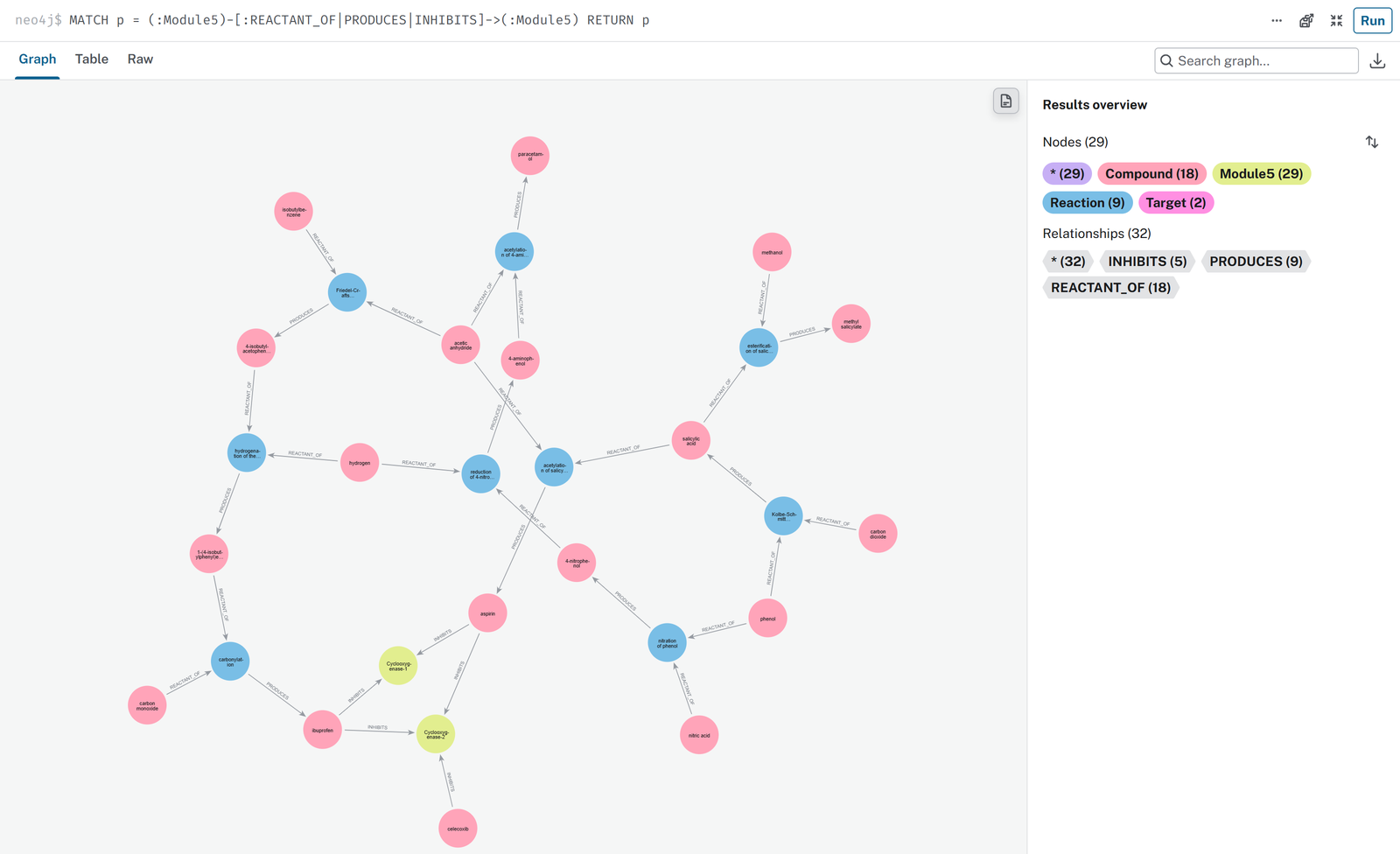
Neo4j comes with its own web page, Neo4j Browser, which draws the results of a query as a
picture. Open http://localhost:7474, log in as the database guide shows, type this query on the
$ line and click Run:
MATCH p = (:Module5)-[:REACTANT_OF|PRODUCES|INHIBITS]->(:Module5) RETURN p
(:Module5 keeps the picture to this lesson's nodes.) The network appears: compounds,
reactions and the two enzymes as circles (Neo4j gives each label its own colour), joined by labelled arrows. If the names
do not show, zoom in with the + button at the bottom right of the picture. You can drag the circles about, and click one to see its properties.
4. Following links: Cypher questions
A Cypher query is a pattern to find (MATCH), conditions (WHERE), and what to give back
(RETURN). Which compounds inhibit which targets:
# needs: neo4j
records, _, _ = driver.execute_query("""
    MATCH (c:Compound)-[:INHIBITS]->(t:Target)
    RETURN t.name AS target, collect(c.name) AS inhibitors ORDER BY target""")
for record in records:
    print(f"{record['target']:17} {sorted(record['inhibitors'])}")
Cyclooxygenase-1  ['aspirin', 'ibuprofen']
Cyclooxygenase-2  ['aspirin', 'celecoxib', 'ibuprofen']
(collect gathers the values of a group into a list, like GROUP BY with a list in SQL.)
The strength of a graph database is in links of any length. -[:REACTANT_OF|PRODUCES*]-> means
"one or more relationships of either type, in the arrow's direction", so the pattern below finds
every compound reachable from phenol by any number of reactions. Each reaction is two relationships
(reactant of, then produces), so the number of steps is half the path's length:
# needs: neo4j
records, _, _ = driver.execute_query("""
    MATCH path = (start:Compound {name: $start})-[:REACTANT_OF|PRODUCES*]->(product:Compound)
    RETURN product.name AS product, min(length(path)) / 2 AS steps
    ORDER BY steps, product""", start=START)
for record in records:
    print(f"{record['steps']} step(s): {record['product']}")
1 step(s): 4-nitrophenol
1 step(s): salicylic acid
2 step(s): 4-aminophenol
2 step(s): aspirin
2 step(s): methyl salicylate
3 step(s): paracetamol
The question a project actually asks joins the two kinds of link: which of the drugs we can make from phenol act on a cyclooxygenase, and by which route?
# needs: neo4j
records, _, _ = driver.execute_query("""
    MATCH route = (start:Compound {name: $start})-[:REACTANT_OF|PRODUCES*]->(drug:Compound)
                  -[:INHIBITS]->(target:Target)
    RETURN drug.name AS drug, target.name AS target,
           [n IN nodes(route) WHERE n:Reaction | n.name] AS reactions
    ORDER BY drug, target""", start=START)
for record in records:
    print(f"{record['drug']} inhibits {record['target']}, via: {', '.join(record['reactions'])}")
aspirin inhibits Cyclooxygenase-1, via: Kolbe-Schmitt carboxylation, acetylation of salicylic acid
aspirin inhibits Cyclooxygenase-2, via: Kolbe-Schmitt carboxylation, acetylation of salicylic acid
(nodes(route) lists the nodes along the path, and [n IN ... WHERE n:Reaction | n.name] keeps the
reactions and takes their names, like a Python list comprehension.) Phenol leads to aspirin, which
inhibits both enzymes; paracetamol is made from phenol too, but has no INHIBITS link in our
network, so it does not appear. A graph only answers from the links it has been given.
One more question that is natural in a graph: which compounds are used in more than one reaction? These are the shared building blocks a group would keep in stock:
# needs: neo4j
records, _, _ = driver.execute_query("""
    MATCH (c:Compound)-[:REACTANT_OF]->(r:Reaction)
    WITH c, count(r) AS uses WHERE uses > 1
    RETURN c.name AS compound, uses ORDER BY uses DESC, compound""")
for record in records:
    print(f"{record['compound']:17} used in {record['uses']} reactions")
acetic anhydride  used in 3 reactions
hydrogen          used in 2 reactions
phenol            used in 2 reactions
salicylic acid    used in 2 reactions
Seeing the molecules
Neo4j Browser draws every node as a circle with a caption: it does not know that a SMILES string
is a molecule. Chemists want to see structures, so we let each tool do what it is good at: Neo4j
finds the answer, and RDKit draws it. The course's small helper file drawing.py, next to the
lesson (in Colab the first cell downloads it), draws each molecule in its own square box with its
name underneath:
grid_svgputs several molecules side by side;scheme_svgdraws a route as a reaction scheme: boxes joined by arrows, with the other reactants written over each arrow and the reaction's name under it.
Both return an SVG picture (a text format for drawings that browsers and notebooks show). In a
notebook, a cell that ends with the picture shows it; we also save it in work/, as a file any
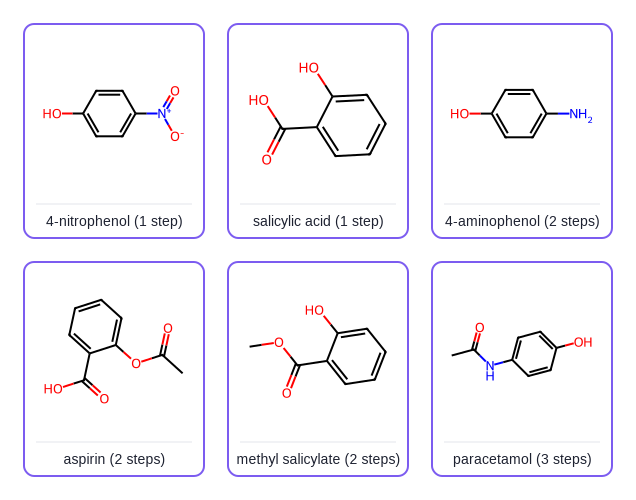
browser opens. First, everything phenol leads to, from the reachability question above, with the
number of steps in each caption:
# needs: neo4j
records, _, _ = driver.execute_query("""
    MATCH path = (start:Compound {name: $start})-[:REACTANT_OF|PRODUCES*]->(product:Compound)
    RETURN product.name AS name, product.smiles AS smiles, min(length(path)) / 2 AS steps
    ORDER BY steps, name""", start=START)
grid = grid_svg([(r["smiles"], f"{r['name']} ({r['steps']} step{'s' if r['steps'] > 1 else ''})")
                 for r in records])  # fmt: skip
(WORK / "from-phenol.svg").write_text(grid, encoding="utf-8")
print(f"drew {len(records)} molecules in work/from-phenol.svg")
grid  # in a notebook, the last line of a cell is shown: here, the picture
drew 6 molecules in work/from-phenol.svg
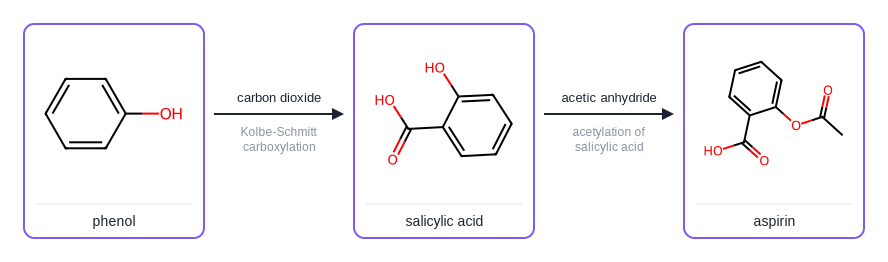
Then the route itself. ORDER BY length(route) LIMIT 1 keeps the shortest path from phenol to
aspirin, and for each node on it the query returns either the compound (name and SMILES) or the
reaction with all its reactants. In Python we drop, from each reaction's reactants, the compound
the route arrives with, which leaves the other reagents to write over the arrow:
# needs: neo4j
records, _, _ = driver.execute_query("""
    MATCH route = (start:Compound {name: $start})-[:REACTANT_OF|PRODUCES*]->(drug:Compound {name: $drug})
    RETURN [n IN nodes(route) | CASE WHEN n:Reaction
        THEN {reaction: n.name, reactants: [(c:Compound)-[:REACTANT_OF]->(n) | c.name]}
        ELSE {compound: n.name, smiles: n.smiles} END] AS steps
    ORDER BY length(route) LIMIT 1""", start=START, drug=DRUG)
steps = records[0]["steps"]
for k, step in enumerate(steps):
    if "reaction" in step:  # the other reactants: all of them except the compound we arrive with
        step["with"] = sorted(set(step["reactants"]) - {steps[k - 1]["compound"]})
        print(f"  --[{step['reaction']}, with {', '.join(step['with'])}]-->")
    else:
        print(step["compound"])
scheme = scheme_svg(steps)
(WORK / f"route-{DRUG}.svg").write_text(scheme, encoding="utf-8")
scheme
phenol
  --[Kolbe-Schmitt carboxylation, with carbon dioxide]-->
salicylic acid
  --[acetylation of salicylic acid, with acetic anhydride]-->
aspirin
([(c:Compound)-[:REACTANT_OF]->(n) | c.name] is a pattern comprehension: it finds every
compound that is a reactant of n and collects their names, inside the query. CASE WHEN ... THEN
... ELSE ... END chooses between two results, like if and else; {reaction: ..., ...} builds
a small record, which arrives in Python as a dictionary.) Change DRUG in the Setup block to
"paracetamol" or "methyl salicylate" and run the two blocks again to draw their routes.
5. A molecule inside a graph database
Module 1 promised to come back to storing a molecule itself in a graph database, atoms as nodes and bonds as relationships. It can be done, and Cypher can then walk the bonds:
# needs: neo4j
atoms = [{"i": a.GetIdx(), "element": a.GetSymbol()} for a in aspirin.GetAtoms()]
bonds = [{"a": b.GetBeginAtomIdx(), "b": b.GetEndAtomIdx(), "order": b.GetBondTypeAsDouble()}
         for b in aspirin.GetBonds()]  # fmt: skip
driver.execute_query(f"""
    UNWIND $atoms AS atom CREATE (:Atom:{LESSON_LABEL} {{molecule: 'aspirin', i: atom.i, element: atom.element}})
    WITH count(*) AS made
    UNWIND $bonds AS bond
    MATCH (a:Atom {{molecule: 'aspirin', i: bond.a}}), (b:Atom {{molecule: 'aspirin', i: bond.b}})
    CREATE (a)-[:BOND {{order: bond.order}}]->(b)""", atoms=atoms, bonds=bonds)
records, _, _ = driver.execute_query("""
    MATCH (a:Atom {molecule: 'aspirin', i: 0}), (b:Atom {molecule: 'aspirin', i: 12}),
          path = shortestPath((a)-[:BOND*..30]-(b))
    RETURN length(path) AS bonds_apart, [n IN nodes(path) | n.element] AS elements""")
print("atom 0 to atom 12:", records[0]["bonds_apart"], "bonds, through", "".join(records[0]["elements"]))
atom 0 to atom 12: 6 bonds, through CCOCCCO
The answer matches section 1 ([:BOND*..30] means one to thirty bonds; an upper limit keeps a
search from wandering through a large graph). But this is rarely how molecules are stored: one molecule becomes
dozens of nodes, and a substructure search becomes a large pattern match over all of them, which is
what RDKit and the cartridge of Module 4 already do far better. The usual design keeps each
molecule as one node with its SMILES (and searches it with RDKit), and uses the graph for the
links between molecules, as in sections 3 and 4.
6. The same question in SQL, and where each wins
To compare fairly, we store the same network in DuckDB, as Module 4 would: a table of compounds and
two tables of links, which reaction uses which reactant and which produces which product.
Following links any number of steps in SQL needs a recursive query, WITH RECURSIVE: it starts
from one row (phenol, 0 steps) and repeatedly adds the products of reactions whose reactants are
already found, until nothing new turns up:
db = duckdb.connect()  # a database in memory: nothing is written to disk
db.execute("CREATE TABLE reactant (reaction VARCHAR, compound VARCHAR)")
db.execute("CREATE TABLE product (reaction VARCHAR, compound VARCHAR)")
db.executemany("INSERT INTO reactant VALUES (?, ?)", [(n, c) for n, rs, _ in REACTIONS for c in rs])
db.executemany("INSERT INTO product VALUES (?, ?)", [(n, c) for n, _, ps in REACTIONS for c in ps])
print(db.sql("""
    WITH RECURSIVE reachable (compound, steps) AS (
        SELECT ?::VARCHAR, 0
        UNION
        SELECT p.compound, r.steps + 1
        FROM reachable r
        JOIN reactant a ON a.compound = r.compound
        JOIN product p ON p.reaction = a.reaction
        WHERE r.steps < 10
    )
    SELECT compound AS product, min(steps) AS steps FROM reachable
    WHERE steps > 0 GROUP BY compound ORDER BY steps, product""", params=[START]).df().to_string(index=False))
db.close()
          product  steps
    4-nitrophenol      1
   salicylic acid      1
    4-aminophenol      2
          aspirin      2
methyl salicylate      2
      paracetamol      3
(? marks a value passed in params, as $start did in Cypher. UNION adds rows not already
found; steps < 10 stops a network with loops from going round for ever.) The answer is the same
as Cypher's in section 4. The SQL is longer and harder to read, and every extra kind of link (who
inhibits what, who sells what) would add more joins inside the recursion, while the Cypher pattern
just gets one more arrow.
Where each one wins:
- A graph database when the questions follow links, especially of varying or unknown length: routes, networks of reactions or of compounds, targets and pathways, "what is connected to what". The model is also easy to extend: a new kind of link needs no change to existing tables.
- A relational database when the questions are about the records themselves: filtering, summing and comparing many rows, with strict rules on every value and transactions across many tables (Module 4). It is also the safer home for the data a group must never lose, with more tools and more people who know it.
Many groups use both: the relational database is the record, and a graph is built from it for the questions about links. Before the next question, we close the connection to Neo4j:
# needs: neo4j
driver.close()
Try it yourself
The homework is a few questions, answered by running code like the code above: in a new cell at
the end of the notebook, or in a script. It is at the end of the lesson's page, and in
homework.md in the module's folder. The answers are published after the cohort's deadline.
Further reading
- Robinson, I., Webber, J. & Eifrem, E. (2015). Graph Databases: New Opportunities for Connected Data (2nd ed.). O'Reilly Media. ISBN 978-1-491-93089-2.
- Raymond, J. W. & Willett, P. (2002). Maximum common subgraph isomorphism algorithms for the matching of chemical structures. Journal of Computer-Aided Molecular Design, 16(7), 521-533. https://doi.org/10.1023/A:1021271615909
- The Neo4j documentation. Cypher Manual. https://neo4j.com/docs/cypher-manual/current/
- The Neo4j documentation. Neo4j Python Driver Manual. https://neo4j.com/docs/python-manual/current/
- The NetworkX documentation. VF2 algorithm (graph and subgraph matching). https://networkx.org/documentation/stable/reference/algorithms/isomorphism.vf2.html
- The RDKit documentation. Getting Started in Python, section "Maximum Common Substructure". https://www.rdkit.org/docs/GettingStartedInPython.html
Homework
Answer each question by running code like the code in the lesson: add a new cell at the end of the
lesson's notebook (in Colab, + Code) and work there. Run the whole lesson first. Questions 3 to
6 need Neo4j running (see the database guide); the lesson closes its connection at the end, so open
a new one with driver = GraphDatabase.driver(NEO4J_URI, auth=(NEO4J_USER, NEO4J_PASSWORD)). If
you are in a cohort, you will be told where to send your answers; everyone can check theirs against
the answers published after the cohort's deadline.
- Rings and paths (section 1). For naphthalene (
c1ccc2ccccc2c1) and for caffeine (Cn1cnc2c1c(=O)n(C)c(=O)n2C), list the rings NetworkX and RDKit find. Which two atoms of caffeine are furthest apart, and how many bonds separate them? (Hint:nx.diametergives the longest of all shortest paths;Chem.GetDistanceMatrixgives every distance.) - Graph matching (section 2). Write
amide_pattern(require_hydrogen)for a primary amide, C(=O)N with the nitrogen carrying two hydrogens, by analogy withacid_pattern. Test it on paracetamol (CC(=O)Nc1ccc(O)cc1, a secondary amide) and on benzamide (NC(=O)c1ccccc1, a primary one), with and without the hydrogen condition. Check each answer against RDKit with the SMARTS[NX3H2][CX3]=O. - Add to the network (section 3). Add the reaction "hydrolysis of aspirin", in which aspirin
and water (
O) give salicylic acid and acetic acid (CC(=O)O), withMERGEso that running it twice changes nothing. How many reactions now use salicylic acid or make it? Show that running your load a second time leaves the counts of section 3 unchanged apart from your additions. - Follow the links (section 4). Starting from acetic anhydride instead of phenol, which compounds can be made, and in how many steps? Which of them inhibit a cyclooxygenase?
- Count the routes (section 4). Write a Cypher query that returns, for each compound that is made by at least one reaction, how many different starting materials (compounds that no reaction makes) lead to it. Which compound has the most?
- Graph or table? (section 6). Write the question of homework 4 as a recursive SQL query in DuckDB, and compare its length and readability with your Cypher. Then name one question about this data that is easier in SQL than in Cypher, and explain why.
How was this module?
Found this module useful? ★ Star the course on GitHub: it helps other chemists find it.