
Get set up
You can read this page without running anything. To run the code yourself, the easiest way needs nothing installed, only a web browser and a free Google account:
- Open this lesson in Google Colab. Colab is Google's free service for running Python notebooks in the browser; sign in with your Google account if asked.
- Run the cells in order, from the top: click the ▶ button at the left of a cell, or click inside it and press Shift+Enter. The first cell installs what the lesson needs and takes a minute or two.
- If Colab warns "This notebook was not authored by Google", click Run anyway: the notebook comes from this course's own repository.
- Under each cell you should see what the box labelled Output under the same code on the lesson's page shows (the notebook opens with our outputs already in place; running a cell replaces them with yours). Boxes labelled Example output show timings or memory, so your numbers will differ a little.
New to notebooks, or want to run the lessons on your own computer instead (with Jupyter, Anaconda or a terminal)? Start here shows every step.
If you already work in a terminal, the short version, with uv and Git installed:
git clone https://github.com/David-Alobo/monstrous-learn.git
cd monstrous-learn/data-engineering/series-2
uv sync
uv run python 09-continuous-integration/code.py
or, in any Python 3.11+ environment: python -m pip install dlt[duckdb] dbt-core dbt-duckdb duckdb pandas numpy rdkit pyyaml.
Modules 5 to 8 check the data: tests on every build, contracts, alerts when a week looks wrong. This module checks the code. The dbt project changes every week: a new column for the chemists, a fixed join, a faster model. Each change is a chance to break something, and the warehouse is a bad place to find out, because by then the dashboards have been showing the broken numbers.
Continuous integration (CI) means that every change is built and tested automatically before
it is merged into the main version of the code. A change is proposed as a pull request: a
request to merge a branch (a copy of the code with the change) into main. A CI service such
as GitHub Actions then runs a script on a fresh machine, and the pull request shows whether it
passed. In Series 1, Module 13 we versioned code,
environments and data; this course's own repository runs every lesson of every module this way on
each change (its workflow).
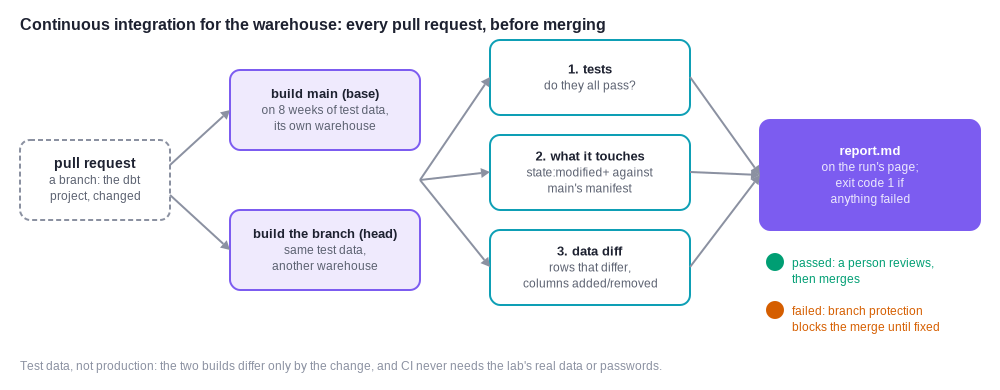
For a warehouse, "it builds and the tests pass" is not quite enough. A reviewer also wants to know what the change does to the data: which tables it touches, and how their contents differ. A change can pass every test and still alter a thousand potencies. So the CI of this module answers three questions for every pull request:
- Does the project still build, and do its tests pass?
- Which models does the change touch, directly or downstream?
- How do those models' contents differ from
main's?
By the end of this module you will be able to:
- build a disposable copy of the warehouse from test data, without touching the real one;
- use dbt's state selection to list what a change touches;
- compare two builds of a model, column by column and row by row (a data diff);
- write a CI script that ends with a report and an exit code;
- run it in GitHub Actions on every pull request, and make passing it a condition for merging.
Setup
The lab's code lives in a repository of its own, made here in work/lab-repo/: Module 6's dbt
project, and the CI script and workflow this module writes. The script is run as a separate
program, exactly as GitHub Actions would run it, with Python's subprocess module. yaml (PyYAML)
reads the workflow file back to check it.
import logging
import os
import shutil
import subprocess
import sys
from pathlib import Path

import yaml

import labstack

logging.basicConfig(level=logging.INFO, format="%(levelname)s %(message)s", force=True)
log = logging.getLogger(__name__)

# where the lesson writes its files (git-ignored); change it to write somewhere else
WORK = Path("work")
REPO = WORK / "lab-repo"  # the lab's repository: the dbt project, ci.py and the workflow
BRANCHES = WORK / "branches"  # each pull request's version of the dbt project

shutil.rmtree(WORK, ignore_errors=True)  # start clean
labstack.dbt_project(REPO / "lab_dbt", after=6)


def write(path: Path, text: str) -> None:
    """Save a file (made, with its folders, if it is new)."""
    path.parent.mkdir(parents=True, exist_ok=True)
    path.write_text(text.lstrip("\n"), encoding="utf-8", newline="\n")
1. A warehouse of its own
CI must never touch the real warehouse: a broken change would break it, and two pull requests
built at once would overwrite each other. So each build goes into a disposable warehouse,
made for the run and thrown away after. The dbt project of Module
4 was written for this: its profile reads the database's path
from the environment variable LAB_WAREHOUSE, so the same project can build into any file.
The other half is data. CI cannot use the lab's real data: the CI machine should not hold it, and a
build on a year of data would take too long for every pull request. It builds on test data
instead: small, known, and the same every time. Many teams keep a sample of production data, with
anything sensitive removed; this lab has something better, its synthetic weeks (labdata), which
contain every problem the lab has met. labstack.warehouse_at loads and snapshots them week by
week into whatever warehouse LAB_WAREHOUSE names.
2. The CI script
ci.py builds the project twice on the same test data: as it is on main (the base) and as it
is on the pull request's branch (the head). Building both, instead of comparing the branch with
production, means that any difference between them comes from the change alone, never from the
data. Its steps:
buildcopies a project into the run's own folder, pointsLAB_WAREHOUSEat a new database there, loads the test data, and runsdbt build;changedasks dbt which models the change touches. dbt saves a manifest of the project with every build (Module 4, section 5); given the base's manifest with--state, the selectorstate:modifiedpicks the models whose code differs from it, and+adds everything downstream;diffcompares one model's two builds. The head's warehouse attaches the base's (DuckDB can open a second database file under a name, herebase), and SQL'sEXCEPTreturns the rows of one table that are not in the other, compared on the columns both have;- the report says what passed, what failed, what changed and how, as Markdown, and the script ends with exit code 1 if anything failed, which is how a CI service knows the check did not pass (Series 1, Module 10, section 1).
write(REPO / "ci.py", '''
"""Continuous integration for the lab's warehouse: build main and a branch, test, compare.

Usage: python ci.py --base MAIN_PROJECT --head BRANCH_PROJECT --out FOLDER
"""

import argparse
import logging
import os
import shutil
import sys
from pathlib import Path

import duckdb

import labdata
import labstack

WEEKS = 8  # how many weeks of the lab's synthetic test data to build on
QUIET = logging.getLogger("ci.dbt")  # one line per model: in dbt's own log, not the report
QUIET.propagate = False
RUN_SPECIFIC = {"load_id"}  # columns that differ between any two builds: left out of the diff


def build(project: Path, folder: Path) -> tuple[Path, list]:
    """Build a copy of a dbt project on the test data, in a warehouse of its own."""
    copy = shutil.copytree(project, folder / "lab_dbt",
                           ignore=shutil.ignore_patterns("target", "logs"))
    os.environ["LAB_WAREHOUSE"] = str((folder / "lab.duckdb").resolve())
    labstack.warehouse_at(labdata.Lab(), WEEKS, folder, project=copy, build=False)
    return copy, labstack.dbt(copy, "build", log=QUIET)


def changed(head: Path, base: Path) -> list[str]:
    """The models the head changes, and every model downstream of them."""
    state = str((base / "target").resolve())
    return sorted(labstack.dbt(head, "ls", "--select", "state:modified+", "--state", state,
                               "--resource-type", "model", "--output", "name"))


def diff(db: duckdb.DuckDBPyConnection, model: str) -> dict | None:
    """How a model differs between the base (attached as `base`) and the head.

    None if the model was not built on the branch (dbt skips models after a failed test).
    """
    def columns(database: str) -> list[str]:
        return [row[0] for row in db.execute(
            "SELECT column_name FROM information_schema.columns "
            "WHERE table_catalog = ? AND table_name = ? ORDER BY ordinal_position",
            [database, model]).fetchall()]

    head_cols, base_cols = columns("lab"), columns("base")
    if not head_cols:
        return None
    schema = db.execute("SELECT table_schema FROM information_schema.tables "
                        "WHERE table_catalog = 'lab' AND table_name = ?", [model]).fetchall()[0][0]
    common = ", ".join(f'"{c}"' for c in head_cols
                       if c in base_cols and c not in RUN_SPECIFIC)
    head_table, base_table = f"lab.{schema}.{model}", f"base.{schema}.{model}"

    def count(sql: str) -> int:
        return db.execute(f"SELECT count(*) FROM ({sql})").fetchall()[0][0]

    return {
        "rows on main": count(f"SELECT * FROM {base_table}"),
        "rows on branch": count(f"SELECT * FROM {head_table}"),
        "rows that differ": count(f"SELECT {common} FROM {head_table} EXCEPT ALL "
                                  f"SELECT {common} FROM {base_table}"),
        "columns added": [c for c in head_cols if c not in base_cols],
        "columns removed": [c for c in base_cols if c not in head_cols],
    }


def main() -> int:
    parser = argparse.ArgumentParser(description=__doc__)
    parser.add_argument("--base", type=Path, required=True)
    parser.add_argument("--head", type=Path, required=True)
    parser.add_argument("--out", type=Path, required=True)
    args = parser.parse_args()
    shutil.rmtree(args.out, ignore_errors=True)
    base, _ = build(args.base, args.out / "base")
    head, results = build(args.head, args.out / "head")

    failed = sorted(r.node.name for r in results if str(r.status) in ("fail", "error"))
    passed = sum(str(r.status) == "pass" for r in results)
    lines = ["## Warehouse CI", "",
             f"**{'FAILED' if failed else 'Passed'}**: {passed} tests passed, "
             f"{len(failed)} failed.", ""]
    lines += [f"- failed: `{name}`" for name in failed]
    touched = changed(head, base)
    lines += ["", "### Models this change touches", ""]
    lines += [f"- `{model}`" for model in touched] or ["- none"]
    with duckdb.connect(os.environ["LAB_WAREHOUSE"]) as db:
        db.execute(f"ATTACH '{(args.out / 'base' / 'lab.duckdb').resolve()}' AS base (READ_ONLY)")
        lines += ["", "### How their contents differ from main", "",
                  "| model | rows on main | rows on branch | rows that differ | columns added "
                  "| columns removed |", "|---|---|---|---|---|---|"]
        for model in touched:
            d = diff(db, model)
            if d is None:
                lines.append(f"| `{model}` | not built on the branch (skipped) | | | | |")
                continue
            lines.append(f"| `{model}` | {d['rows on main']} | {d['rows on branch']} | "
                         f"{d['rows that differ']} | {', '.join(d['columns added']) or '-'} | "
                         f"{', '.join(d['columns removed']) or '-'} |")
    report = "\\n".join(lines) + "\\n"
    (args.out / "report.md").write_text(report, encoding="utf-8")
    print(report)
    return 1 if failed else 0


if __name__ == "__main__":
    sys.exit(main())
''')
The script is written inside a Python string, so its own backslashes are doubled ("\\n" becomes
"\n" in the file). It is about a hundred lines: every step is a dbt command, a SQL query or a
file copy, so the script is mostly the order they run in and the report.
3. Two pull requests
A pull request is a branch with a change. Here a branch is a copy of the dbt project with the change
made; in the lab's repository it would be a Git branch, and the CI service would check it out.
pull_request makes one, and run_ci runs the CI script on it, as a separate program, and shows
what it printed. PYTHONPATH tells that program where to find labdata and labstack, as the
lab's repository would.
def pull_request(name: str, model: str, old: str, new: str) -> Path:
    """A branch: a copy of main's dbt project with one passage of one model changed."""
    project = shutil.copytree(REPO / "lab_dbt", BRANCHES / name / "lab_dbt")
    path = project / model
    text = path.read_text(encoding="utf-8")
    assert text.count(old) == 1, f"{model}: the passage to change is not there exactly once"
    path.write_text(text.replace(old, new), encoding="utf-8", newline="\n")
    return project


def run_ci(head: Path, name: str) -> int:
    """Run ci.py on a branch, as a CI service would, and show its report."""
    folders = [os.getcwd(), *(p for p in sys.path if p)]  # here, and where Python looks
    env = {**os.environ, "PYTHONPATH": os.pathsep.join(folders)}
    done = subprocess.run(
        [sys.executable, str(REPO / "ci.py"), "--base", str(REPO / "lab_dbt"),
         "--head", str(head), "--out", str(WORK / "ci" / name)],
        env=env, capture_output=True, text=True, encoding="utf-8",
    )
    print(done.stdout)
    log.info("ci.py ended with exit code %d", done.returncode)
    return done.returncode
The first pull request is the one a chemist asked for: the compound dimension should carry the topological polar surface area (TPSA), a property that tracks how well a molecule passes through membranes. One line in the Python model:
tpsa = pull_request(
    "add-tpsa", "models/marts/dim_compound.py",
    '    compounds["heavy_atoms"] = [m.GetNumHeavyAtoms() for m in mols]\n',
    '    compounds["heavy_atoms"] = [m.GetNumHeavyAtoms() for m in mols]\n'
    '    compounds["tpsa"] = [round(Descriptors.TPSA(m), 1) for m in mols]\n',
)
exit_code = run_ci(tpsa, "add-tpsa")
dim_compound
fact_measurement
measurements_wide
## Warehouse CI

**Passed**: 24 tests passed, 0 failed.


### Models this change touches

- `dim_compound`
- `fact_measurement`
- `measurements_wide`

### How their contents differ from main

| model | rows on main | rows on branch | rows that differ | columns added | columns removed |
|---|---|---|---|---|---|
| `dim_compound` | 320 | 320 | 0 | tpsa | - |
| `fact_measurement` | 1032 | 1032 | 0 | - | - |
| `measurements_wide` | 992 | 992 | 0 | - | - |


INFO ci.py ended with exit code 0
The CI passed, and the report says exactly what a reviewer needs. The change touches
dim_compound and the two models built from it; dim_compound gained one column; and no row of
any of them changed on the columns they already had, so no number anyone relies on moved. (The
diff leaves out load_id, which records dlt's load and so differs between any two builds:
RUN_SPECIFIC in the script lists such columns.) That
last line is the one tests cannot give: the tests say the new code is right, the diff says what it
did to the data.
The second pull request looks harmless too. Someone thinks pIC50s with fifteen decimals look untidy in the dashboards and rounds them, in the staging model:
rounded = pull_request(
    "round-pic50", "models/staging/stg_results.sql",
    "       9 - log10(value * u.factor)   as pic50,\n",
    "       round(9 - log10(value * u.factor), 2) as pic50,\n",
)
exit_code = run_ci(rounded, "round-pic50")
fact_measurement
measurements_wide
stg_results
## Warehouse CI

**FAILED**: 23 tests passed, 1 failed.

- failed: `pic50_matches_ic50`

### Models this change touches

- `fact_measurement`
- `measurements_wide`
- `stg_results`

### How their contents differ from main

| model | rows on main | rows on branch | rows that differ | columns added | columns removed |
|---|---|---|---|---|---|
| `fact_measurement` | 1032 | 1032 | 1030 | - | - |
| `measurements_wide` | not built on the branch (skipped) | | | | |
| `stg_results` | 1032 | 1032 | 1030 | - | - |


INFO ci.py ended with exit code 1
The CI failed, and for a good reason. The singular test of Module 5
says every pIC50 is exactly 9 − log₁₀ of its IC50; rounded values are not. The diff shows the cost:
1,030 of the 1,032 results have a different pIC50 from main's, in staging and in the fact table.
The wide view was not built at all, because dbt skips what is built from a model whose test failed
(Module 5): on main the dashboards would have kept their last good data. Rounding belongs where numbers are shown (the dashboard), not where they are stored, and the
CI said so before anything reached the warehouse. Without the test, the pull request would have
passed, but the diff would still have told the reviewer that a thousand potencies moved.
4. In GitHub Actions
GitHub Actions runs workflows: YAML files in the repository's .github/workflows/ folder that
say when to run (on), on what machine (runs-on) and which steps. A step either runs a
command (run) or uses a ready-made action (uses), such as actions/checkout, which fetches
the repository. Here is the lab's workflow:
write(REPO / ".github" / "workflows" / "warehouse-ci.yml", """
name: warehouse-ci
on:
  pull_request:
    paths: ["lab_dbt/**", "ci.py"]  # only changes to the warehouse's code
jobs:
  build-and-compare:
    runs-on: ubuntu-latest
    steps:
      - name: Fetch the branch, and main's history
        uses: actions/checkout@v4
        with:
          fetch-depth: 0
      - name: Put main's version of the code next to the branch's
        run: git worktree add ../main origin/main
      - name: Install uv
        uses: astral-sh/setup-uv@v6
      - name: Install the lab's packages, as locked
        run: uv sync --locked
      - name: Build main and the branch on the test data, test and compare
        run: uv run python ci.py --base ../main/lab_dbt --head lab_dbt --out ci-out
      - name: Show the report on the run's page
        if: always()
        run: cat ci-out/report.md >> "$GITHUB_STEP_SUMMARY"
      - name: Keep the report
        if: always()
        uses: actions/upload-artifact@v4
        with:
          name: warehouse-ci-report
          path: ci-out/report.md
""")
workflow = yaml.safe_load((REPO / ".github" / "workflows" / "warehouse-ci.yml")
                          .read_text(encoding="utf-8"))
print("keys:", list(workflow))
for step in workflow["jobs"]["build-and-compare"]["steps"]:
    print("-", step["name"])
keys: ['name', True, 'jobs']
- Fetch the branch, and main's history
- Put main's version of the code next to the branch's
- Install uv
- Install the lab's packages, as locked
- Build main and the branch on the test data, test and compare
- Show the report on the run's page
- Keep the report
Most of it reads as written. fetch-depth: 0 fetches the whole history, so that main can be put
next to the branch with git worktree (a second folder with another version of the same
repository). if: always() runs a step even when an earlier one failed: a failed CI is exactly when
the report matters most. $GITHUB_STEP_SUMMARY is a file whose contents GitHub shows on the run's
page, so the report appears there as formatted Markdown.
One line of the output is a surprise: the key on came back as True. PyYAML follows an old
version of YAML in which on, yes and true all mean the same thing; GitHub reads it as the word
on. The workflow is right, and it is a useful reminder that YAML is read by programs that do not
always agree.
Two settings on GitHub finish the job, in the repository's settings under Branches:
- a branch protection rule for
mainthat requires thebuild-and-comparecheck to pass, so a pull request whose CI failed cannot be merged; - required reviews, so a person reads the report before merging: CI says what a change does, people decide whether that is what the lab wants.
The lab's secrets stay out of all this. CI builds on synthetic data, so it needs no password; a team whose CI must reach a real database gives it a separate, read-only account, stored as a GitHub secret and read from the environment, never written in the workflow (Series 1, Module 4, section 9).
In Module 10 the warehouse finally reaches the chemists: dashboards of their series, built on the marts these modules have made, tested and watched.
Try it yourself
The homework is a few questions, answered by running code like the code above: in a new cell at
the end of the notebook, or in a script. It is at the end of the lesson's page, and in
homework.md in the module's folder. The answers are published after the cohort's deadline.
Further reading
- The GitHub Actions documentation. Understanding GitHub Actions: workflows, events, jobs, steps and actions. https://docs.github.com/en/actions/get-started/understand-github-actions
- The dbt documentation. Node selector methods,
state: selecting what changed against a manifest, as used by "slim CI". https://docs.getdbt.com/reference/node-selection/methods - The DuckDB documentation. ATTACH: several database files in one connection. https://duckdb.org/docs/stable/sql/statements/attach
- Humble, J. & Farley, D. (2010). Continuous Delivery: Reliable Software Releases through Build, Test, and Deployment Automation. Addison-Wesley. Chapter 3, on continuous integration.
Homework
Answer each question by running code like the code in the lesson: add a new cell at the end of the
lesson's notebook (in Colab, + Code) and work there. Run the whole lesson first, so that the
lab's repository (work/lab-repo, with ci.py), the pull_request and run_ci functions and the
two CI runs exist. If you are in a cohort, you will be told where to send your answers; everyone
can check theirs against the answers published after the cohort's deadline.
- (Builds on section 1.) Run
ci.pywith the same project as base and head (run_ci(REPO / "lab_dbt", "no-change")). What does the report say the change touches, and how do the contents differ? Why is that the right answer, and why is it a useful run to keep in a CI's own tests? - (Builds on section 2.) Open the two warehouses of the
add-tpsarun (work/ci/add-tpsa/baseand.../head) with DuckDB and confirm the report by hand: the new column's values for five compounds, and a query that shows the twofact_measurementtables are the same apart fromload_id. - (Builds on section 2.) Change
ci.pyso that the report also lists the tests that ran on the models the change touches, with their results (the results ofbuildcarry each node's name and status;dbt ls --select state:modified+ --resource-type testnames the tests). Rerun theround-pic50pull request. - (Builds on section 3.) Make a third pull request that renames the column
heavy_atomston_heavy_atomsindim_compound. Does CI pass? What does the diff report, and which readers of the warehouse would this change break although every test passed? How could the project make such a change fail CI? (Think of Module 5, section 3.) - (Builds on section 3.) Make a pull request that changes the potency cut-off for the panel in
a new mart of your own,
marts.panel_candidates(compounds with a mean measured EGFR pIC50 of at least 7.5). What does the diff say about a model that does not exist onmain? Changediffso that a new model is reported as new instead. - (Builds on section 4.) The workflow runs only when files under
lab_dbt/orci.pychange. Give one change that would break the warehouse but would not start the workflow, and changepathsso that it would. What is the cost of running CI on every change? - To think about (no code; builds on sections 1 and 4): CI builds on eight weeks of synthetic data. Name one kind of problem it can never catch, because the test data cannot contain it, and say which module's tool would catch it instead, after the change is merged.
How was this module?
Found this module useful? ★ Star the course on GitHub: it helps other chemists find it.