Get set up
You can read this page without running anything. To run the code yourself, the easiest way needs nothing installed, only a web browser and a free Google account:
- Open this lesson in Google Colab. Colab is Google's free service for running Python notebooks in the browser; sign in with your Google account if asked.
- Run the cells in order, from the top: click the ▶ button at the left of a cell, or click inside it and press Shift+Enter. The first cell installs what the lesson needs and takes a minute or two.
- If Colab warns "This notebook was not authored by Google", click Run anyway: the notebook comes from this course's own repository.
- Under each cell you should see what the box labelled Output under the same code on the lesson's page shows (the notebook opens with our outputs already in place; running a cell replaces them with yours). Boxes labelled Example output show timings or memory, so your numbers will differ a little.
New to notebooks, or want to run the lessons on your own computer instead (with Jupyter, Anaconda or a terminal)? Start here shows every step.
If you already work in a terminal, the short version, with uv and Git installed:
git clone https://github.com/David-Alobo/monstrous-learn.git
cd monstrous-learn/data-engineering/series-2
uv sync
uv run python 11-capstone/code.py
or, in any Python 3.11+ environment: python -m pip install dlt[duckdb] dbt-core dbt-duckdb duckdb pandas numpy rdkit pandera pandera-chem prefect requests streamlit altair.
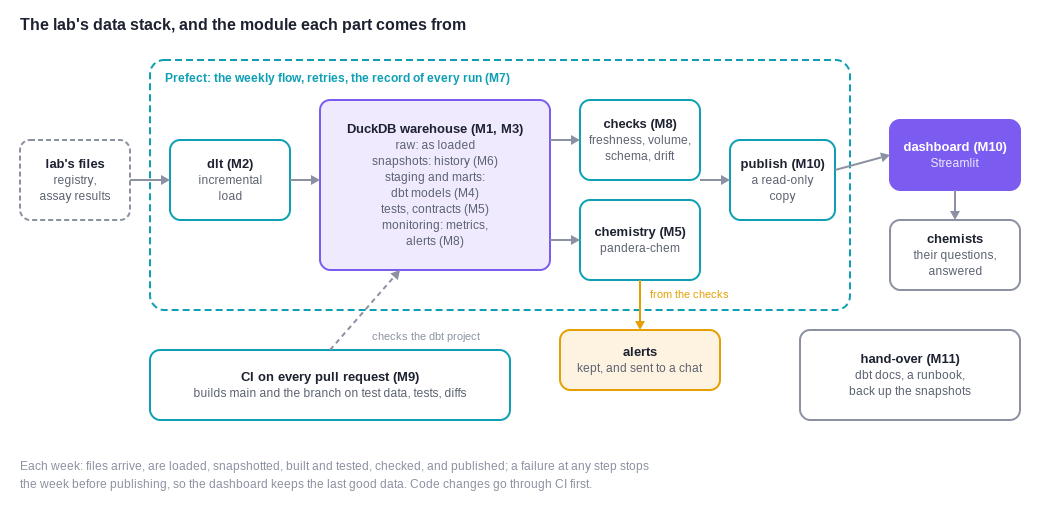
Ten modules have each added one piece: a raw layer that dlt fills (Module 2), a star schema (Module 3) that dbt builds, tests and keeps the history of (Modules 4 to 6), a Prefect flow that runs it every week (Module 7), checks that say when something looks wrong (Module 8), a CI script that checks every change to the code (Module 9), and a dashboard for the chemists (Module 10). This module puts them together into one stack that runs a lab's data from the files to the dashboard, and then hands it over.
The lab is a new one. labdata.Lab(seed=2) is the same kind of kinase project as the lab of the
whole series (the same planted problems in the same weeks), but with different compounds, results
and chemists' choices. A stack that only works on the data it was built with is not finished; one
that runs another lab's twelve weeks without a change is closer to something a lab could rely on.
As in Series 1's capstone, the code lives in one file next to this lesson, stack.py, a Python
module that the lesson imports. It is the kind of file a lab would keep in its repository: other code
can import it, the CI of Module 9 can test it, and a server can run it. In Colab, the notebook's first
cell downloads it. Read stack.py on GitHub;
every function has a short description. The lesson ends with the capstone brief: the project you
build to complete the series, and how it is judged.
Setup
The Setup is Module 7's: Prefect keeps its files in work/, and the same logging filters keep its
lines plain and the outputs the same on every computer. Prefect's own lines are shown only from
warnings up, which here means the alerts.
import os
import shutil
from pathlib import Path

WORK = Path("work")  # where the lesson writes its files (git-ignored)
shutil.rmtree(WORK, ignore_errors=True)  # start clean, before Prefect keeps its files in work/
(WORK / "prefect").mkdir(parents=True)
os.environ["PREFECT_HOME"] = str((WORK / "prefect").resolve())
os.environ["PREFECT_SERVER_ANALYTICS_ENABLED"] = "false"

import json
import logging

import duckdb
from prefect.client.orchestration import get_client
from streamlit.testing.v1 import AppTest

import labstack
import stack

logging.basicConfig(level=logging.INFO, format="%(levelname)s %(message)s", force=True)
log = logging.getLogger(__name__)
logging.getLogger("httpx").setLevel(logging.WARNING)


def named(record: logging.LogRecord) -> bool:
    """Start each of Prefect's lines with its run's name, and leave out tracebacks."""
    name = getattr(record, "task_run_name", None) or getattr(record, "flow_run_name", None)
    if name:
        record.msg, record.args = f"{name}: {record.getMessage()}", ()
    record.exc_info = record.exc_text = None
    return True


for name in ("prefect.flow_runs", "prefect.task_runs"):
    logging.getLogger(name).addFilter(named)
    logging.getLogger(name).setLevel(logging.WARNING)  # warnings only: here, the alerts
logging.getLogger("prefect").addFilter(lambda r: "temporary server" not in r.getMessage())
logging.getLogger("streamlit.runtime.scriptrunner_utils.script_run_context").addFilter(
    lambda record: "missing ScriptRunContext" not in record.getMessage())  # expected in a test
1. The plan
Each week, one run of one flow does all of this, in this order. Every stage stops the week if it fails for a real reason, and the published copy, and so the dashboard, keeps last week's good data:
| Stage | What it does | Tool | From |
|---|---|---|---|
| receive | the week's files arrive in the inbox; retried if the share fails | Prefect | Module 7 |
| load | what is new is loaded into the raw layer, unchanged | dlt | Module 2 |
| snapshot | every version of every registration is kept | dbt | Module 6 |
| build | staging and marts are built and tested; a failure stops the week | dbt | Modules 3 to 6 |
| monitor | metrics are recorded; freshness, volume, schema, registrations and drift are checked | Prefect, DuckDB | Module 8 |
| chemistry | the week's new compounds are checked | pandera-chem | Module 5 |
| alert | every finding is logged, kept and posted to a chat channel if one is set up | Prefect | Module 8 |
| publish | a read-only copy of the warehouse replaces last week's | DuckDB | Module 10 |
Around the flow sit two things that do not run every week: the CI of Module 9, which checks every change to the dbt project before it is merged, and the dashboard of Module 10, which reads the published copy.
2. The settings
Everything a run can change is in one place, stack.Settings, with a default for each. Its values
are plain (text, numbers, lists), because they are passed to the flow and kept in Prefect's record
of every run, so that anyone can see later what a run was asked to do. The chat channel's address is
deliberately not a setting: it works like a password, so the stack reads it from the environment
variable LAB_ALERT_WEBHOOK when it sends an alert, and it is never recorded.
settings = stack.Settings(work=str(WORK), seed=2, share_fails_once=(9,))
for name, value in settings.as_dict().items():
    print(f"{name:16} {value}")
work             work
seed             2
baseline_weeks   4
drift_limit      1.0
volume_range     (0.5, 1.5)
share_fails_once (9,)
seed=2 chooses the new lab. share_fails_once=(9,) makes the lab's file share fail once in week
9, as in Module 7, so that the record shows a retry.
3. A tour of stack.py
stack.py is about 550 lines, half of them descriptions. Read it with this list beside it:
- The warehouse.
queryruns one query;has_tablesays whether a table exists yet (in week 1 nothing has been tested, so there is no assay table, and the build leaves out what needs one);preparemakes the folders, copies the dbt project as Module 6 finished it, and creates the monitoring tables. - The tasks. One function per stage of the plan, each marked
@task.receivehas retries;buildraises an error when a test fails;check_chemistrychecks only the week's new compounds, so a compound in quarantine is reported once, not every week;publishwrites the new copy under another name and then renames it over the old one (os.replace), so the dashboard always finds either last week's copy or this week's, never half of one. - The checks. Module 8's five checks, each a function of the settings and the week, collected
in
CHECKSand run by themonitortask. Each waits until it has the history it needs: freshness from week 2 (the first week with results), volume from its fourth week with assay files, drift after the baseline weeks. - The flow.
weekly(week, settings)calls the tasks in the plan's order and returns a summary;run_weeksruns it for a range of weeks and gathers the summaries into a table.
Every task is marked cache_policy=NO_CACHE: none of them should ever be skipped because it ran
before with the same inputs, since each depends on the state of the warehouse, which changes every
week.
4. Twelve weeks
stack.prepare(settings)
summary = stack.run_weeks(settings, range(1, 13))
print(summary.to_string())
WARNING alert: schema: raw.assay changed: added ['operator', 'unit'], removed []
WARNING alert: registrations: registration changed: LAB-0042
WARNING alert: schema: raw.assay changed: added ['status'], removed []
WARNING alert: freshness: no plates were run this week: the newest result is older than this week
WARNING alert: volume: 0 assay rows arrived; usually about 128
WARNING alert: volume: 272 assay rows arrived; usually about 128
WARNING alert: drift: clogp moved +1.0 SD from the baseline
WARNING alert: drift: new chemist: EF
WARNING alert: drift: clogp moved +1.1 SD from the baseline
          state  assay rows  tests passed  alerts
week
1     Completed           0            11       0
2     Completed          80            24       0
3     Completed         128            24       0
4     Completed         232            24       0
5     Completed         104            24       1
6     Completed         152            24       0
7     Completed         112            24       1
8     Completed         168            24       1
9     Completed         128            24       0
10    Completed           0            24       2
11    Completed         272            24       3
12    Completed          96            24       1
Twelve weeks, twelve completed runs, and the alerts that came on the way are the lab's planted problems, found in a lab the stack had never seen:
- week 5, the plate reader's software update (from dlt's record of the schema);
- week 7, LAB-0042's corrected registration (from the snapshots);
- week 8, the
statuscolumn of the re-read plate; - week 10, no plates run and no assay rows: the late file;
- week 11, the late file arriving with week 11's, and the new chemist EF's greasier compounds;
- week 12, the drift again.
Week 1 ran 11 tests, not 24: with no assay file yet, the build left out the results and everything built from them, and their tests with them. In week 9 the share failed once and the flow carried on. Here is that in Prefect's record, with every run's state:
with get_client(sync_client=True) as client:
    runs = sorted(client.read_flow_runs(), key=lambda r: r.expected_start_time)
    retried = [t.name for t in client.read_task_runs() if t.run_count > 1]
print(" ".join(f"{run.name.split()[-1]}:{run.state_name}" for run in runs))
print("needed more than one attempt:", retried)
1:Completed 2:Completed 3:Completed 4:Completed 5:Completed 6:Completed 7:Completed 8:Completed 9:Completed 10:Completed 11:Completed 12:Completed
needed more than one attempt: ['receive week 9']
5. What the record holds
The warehouse keeps its own record next to the data: every metric of every week, every alert, every version of every registration. The published copy has all of it, so anyone can read it without touching the working warehouse:
with duckdb.connect(str(settings.published), read_only=True) as db:
    alerts = db.sql("SELECT * FROM monitoring.alerts ORDER BY week, check_name").df()
    history = db.sql("SELECT compound_id, version, valid_from, valid_to "
                     "FROM marts.dim_compound_history WHERE compound_id IN "
                     "(SELECT compound_id FROM marts.dim_compound_history WHERE version > 1)").df()
    sizes = db.sql("""
        SELECT schema_name || '.' || table_name AS table_name, estimated_size AS rows
        FROM duckdb_tables() WHERE schema_name IN ('raw', 'snapshots', 'marts', 'monitoring')
          AND NOT starts_with(table_name, '_dlt') ORDER BY table_name
    """).df()
print(alerts.to_string(index=False))
print(history.to_string(index=False))
print(sizes.to_string(index=False))
 week    check_name                                                                 message
    5        schema               raw.assay changed: added ['operator', 'unit'], removed []
    7 registrations                                          registration changed: LAB-0042
    8        schema                         raw.assay changed: added ['status'], removed []
   10     freshness no plates were run this week: the newest result is older than this week
   10        volume                                 0 assay rows arrived; usually about 128
   11         drift                                   clogp moved +1.0 SD from the baseline
   11         drift                                                         new chemist: EF
   11        volume                               272 assay rows arrived; usually about 128
   12         drift                                   clogp moved +1.1 SD from the baseline
compound_id  version valid_from   valid_to
   LAB-0042        1 2026-09-14 2026-10-19
   LAB-0042        2 2026-10-19        NaT
                table_name  rows
        marts.dim_compound   480
marts.dim_compound_history   481
            marts.dim_date    85
          marts.dim_target     5
    marts.fact_measurement  1344
         monitoring.alerts     9
        monitoring.metrics    59
                 raw.assay  1344
              raw.registry   480
snapshots.registry_history   481
duckdb_tables() lists every table with an estimate of its size: the raw layer as dlt loaded it,
the snapshots, the marts and the monitoring tables. One of them is not like the others. Everything in
raw can be loaded again from the inbox's files, and everything in marts can be built again from
raw; but snapshots.registry_history holds versions that no file contains any more (the registry
export is a snapshot that replaces itself). It is the one table that must be backed up, because
it cannot be made again.
6. The dashboard, on the new lab
The dashboard of Module 10 is in this module's folder as dashboard.py, unchanged. It reads the
published copy, so it shows the new lab without being told anything about it. AppTest runs it as
in Module 10:
app = AppTest.from_file(str(Path("dashboard.py").resolve()), default_timeout=120).run()
assert not app.exception, app.exception[0].message
print({metric.label: metric.value for metric in app.metric})
app.selectbox[0].set_value("LAB-0042").run()
print([warning.value for warning in app.warning])
{'Compounds': '440', 'EGFR pIC50 of 7 or more': '68', 'Tested on the panel': '53', 'Best selectivity': '3.3'}
["LAB-0042's registration changed 1 time(s): measurements before the change were made under an earlier structure."]
The new lab's headline numbers, and LAB-0042's page warning that its measurements were made under
an earlier structure: the same questions, answered for a different lab, by the same code. On your
own computer, uv run streamlit run dashboard.py in this module's folder (after running the lesson)
opens it in your browser.
7. Handing it over
A stack is finished when someone else can run it. dbt documents the warehouse itself (Module 4, section 6): every model, column, test and the lineage, generated from the project.
docs = labstack.dbt(settings.project, "docs", "generate", log=stack.QUIET)
manifest = json.loads((settings.project / "target" / "manifest.json").read_text(encoding="utf-8"))
models = [node for node in manifest["nodes"].values() if node["resource_type"] == "model"]
print(len(models), "models,", sum(bool(m["description"]) for m in models), "with a description;",
      sum(node["resource_type"] == "test" for node in manifest["nodes"].values()), "tests")
8 models, 5 with a description; 24 tests
Three models have no description yet (dim_target, dim_date and dim_compound_history): a
gap a colleague would meet on their first day, and the first warm-up question below.
The rest is a runbook: a short document that tells whoever runs the stack next what it does and what to do when something happens. For this stack it would answer:
- What runs, and when. The
lab-stackflow, every Monday at 07:00 (Module 7, section 5), then the dashboard's copy is replaced. Where the code, the warehouse and the logs live. - How to rerun a week. Run the flow for that week again: dlt loads each file once and the build is idempotent, so a rerun is safe (Module 7, section 3).
- What each alert means, and who acts. Freshness and volume: ask the lab whether the plate reader exported. Schema: read the new columns, then decide in staging (Module 2, section 4). Registrations: tell the chemists whose decisions used the old structure (Module 6). Drift: a chemist decides whether it was planned (Module 8).
- How to change something. A new kinase is a row in the
targetsseed; a new unit spelling a row inunit_to_nm; a new model a pull request that CI checks (Module 9). - What to back up. The snapshots (section 5). Everything else can be made again from the files and the code.
- What it does not do yet. It runs on one machine; DuckDB allows one writer at a time, so a second pipeline would need its own warehouse or a server database; the dashboard has no login, so it must stay on the lab's own network; and the test data are synthetic, so the CI cannot catch problems that only real data contain.
That last part matters as much as the rest: a colleague who knows the limits of a system can work around them, and one who does not will find them at the worst moment.
The capstone brief
Series 2 ends with a project of your own. If you are in a cohort, you hand it in and three other learners review it against the rubric below, as you review three of theirs; a project that passes completes the series. If you are following on your own, build the same project and use the rubric to check it.
What to build
A running data stack for a small lab, from its files to a dashboard, built with the tools of this series. Choose one lab:
- a
labdata.Labwith your own seed (not 0 or 2) and your own number of compounds a week (per_week), run for all twelve weeks; or - a lab of your own design: a different target, a different assay, or ChEMBL's activities for a target you choose, loaded incrementally with dlt's REST API source as in Module 2, standing in for the lab's own results.
You may start from stack.py, the dbt project in stages/after-06/ and dashboard.py, and change
them. Say in your README what you kept, what you changed and what you added.
Requirements
- Ingestion and history. The raw layer loaded with dlt, incrementally, with a schema contract or a written reason for leaving the schema to evolve; registry history kept with dbt snapshots (Modules 2 and 6).
- Modelling and transformation. A star schema with a declared grain, built by dbt with sources, seeds and models, and at least one Python model; the lineage graph in your README (Modules 3 and 4).
- Tests and contracts. dbt tests on keys, values and relationships, at least one test of your own (generic or singular), an enforced contract on a mart, and chemistry checks with pandera-chem (Module 5).
- Orchestration and recovery. A Prefect flow that runs a week, with retries where failures pass and a failure that stops the week before anything is published; one failure and one rerun shown in your run record (Module 7).
- Observability. At least three checks from different kinds (freshness, volume, schema, distribution), recorded metrics, and alerts kept in a table, with at least one alert shown firing for a reason you can explain (Module 8).
- Serving and hand-over. A dashboard, tested with AppTest; a CI workflow that builds and tests every pull request (Module 9); the dbt docs; and a runbook of at most two pages (section 7).
What to hand in
- A link to a public Git repository with your code, dbt project, tests,
pyproject.tomland lock file, the CI workflow, and a README that lets someone else run the whole stack. - The run record of your final run, in the repository:
monitoring.alertsandmonitoring.metricssaved as CSV files, and the list of flow runs with their states. - The runbook (at most two pages) and two screenshots of the dashboard.
Leave out the data files (the warehouse and its copies): anyone can make them again from your code and settings. If you are in a cohort, you will be told where to send the link and by which date.
How it is judged: the peer-review rubric
Three peers review each submission against the six criteria below, each marked not yet, meets or exceeds, with one sentence of evidence for each mark. A submission passes when, for every criterion, at least two of the three reviewers mark it meets or exceeds. Reviewers judge from your repository and README, and follow the README to run your stack.
| Criterion | Not yet | Meets | Exceeds |
|---|---|---|---|
| Ingestion and history | Files loaded by hand, or reloaded in full every week; no history of changed registrations | dlt loads incrementally and a rerun loads nothing twice; snapshots keep every version, with dates the lab can use | A schema change handled on purpose (contract, or evolution with a staging fix), and an "as of" question answered from the history |
| Modelling and transformation | Tables built by scripts in an order only the author knows | A star with a stated grain, built by dbt from sources and seeds, with a Python model and the lineage shown | Incremental models where they pay, with the reason given, and the documentation complete |
| Tests and contracts | No tests, or tests that never fail | Built-in and own tests, a contract on a mart, chemistry checks, and a failing test shown stopping the marts | Tests chosen from the lab's real problems, with severities justified, and the grain defined precisely |
| Orchestration and recovery | Steps run by hand | A flow with retries, a failure that stops before publishing, and a rerun shown in the record | Caching or idempotence argued for each task; a schedule and its server set-up described |
| Observability | Prints only | Three kinds of check, recorded metrics, kept alerts, one shown firing | Thresholds justified from the data; alerts that say where to look; a view of the pipeline's health |
| Serving and hand-over | No dashboard, or a README that does not let a reviewer run it | A dashboard tested with AppTest, CI on every pull request, dbt docs and a runbook | The dashboard answers a chemist's question the lesson's does not; the runbook names the system's limits |
Try it yourself
The homework is the capstone brief above, and a few warm-up questions on stack.py in
homework.md in the module's folder, also at the end of the lesson's page. The answers to the
warm-up questions are published after the cohort's deadline.
Further reading
- Kleppmann, M. (2017). Designing Data-Intensive Applications. O'Reilly Media. Chapters 10 and 11, on batch and stream processing: the ideas behind every stage of this stack, at scale.
- Reis, J. & Housley, M. (2022). Fundamentals of Data Engineering. O'Reilly Media. Chapters 2 and 11: the lifecycle and its undercurrents (security, data management, DataOps, orchestration), and where the field is going.
- Beyer, B., Jones, C., Petoff, J. & Murphy, N. R. (eds.) (2016). Site Reliability Engineering. O'Reilly Media. Chapter 14, "Managing Incidents", and the runbooks of chapter 6. https://sre.google/sre-book/managing-incidents/
- Wilkinson, M. D. et al. (2016). The FAIR Guiding Principles for scientific data management and stewardship. Scientific Data, 3, 160018. https://doi.org/10.1038/sdata.2016.18
Homework
The main homework of this module is the capstone brief at the end of the lesson. These warm-up
questions get you used to stack.py before you start. Answer them by running code like the code in
the lesson: add a new cell at the end of the lesson's notebook (in Colab, + Code) and work there.
Run the whole lesson first, so that the stack's warehouse, its published copy, Prefect's record and
the settings exist. If you are in a cohort, you will be told where to send your answers; everyone
can check theirs against the answers published after the cohort's deadline.
- (Builds on section 7.) Add descriptions for
dim_target,dim_dateanddim_compound_history(and their columns) to the project's YAML files inwork/lab_dbt, rundbt docs generateagain, and check that every model now has one. - (Builds on sections 2 and 4.) Run the stack for a third lab:
stack.Settings(work="work3",
   seed=3)
, withstack.prepareandstack.run_weeks. (Prefect's record is shared, so the lesson's flow runs stay in it.) Which alerts are the same as for seed 2, which differ, and why? Is there a planted problem that one of the checks missed for this lab? - (Builds on section 3.)
publishwrites the new copy under another name and then renames it over the old one. Explain what a dashboard reading the copy at the wrong moment would see ifpublishcopied straight onto the old file instead. Why does renaming not have that problem? - (Builds on section 4.) Make week 6 fail: before running it, change a model in the stack's dbt
project so that it cannot be built, run
stack.run_weeks(settings, range(6, 7))in a fresh copy of the lesson that stopped after week 5, then fix the model and run week 6 again. What did the dashboard's copy hold between the failed run and the rerun? - (Builds on section 5.) Back up the one table that cannot be made again: write a function that
exports
snapshots.registry_historyfrom the published copy to a dated Parquet file (COPY ... TO '...parquet' (FORMAT parquet)), and another that restores it into an empty warehouse. Test the pair. - (Builds on the brief.) Choose your capstone's lab and write the first paragraph of its README: which lab, which weeks, and which of the six requirements you expect to be hardest, and why.
How was this module?
Found this module useful? ★ Star the course on GitHub: it helps other chemists find it.